What's new

Critique me please

AfterAll25

TPF Noob!
Joined
Apr 28, 2013
Messages
22
Reaction score
0
Location
NJ
Can others edit my Photos
Photos OK to edit
I would love any help that I can get on these- they are a few of my favorites.

I took this at Point Pleasant last summer. I can see that I focused on the rocks rather than the boat and the background is a bit busy. I worked on it a little in Photoshop (which I stink at). But what else can I do?- I am trying to get better working with what I have so any advice would be great!


e1zit.jpg

http://i39.tinypic.com/e1zit.jpg
Canon T2i
f/ 5.6
1/2500 sec
ISO 400
49mm focal length

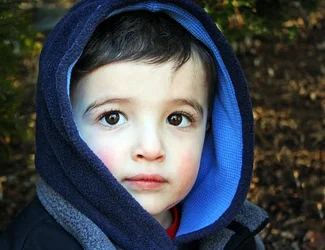
This was taken outside just before dusk with only ambient light. I was just following my son around while he played in the bushes in my backyard. I spruced it up a tad in photoshop (just some basic fixes, no skin smoothing or eye sharpening)
3356ouf.jpg

http://i44.tinypic.com/3356ouf.jpg
Canon EOS Digital Rebel
f/5
1/60 sec
ISO 400
43mm focal length

This was also taken outside just at dusk with only ambient light. I can see that it is a tad darkish. This was my first try at smoothing skin and sharpening eyes in Photoshop. Did I overdo it?
16k9cg5.jpg

http://i44.tinypic.com/16k9cg5.jpg
Canon T2i
f/6.3
1/640 sec
ISO 800
170 mm focal length

Thanks so much in advance... I am still new here, so if it would be better for me to make 3 separate posts, just say the word... thanks again!
 
First, unless there's a reason such as lending to the story, shoot portraits in portrait orientation. If you are going to shoot a portrait in Landscape orientation put your subject off to one side a bit looking into the frame. #2 could've been a real winner.
 
First, unless there's a reason such as lending to the story, shoot portraits in portrait orientation. If you are going to shoot a portrait in Landscape orientation put your subject off to one side a bit looking into the frame. #2 could've been a real winner.

Is there any particular reason that a portrait cannot be taken in landscape? Did the orientation ruin the whole photo? Not being argumentative, just curious- trying to learn. I tend to orient my camera in landscape for no particular reason, but I can def stop...
 
yes, the reason is that you can have more of the subject in the frame. There's a reason it's called "Portrait" orientation. Yes, you have what could've been a spectacular image in #2 but the way it was cropped just makes it a nice snapshot, in my opinion...a shame.
 
Shoot landscapes in Landscape. Shoot Portraits in Portrait. There are times when you'd do the opposite such as when shooting an event or if you are capturing an environmental portrait.
 
yes, the reason is that you can have more of the subject in the frame. There's a reason it's called "Portrait" orientation. Yes, you have what could've been a spectacular image in #2 but the way it was cropped just makes it a nice snapshot, in my opinion...a shame.

Thank you for the advice. I still love the picture because of the subject (despite the fact that my mom told me it looks like the mugshot of the unabomber) :) Anything else I should work on?
 
$3356oufx.webp
I think this is a great picture and took the liberty to crop it on the left side to give it better composition. I darken the background to bring more focus to the face. I have lots of experience doing this because we have four grandkids 6 years old and under. This picture is a keeper for sure. Have fun
 
Thanks I like what you did with the background- how did you do that?
 
This was certainly just a quick fix to get rid of some of the noise in the background. It could be done much better with more time. I used content aware fill in the sunlit leaves to get rid of them. If you have PS you can just select a small area at a time and fill them in. Or you could just use the clone stamp tool to do the same thing. (I find little bright spots in the background takes your eyes away from the subject). Afterwards I burned in the background to darken it down. When the background it out of focus it makes it easy to do this type of touch up. The fact that you used shallow depth of field for your portraits tells me you know how to use your camera to capture these moments. This image would look good in B&W as well. Have fun.
 
The middle one is pretty good.

The boat, well, there's just not much to look at it there. There's a lot of clutter around the subject, and the subject is just some dude's boat. AND the dude's boat is visually overlapping with some other dude's boat in the frame. Get in a bunch closer, separate the boat from other elements, and give me a more dynamic look at the thing. Do you want to show me that it's FAST? Or COOL? Or BIG? What impresses you about the boat, and how can you emphasize that in the picture?

The two portraits as noted would be better served the other way. You lopped off the top edges of their little heads!

The last one has sort of flat light and just isn't very interesting.

The middle one's strength is in the relatively vibrant colors, and the kid's expression.
 
You have a terrific attitude and will do well, not only here but in your photography.
Either of the images if the children is very nice.
Sensitive, nice color, well exposed.
I would suggest you post larger images - at least 800 high, so that the details can be seen will.

In regards the other, the rear boat and the background are too much in focus and overlap the 'important' boat, so the look is sort of confusing.
At best, this isn't super interesting and it would be at very most, with perfect technical stuff and composition, an ok but forgettable shot.

But the shots of the children are terrific and certainly, with a tiny bit of Post processing, keepers.
 
I am not really sure about the boat. I was there, taking pictures and the boat went by so I thought "hmm... cool boat, nice colors" and snapped away. I said myself that it is a bit busy. I should have zoomed in and gotten the guy with no shirt on ON the boat... now THAT would have been a keeper ;)
 
You have a terrific attitude and will do well, not only here but in your photography.
Either of the images if the children is very nice.
Sensitive, nice color, well exposed.
I would suggest you post larger images - at least 800 high, so that the details can be seen will.

In regards the other, the rear boat and the background are too much in focus and overlap the 'important' boat, so the look is sort of confusing.
At best, this isn't super interesting and it would be at very most, with perfect technical stuff and composition, an ok but forgettable shot.

But the shots of the children are terrific and certainly, with a tiny bit of Post processing, keepers.

Thank you. I really want to learn and get better so I appreciate any cc I can get.

What kind of additional post processing would you suggest? I am very much a newb at photoshop so any pointers are very helpful! Did I over process the baby's face in #3? I smoothed the skin and sharpened the eyes a bit....
 

Create an account or login to comment

You must be a member in order to leave a comment

Create account

Create an account on our community. It's easy!

Log in

Already have an account? Log in here.

New Topics

Back
Top Bottom