What's new

Critique my photo

undercovernerd

TPF Noob!
Joined
Feb 15, 2014
Messages
7
Reaction score
0
Location
Bay Area, CA/Seattle, WA
Can others edit my Photos
Photos NOT OK to edit
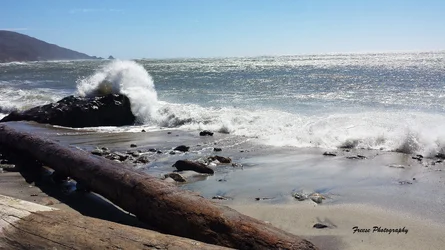
I'm pretty new to photography. I took this photo in Big Sur, and wanted some feedback on the photo itself. Good and bad much appreciated. I'm using a little beginner Nikon l820. I did photoshop the contrast to bring the color out of the hills a little better. I think the quality of the browns are more the cameras fault than myself. But hey, what do I know! What would you change? what could I have done better? pros? cons?
$Image 1 copy.webp
 
Last edited:
OK as you are a beginner I can offer a few simple tips.

1) put the horizon on a 1/3 line in the frame
2) level the ocean or all the sea will flood America
3) Focus on a subject...by focus I mean place it in the frame so our eyes go right to it. This is done a variety of ways, one is rule of thirds ;)

I love Big Sur, it's time I was back for a visit.
 
I don't know what a l820 is, but I'm guessing it is a P&S. Nothing wrong with that, but you have to understand its probable limitations. Judging from the shadows, I'm guessing this was taken not too far past noon since the sun sets in the west. The best advice I can give is for you to start understanding how light has a major impact on a photo. It seems the crashing wave on the boulder is your subject. How effective do you think the subject is? It's a large blob of black with some specular highlights to help define it somewhat. The majority of the rest of the scene is ocean, but the lighting makes a mess of it. Since the subject is the boulder with a crashing wave on it, go out in the early morning and shoot it again. See if it is a better shot.

As Trever mentioned, level the horizon.


I think the quality of the browns are more the cameras fault than myself.

Don't think you can get away with such a statement. There is always a workaround. And anyone with connecting grey matter can tell you........

<span style="color: rgb(51, 51, 51);">
 
Last edited by a moderator:
Great information. You know your stuff! As far as getting away with the brown. You said P&S will have limitations. Can't that be one of them :) How would I go about getting better colors from the hills in this shot?
 
How would I go about getting better colors from the hills in this shot?

it all starts with better light. Go out earlier or later in the day and try to avoid shooting a scene like this in the middle of the day. Keep your horizon straight and avoid having it right in the middle of the frame unless there is a REALLY good reason to have it there. Take your time looking at the scene and find something interesting to focus on before you start snapping away. Think about WHY you are taking the shot and what you want to say.

now, go shoot some more and have fun!
 
Go into photoshop and use crop with a grid to level the horizon. Look at the water and see how it tilts to the left? Thus the pun you are flooding America (nice one by the way). In LightRoom there is a button that says level and you can just click it and it does it automatically.
 
You have got the idea of what you wanted to shoot here...the guess is that you wanted the wave hitting the rock to be your subject. Concentrate on that...take lots of shots of that one subject on different angles. The wood should be the leading line to direct the attention to the rock and the wave so move a little bit more to the right until the angle of the wood is at the corner of the frame without losing the wave hitting the rock and more of the that hill...just a suggestion, but what do I know? For the Rule of third, divide your frame into three from the top and from the side...put your horizon on the top third of the frame. What software are you using for post processing?
 
.... As far as getting away with the brown. You said P&S will have limitations. Can't that be one of them :)
Nice try! :biggrin:


How would I go about getting better colors from the hills in this shot?
The hills are a nice additional character in the scene for leading lines but do not evoke much more emotion and do not act as a secondary subject IMO. Therefore, there is nothing wrong to have them silhouetted. If it was autumn and you were trying to bring out fall foliage colors, then we would be having a different conversation.
 
Thank you. What do you mean by level the ocean? Excuse my ignorance.

Nearly any photo editing software (and even in some cameras) can adjust the tilt of the picture so things that should be level, like the horizon, can be put level. Eventually, you will be adjusting the tilt using whatever reference line you can find in your photographs. It's fun, rewarding, and easy, and will catapult your photos into the next level.
 

Create an account or login to comment

You must be a member in order to leave a comment

Create account

Create an account on our community. It's easy!

Log in

Already have an account? Log in here.

Back
Top Bottom