What's new

Critique Please.. and Thank you

tmjjk

No longer a newbie, moving up!
Joined
Mar 28, 2012
Messages
550
Reaction score
61
Location
Cleveland
Can others edit my Photos
Photos OK to edit
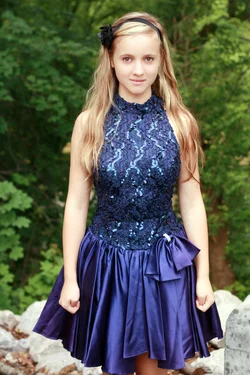
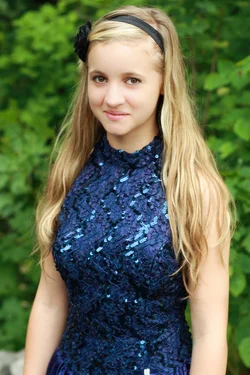
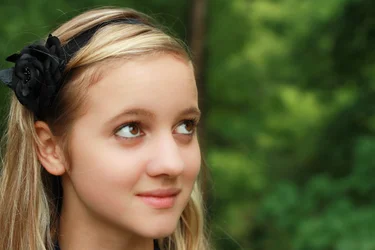
$1 (1 of 1).webp$1 (1 of 1)-3.webp$1 (1 of 1)-4.webp
 
just saw in the third her right eye is out of focus...darn
 
Lovely model!
#1 is fairly "static", both in pose and in lighting. She appears somewhat tense, as her hands are making "girl fists". I wish you had lowered the camera position some, and framed lower, to include her knees.
#2 is superb! if only a little over-exposed on her face. Nice pose, good framing (a little too high camera position)
#3 I can't tell the focus on my computer, but to me, this should have been vertical format, and include more of her hair and torso. If framing tightly, you can cut the frame just above her bust line with no harm, but this is too tight. Also, I like her pose, but you have framed too much empty space to the right, and cropped her hair on the left. A little balance is called for here.

 
thank you very much... and does static mean boring? And these are great tips... really grateful
 
Static is that thing that happens to your socks when you forget to buy dryer sheets.

She does look tense in in all these. By #3 she seemed to be getting a little more relaxed.

But i dont like how you have the camera pointing down at her in both 1 and 2 and three the crop was a bit too tight and what is she staring at? There is no context to the off camera stare.
 
didn't even realize I was pointing down... definitely an easy fix and I will change that... I just like the horizontal orientation and was told if she was looking off camera I could do that lol.... and she is grounded until she smiles better for her mom :sexywink:
 
thank you very much... and does static mean boring? And these are great tips... really grateful

Sorry for the ambiguity. What I mean is that the model is simply standing face-on to the camera, and nothing about her pose indicates she is "animated". something like a 3/4 pose, with her hips thrust to one side, or something like that You knid of make a suggestion, but let her pick the pose.

The lighting is simply straight-on to the model, therefore not "modeling" her features with differing light and shadow across her face. For an example of a better modeling light, see shot #3.
 
Oh, one more comment on shot #3; I know why you wanted her gaze to be off camera, and that is to show off her big brown eyes. Reason enough to set up a slightly different shot. Next time, find something like a little toy bird, or butterfly, and ask her to hold it out to the side about half an arm's length out (elbow bent o.k.) and ask her to fix her gaze on it. You will get those eyes, and a legitimate reason to frame horizontally, if that is what you want.
 
Great!! Thank you... I will try again tomorrow and really appreciate the advice... Can't wait to use this info :)
 
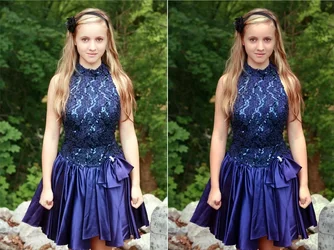
Did just a little touchup .. with the blue dress, she is a bit yellow, and a touch overexposed (on my calibrated monitor). So added just a tiny bit of red and magenta, and a touch of blue to kill the yellow. Upped the sat just a hair too....

my edit is on the right

$c.webp
 
Nice edit, cgipson1.

tmjjk, for ease of C&C, please number your photos in the future. In my untrained opinion:

The obvious winner is #2.

The less obvious winner is #1, however. In it, her pose and fists make her appear very stiff and tense, as if she's holding her emotions in check. It's striking and memorable and makes me imagine she's involved in some intense drama, though not in a good way at all. I like this photo for that candid quality, but I doubt that's the image you were expecting.

And #3 is truly adorable, and not very interesting I'm afraid.
 
I really like the edit as well! Thank you cgipson... lets see what I can pull off today... its so dreary where I am, hope I can manage some natural catch lights.
 
I really like the edit as well! Thank you cgipson... lets see what I can pull off today... its so dreary where I am, hope I can manage some natural catch lights.

Thanks... just meant to be an example of what you can do in post... to help a shot look better. If you aren't calibrating your monitor... it is easy to be out of bounds on exposure and color...
 
How do I know if my monitor is calibrated... and I am guessing that if I have to ask that it is not... :/
 
I am googling it now
 

Create an account or login to comment

You must be a member in order to leave a comment

Create account

Create an account on our community. It's easy!

Log in

Already have an account? Log in here.

Back
Top Bottom