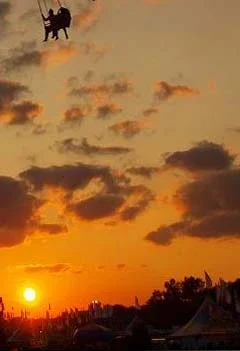
Just getting started in doing some post-processing, and I cropped this picture of a swing at the fair. It made the file size pretty small - just 28K. I'm wondering is this too small to print or have as a little larger picture? Any suggestions on how it looks?
No image too small to print if its printed small enough. Your 28k image, which is 240x351 pixels, will print fine, and seem quite sharp, if printed to a size that works out to around 300 pixels per inch (PPI):
240/300 = 0.8"
351/300 =~1.2"
final print size roughly 3/4" x 1 1/4" (read: postage stamp)
even if you accept an adequate level of sharpness (150ppi) you can only print a 1.8"x2.4" print (slightly smaller than a business card).
You need to start by deciding the final print size and working backwards from there. If you intend to make an 8x10 you need an edited image that is 2400x3000 pixels (8" x 300ppi =2400 pixels, 10x300=3000). You then need to crop you image and resample so that you have the necessary pixel size.
In the case of your image, an 8x10 would of course pose problems. The aspect ratio (w/h) of your cropped image is quite different than that of an 8x10 print. In this case you would need to crop and resample so that the long size worked out to the desired 3000 pixels. The short side, the width in this case, will fall short of the needed 2400 pixels. You would want to add a white border on each side to pad out the image.
In Photoshop, the easiest method is to use the "Image/Canvas Size..." dialog to add the necessary width. Most image editors will has something similar. Once you have the shape of the data file matching the shape of the desired print size, the lab should be able to print it without inappropriately cropping the image. Some labs may offer this as a service.




![[No title]](/data/xfmg/thumbnail/34/34685-17f2466cddc9890af6ca67c65e2e7d5c.jpg?1734165691)
![[No title]](/data/xfmg/thumbnail/34/34346-f7996f51f0624620cfd54a488abeacf9.jpg?1734164887)
![[No title]](/data/xfmg/thumbnail/34/34686-9d6b51a2427064204f762b07c8b00f70.jpg?1734165692)
![[No title]](/data/xfmg/thumbnail/31/31046-f1d28c614676726741e90ce5b420a03e.jpg?1734159151)
![[No title]](/data/xfmg/thumbnail/42/42397-30faa170de7ed9be38adf00b9b26a220.jpg?1734176928)