What's new

cropping and printing

minniemouse22

TPF Noob!
Joined
Dec 28, 2012
Messages
18
Reaction score
1
Location
MS
Can others edit my Photos
Photos OK to edit
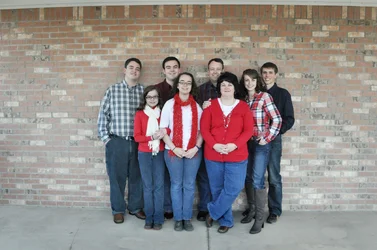
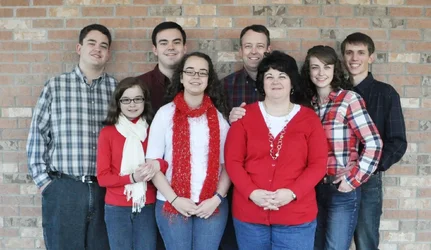
Recently did a session with a family who was unsure of what they wanted.. "just family pictures of all of us together". We did that and got some great shots. However, my client has come back to me with the desire to heavily crop these photos. I'm worried about the way these will print. Will they come out as an 8X10 if that is what they decide to print. Or will it print to scale? Here is an example:
 

Attachments

  • $DSC_0135 4.webp
    $DSC_0135 4.webp
    173 KB · Views: 99
  • $DSC_0135 2.webp
    $DSC_0135 2.webp
    448.2 KB · Views: 96
Neither of these will print natively to an 8X10 - you will lose image from the sides of each due to cropping. An 8x10 has a 1.25:1 aspect ratio (long side to short side); these shots have aspect ratios of ~1.72:1 and 1.5:1. That is, you will lose quite a bit from the sides of the first, cropping into the people, while you will not lose terribly much from the second (you'll lose some of the brick wall but none of the people).

I always crop fresh from the original for each desired print size. That allows me to control what is cut out (and what remains). It looks to me like the left shot above is simply a subsection of the one on the right, so you could easily go back to the one on the right and recrop it for 8x10 as you deem ideal. One thing to keep in mind when cropping for a specific print size is to resize it for an appropriate pixels/inch setting (if you know the printer to be used you can pick an ideal number, otherwise you just want to make sure that number is sufficiently large). If you were to take these files, allow for some cropping, and print them at 8x10, you would have print resolutions of ~138 pixels/inch for the left and 267 pixels/inch for the right. The 138 pixels/inch might be getting a little low for it to print well. I recommend cropping/resizing and then sharpening as the last step to get an image print ready.
 
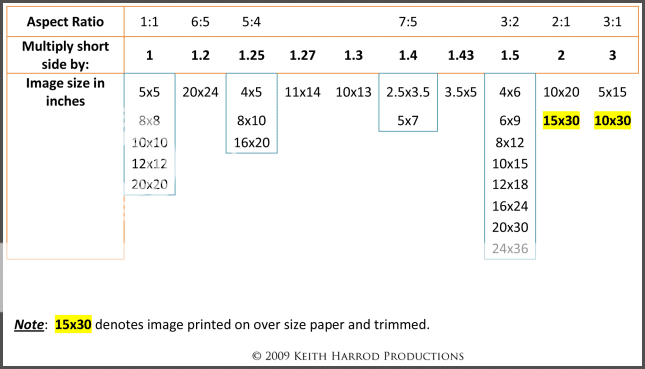
The long side of your original is 1.5x longer than the short side, which is an aspect ratio of 3:2 (8x12).

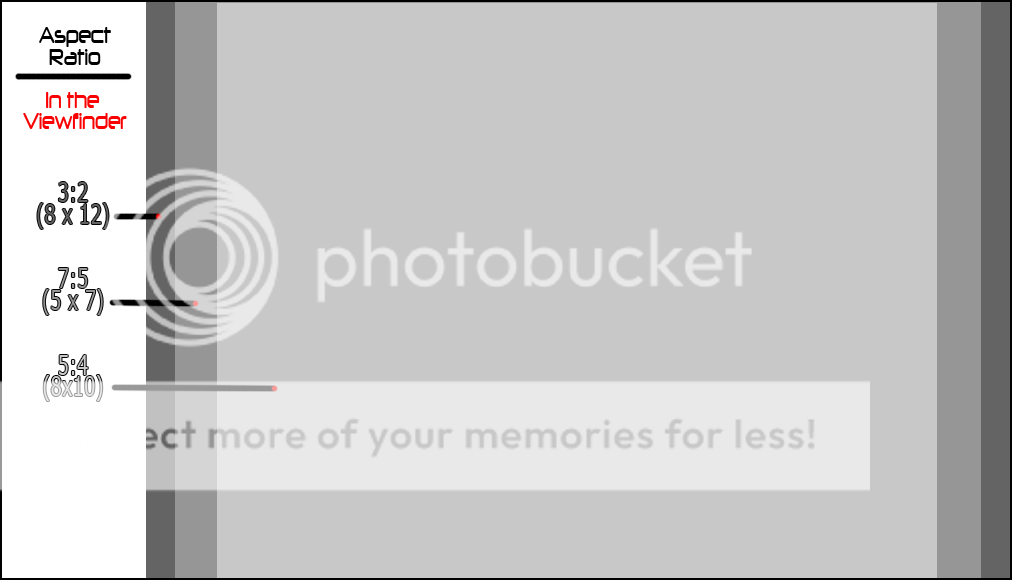
As mentioned an 8x10 (or 10x8) has a long side that is only 1.25x longer than the short side. (5:4 aspect ratio)

In other words, an 8x10 is less rectangular than the images your camera makes.
The long side of the crop you posted is 1.72x longer than the short side (1904 / 1106 = 1.722)

AspectRatioChartv2-1.png


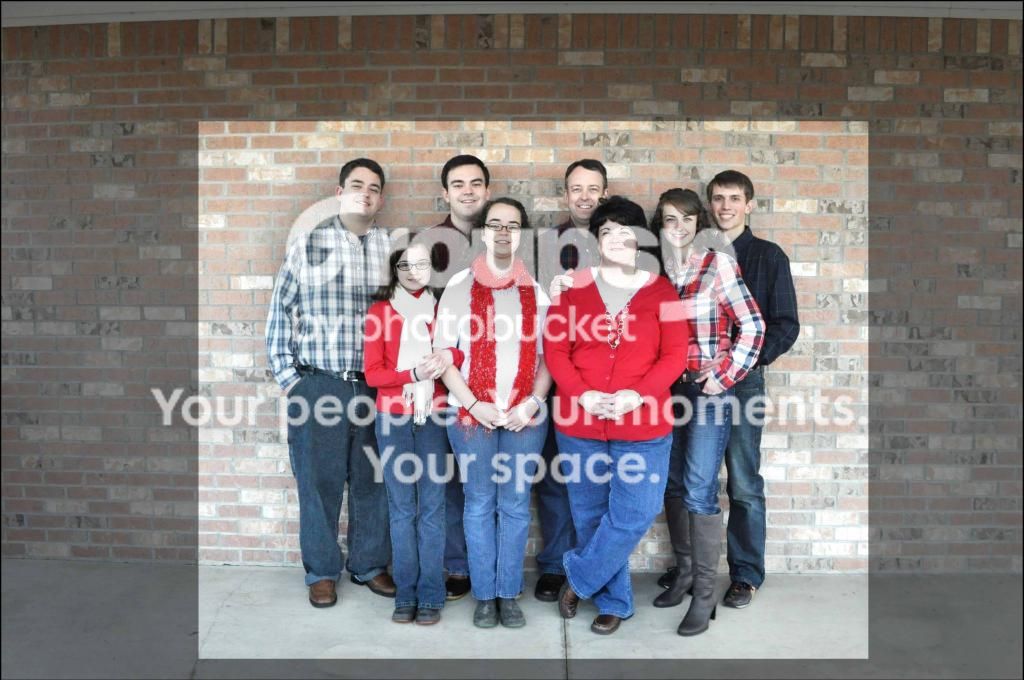
This edit shows an 10x8 (5:4) crop of your 3:2 aspect ratio original. (More info below edit)

DSC_01352_zps75bc8d64.jpg


The next issue is print size and quality.

To make the numbers simple we will assume a crop that leaves 1000 x 800 pixels.

At 100 pixels-per-inch (PPI) a 1000x800 pixel image will be a 10 x 8 inch print. (1000 pixels / 100 PPI = 10 inches and 800 pixels / 100 PPI = 8 inches)
100 PPI is as low as you can go and still get a decent quality print.

A 2000 x 1600 pixel photo at 200 PPI will have better quality and will still be a 10x8 print - (2000 pixels / 200 PPI = 10 inches and 1600 pixels / 200 PPI = 8 inches)

The way to make the pixel dimensions of the photo subjects larger in the original, so less has to be cropped, is to zoom in or get closer.

Now consider that if you don't know all this basic photograph math stuff, how can you expect the people in the photo to know it.

ViewfinderAspectRatiocopy.png
 
Last edited:
And just when I think I know what I'm doing...

Anyway, how do you access aspect ratio information per picture?
 
Do the math.
Divide the long side pixel dimensions by the short side pixel dimensions.
Your crop was a custom aspect ratio.
The long side of the crop you posted is 1.72x longer than the short side (1904 / 1106 = 1.722)
APS-C size and full frame image sensors are all based on the 3:2 aspect ratio of 135 format (35 mm) film.

Most P&S camera have a 4:3 aspect ratio image sensor, as do Olympus cameras and other four/thirds system cameras.

1:1 is square.
3 / 2 = 1.5
7 / 5 = 1.4
5 / 4 = 1.25
4 / 3 =1.33

A lot of today's TV screens and movies are 16:9 (16 / 9 = 1.78)

Printing has it's own sub-set of technical considerations your clients will be unaware of. Then there is the entire sub-set of print presentation.

Tutorials on Color Management & Printing

Image sharpening is usually best done as a 3 step process - capture sharpening, local sharpening, output sharpening.
Images destined for print can often tolerate more sharpening than images destined for electronic display.
Plus, there are a number of sharpening techniques, like LAB sharpening, high-pass filter sharpening, luminosity sharpening, local contrast sharpening, mid-tone contrast sharpening, un-sharp mask sharpening, etc.

Real World Image Sharpening with Adobe Photoshop, Camera Raw, and Lightroom (2nd Edition)
 
Last edited:

Create an account or login to comment

You must be a member in order to leave a comment

Create account

Create an account on our community. It's easy!

Log in

Already have an account? Log in here.

New Topics

Back
Top Bottom