What's new

Down for a debate?

N1kon1k

No longer a newbie, moving up!
Joined
Dec 5, 2015
Messages
151
Reaction score
39
Can others edit my Photos
Photos OK to edit
IMG_0712.webp
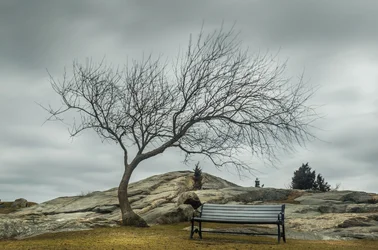
after learning a bit more about composition and elements of design... I decided to go back to a familiar spot and figure how I could make a previous shot better...

Long story short... 1foot of snow storm was rolling in so I decided to bring the cheaper good old D5100

I tried a 8x10 crop but it seems to make the shot to tight...

What do you all like and dislike?
 
What do you all like and dislike?
Tree good, rocks good, sky good.

Most of the interest is piled up in the middle. Park bench seems out of place. Seems underexposed.
 
I like the image, and I agree with Designer. The only thing I might do, if it was mine, would be to clone out the large green tree poking up above the rocks on the right lower middle part of the image. I found it a bit distracting. I also agree that it seems a bit underexposed.

WesternGuy
 
Looks underexposed, but sooooo much stronger than the way you handled this scene a month ago! Bravo for going back and re-creating this basic shot, but in a better way! What do I dislike? I dislike seeing a 350 pixel-sized photo on a photo forum. The image comes through as basically just its gestalt; asking what we like after having been shown basically a large thumbnail is something I do not like.

If you're afraid of people stealing your images, its best not to ever post them on the web in any form, but an image that's this small is not even worth evaluating in any sense except the most-basic thumb up or down...we cannot SEE what you actually did at this small image size.

 
Last edited:
What do you all like and dislike?
Tree good, rocks good, sky good.

Most of the interest is piled up in the middle. Park bench seems out of place. Seems underexposed.

I had the bench exposed better but that grey on the bench was so bright it kept drawing my eye to it almost ignoring the tree... I under exposed it a bit to let the eye bounce back and forward...

Not trying to excuse myself... Just explaining what I was trying to attempt lol
 
I had the bench exposed better but that grey on the bench was so bright it kept drawing my eye to it almost ignoring the tree... I under exposed it a bit to let the eye bounce back and forward...
I didn't mean that only the bench was underexposed.
 
Thanks to all... so do you think I should just work the under exposure?

Meaning the composition and everything else works? I understand the cloning of the tree but for some reason Lightroom doesn't do a very good job at cleaning the area well if the subject is darker than what you're cloning the area with...

I'll be working on the exposure and post it again in Full resolution So you can see all the other Post processing mistakes
 
Here it is... better?
I'm not sure on how to load full res (it wouldn't let me load image) Bench under Tree  Forum 1.webp
...so I did 2500x2500 pixels Still got a lot to learn so bear with me...
If you can teach me how to do it? please feel free... I would like to make your job easier since you all try to guide me in the right direction.
Bench under Tree  Forum 1.webp
 
Thanks to all... so do you think I should just work the under exposure?

Meaning the composition and everything else works? I understand the cloning of the tree but for some reason Lightroom doesn't do a very good job at cleaning the area well if the subject is darker than what you're cloning the area with...

I'll be working on the exposure and post it again in Full resolution So you can see all the other Post processing mistakes
Can you lighten the shot to make it look as if the exposure is correct? If so, then by all means give it a try.

When I responded in post #2, I indicated that I was not a fan of the composition. If you've got all the stuff bunched up in the middle, then you may have missed an opportunity to introduce some dynamic balance in the scene by getting rid of the park bench, and move around a bit to find a better vantage point. That's one way to try to improve your composition.
 
Yes, it looks so much better in your second posting of it in this thread. The tips of the branches can be seen and appreciated for the way you've rendered them. In this second, larger version of the photo, we can literally SEE the movement of the tips of the branches at the slow shutter speed you used! THAT makes a LOT of difference in how the shot reads--something that was simply un-seeable in the 350-pixel sized original version.
 
IMG_0016.webp
I think I just had a A Ha moment ... the whole time I was saying... damn how come they don't see the motion in the tree and the slight motion in the clouds etc... so much to learn I have... lol thanks a bunch...

And btw Designer ... as far as what you said about composition? I'm sure their might be a better angle to do exactly as you mentioned... but I just started learning about composition and elements of design as Derrel suggested for me too learn... so I'm still trying to get the hang of it and also try to create a better shot than a previous one a month ago...

I'll post the shot so you can compare it in case you didn't see the first shot I took...
 
I had tried the warmer yellowish tones but I was trying to stay true to the color of that day... however it does give it a different feel... also thanks a lot for showing the shot with the tree cloned out... I couldn't do it with Lightroom... kept getting a blurry blob... it really helps the image... I think I just might have to invest in the photoshop program ...
 
I had tried the warmer yellowish tones but I was trying to stay true to the color of that day... however it does give it a different feel... also thanks a lot for showing the shot with the tree cloned out... I couldn't do it with Lightroom... kept getting a blurry blob... it really helps the image... I think I just might have to invest in the photoshop program ...

If you have an LR subscription you get Photoshop as part of the package. If you have the standalone version of LR and are happy with that then there are lots of alternatives to PS to handle things like cloning that cost a whole lot less: Affinity Photo will do very nicely.

Again, nice photo.

Joe
 

Create an account or login to comment

You must be a member in order to leave a comment

Create account

Create an account on our community. It's easy!

Log in

Already have an account? Log in here.

Back
Top Bottom