What's new

EXIF

Did you read the question?

  • Yes

    Votes: 0 0.0%
  • No

    Votes: 1 12.5%
  • Was there a question

    Votes: 1 12.5%
  • Yes and I have given my thoughts

    Votes: 1 12.5%
  • Yes but I have nothing to say

    Votes: 1 12.5%
  • Can I have fries with that

    Votes: 4 50.0%

  • Total voters
    8
  • Poll closed .

SUNR15E

TPF Noob!
Joined
Oct 18, 2012
Messages
57
Reaction score
1
Location
UK
Can others edit my Photos
Photos OK to edit
OK I am converted.

You got me...so now please help me.

I know and understand EXIF I get it...I know what it is I know how to find it.

BUT

Now I have converted to RAW I am confused. EXIF is in with all my JPEGs When I use Flickr it is easy to find. BUT...sorry a bigger BUTT today I loaded one of my Pics to Flickr to see how it works there......and.....Flickr claims the pic was taken TODAY....!!! no other data...I know it must be there somewhere...so I am hoping that you good people will treat me like the noob I am and help me.

So I guess you will need some info to start with.

D300s Shot in RAW
Processed in Photoshop - New - Placed - edited
Saved as a JPEG

T
hen uploaded to Flickr

So
1. Where did I lose my EXIF?
2. How do I get it back?
And

D. Why do we use numbers?

If you can help with those that would be GREAT......Don't forget....NOOB...not EXPERT...do not expect me to have the slightest clue what you are talking about.

IDIOTS GUIDE PLEASE.

Thanks..

SUNR15E
 
OK I am converted.

You got me...so now please help me.

I know and understand EXIF I get it...I know what it is I know how to find it.

BUT

Now I have converted to RAW I am confused. EXIF is in with all my JPEGs When I use Flickr it is easy to find. BUT...sorry a bigger BUTT today I loaded one of my Pics to Flickr to see how it works there......and.....Flickr claims the pic was taken TODAY....!!! no other data...I know it must be there somewhere...so I am hoping that you good people will treat me like the noob I am and help me.

So I guess you will need some info to start with.

D300s Shot in RAW
Processed in Photoshop - New - Placed - edited
Saved as a JPEG

T
hen uploaded to Flickr

So
1. Where did I lose my EXIF?
2. How do I get it back?
And

D. Why do we use numbers?

If you can help with those that would be GREAT......Don't forget....NOOB...not EXPERT...do not expect me to have the slightest clue what you are talking about.

IDIOTS GUIDE PLEASE.

Thanks..

SUNR15E
What do you mean by "new-placed-edited"? As in you made a new document, copied the image and placed it in there? Then that document was made today and your image is an OBJECT placed in the new document and won't retain it's exif data.

I want fries with that, please.
 
Follow the exact same procedure again, look at the JPEG before you load it to Flickr and see if the EXIF data is there. If so then Flickr is stripping it. If not then Photoshop is stripping it.
 
Yes made a new document...
Then

File - Place

Allows the item to have some work done then placed exactly where needed within that new doc....not a copy paste but a placement.

like I say it's new to me so it is hard to explain.

But yes I see what you mean...as I am creating that new document I am losing the EXIF....aargh. I will look at the options I have....But if anyone knows how to retain the info I would love to know. Thanks for helping it has made it clearer.

SUNR15E
 
Instead of placing the image in a document you could create the document around the image.
The only real way of retaining your EXIF is by opening the original photo and saving it somewhere else (regardless of the edits).
As soon as you copy the image into another document the EXIF data is lost.
 
Yes made a new document...
Then

File - Place

Allows the item to have some work done then placed exactly where needed within that new doc....not a copy paste but a placement.

like I say it's new to me so it is hard to explain.

But yes I see what you mean...as I am creating that new document I am losing the EXIF....aargh. I will look at the options I have....But if anyone knows how to retain the info I would love to know. Thanks for helping it has made it clearer.

SUNR15E

Why are you creating a new document?
 
Why are you creating a new document?

I have NO IDEA...

Just a method I saw someone use on a youtube vid and it seemed to work.....I have no idea why it was done that way....

If you have another method of getting RAW into Photoshop Please feel free to point me in the right direction.

I have never tried any other way....

SUNR15E goes off to see other methods of opening RAW in Photoshop... :)

Thanks for making me think.

SUNR15E

 
Why are you creating a new document?

I have NO IDEA...

Just a method I saw someone use on a youtube vid and it seemed to work.....I have no idea why it was done that way....

If you have another method of getting RAW into Photoshop Please feel free to point me in the right direction.

I have never tried any other way....

SUNR15E goes off to see other methods of opening RAW in Photoshop... :)

Thanks for making me think.

SUNR15E
What version of PS are you using?
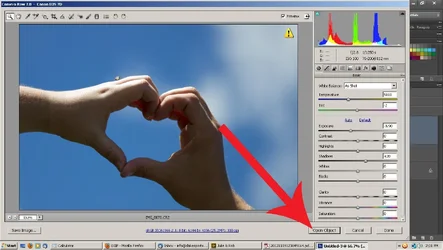
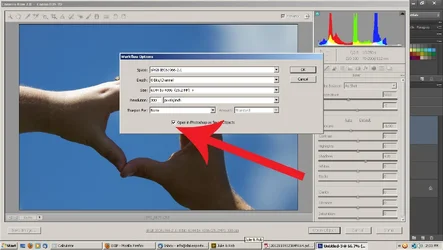
After processing in Adobe Camera Raw Open Object will open it in PS

If you click that little hyper link down under the image, it will allow you to change your color settings to sRGB if you aren't there already, but more importantly (for when you learn more) you can change it to open as a smart object in PS. A smart object remembers where it has been. If you need to re-tweak in raw you just double click on the image in your layers in PS and it goes to back to raw. Google working with smart objects in photoshop and double processing in photoshop
 

Attachments

  • $Open object to PS 1.webp
    $Open object to PS 1.webp
    92 KB · Views: 135
  • $Open object to PS 3.webp
    $Open object to PS 3.webp
    87.3 KB · Views: 125
CS5


by SUNR15E

This is the image (not specific) Just a rubbish random I can afford to play with.
SO I look at the image using ViewNX (the programmer that came with the camera) it simply lets me see the images.

So I look at the EXIF (metadata)


by SUNR15E

And as you can see there is loads of data... :) So I am happy...

Then

I open the image using CS5 and as you say it opens on the page you said......ready for me to open


by SUNR15E

And I SAVE IT....as a JPEG

Then I go back to ViewNX to look at the data.......

AND


by SUNR15E

They are what I would think are simple stages when I save......I click "SAVE AS" and re-title as I do not want to over write or lose the original.

Please tell me if there is a better way....or if you see what I am doing wrong...
I don't want to have to separate and save data and then add it to the finished image that seems more hassle than it is worth...but I also do not want to lose that data simply because I have followed advice and started to look at RAW as an option....I thought it would be simple.

Maybe I am missing something...??

HELP... PLEASE

SUNR15E
 
CS5


by SUNR15E

This is the image (not specific) Just a rubbish random I can afford to play with.
SO I look at the image using ViewNX (the programmer that came with the camera) it simply lets me see the images.

So I look at the EXIF (metadata)


by SUNR15E

And as you can see there is loads of data... :) So I am happy...

Then

I open the image using CS5 and as you say it opens on the page you said......ready for me to open


by SUNR15E

And I SAVE IT....as a JPEG

Then I go back to ViewNX to look at the data.......

AND


by SUNR15E

They are what I would think are simple stages when I save......I click "SAVE AS" and re-title as I do not want to over write or lose the original.

Please tell me if there is a better way....or if you see what I am doing wrong...
I don't want to have to separate and save data and then add it to the finished image that seems more hassle than it is worth...but I also do not want to lose that data simply because I have followed advice and started to look at RAW as an option....I thought it would be simple.

Maybe I am missing something...??

HELP... PLEASE

SUNR15E
Open Adobe Bridge
Right click on the file
File info
See what it says. I have a feeling that viewNX2 isn't recognizing all of the data through adobe.
 
Open Adobe Bridge
Right click on the file
File info
See what it says. I have a feeling that viewNX2 isn't recognizing all of the data through adobe.

Cool did that...yes all the info is still there nice now I know where to find it that helps loads...

Now I go to Flicker and find that they have changed the way they show this info.....Where before I could click the listed camera make...and it showed all EXIF data...now I click the camera make and they give details about how much that camera is USED by their members.....!!!

Why can't they leave it alone...!!!

But thanks, I now have a point of reference where I can look at what I feel was a good result and see how that was done. Thanks for you time on this one...

Right where do I go to ask my next question....oh yer...NEW TOPIC.......What to ask about....??? Oh yer I need to sync my flash with my camera but I only have one that responds to the flash output....360AFD from Jessops (don't answer here I will start a NEW topic...)

Thanks

SUNR15E
 
Open Adobe Bridge
Right click on the file
File info
See what it says. I have a feeling that viewNX2 isn't recognizing all of the data through adobe.

Cool did that...yes all the info is still there nice now I know where to find it that helps loads...

Now I go to Flicker and find that they have changed the way they show this info.....Where before I could click the listed camera make...and it showed all EXIF data...now I click the camera make and they give details about how much that camera is USED by their members.....!!!

Why can't they leave it alone...!!!

But thanks, I now have a point of reference where I can look at what I feel was a good result and see how that was done. Thanks for you time on this one...

Right where do I go to ask my next question....oh yer...NEW TOPIC.......What to ask about....??? Oh yer I need to sync my flash with my camera but I only have one that responds to the flash output....360AFD from Jessops (don't answer here I will start a NEW topic...)

Thanks

SUNR15E

You are welcome!
In flickr it's under Actions: View Exif Data
 

Create an account or login to comment

You must be a member in order to leave a comment

Create account

Create an account on our community. It's easy!

Log in

Already have an account? Log in here.

New Topics

Back
Top Bottom