What's new

First Attempt with Adobe Bridge & Camera RAW

cloud9imagery

TPF Noob!
Joined
Jul 6, 2011
Messages
66
Reaction score
7
Location
Manchester, Tennessee
Can others edit my Photos
Photos OK to edit
For the past two days, I have taken a couple of webinars through Miller's Lab.

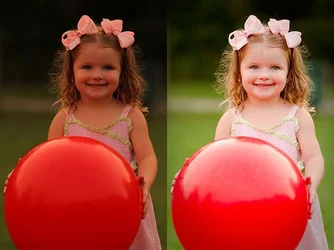
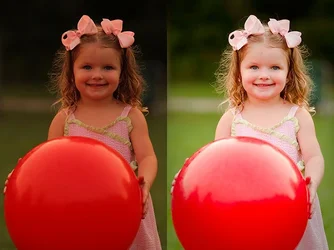
The first is the original RAW file and the second is my first attempt using Adobe Bridge and Camera RAW software.

Please let me know what you think and if you have any advice. Thanks! :heart:
$TEST.webp
 

Attachments

  • $TEST.webp
    $TEST.webp
    53.2 KB · Views: 148
cloud9imagery said:
For the past two days, I have taken a couple of webinars through Miller's Lab.

The first is the original RAW file and the second is my first attempt using Adobe Bridge and Camera RAW software.

Please let me know what you think and if you have any advice. Thanks! :heart:
<img src="http://www.thephotoforum.com/forum/attachment.php?attachmentid=17128"/>

May be a stupid question but how is that first image the original raw file? Did you use camera raw to convert it to a jpeg or something?? Just curious because you can't actually post a raw file here and because camera raw usually has some default settings that will automatically be applied when you open the raw file. I changed my camera raw defaults but the original defaults meant that every picture had some brightness, contrast and sharpening applied even if I didn't physically play around with any sliders.

The edit definitely looks MUCH better then the other one though!!
 
Pretty darned good first effort! You went from a fairly typical low-contrast raw type image to a peppy, processed JPEG image fit for screen viewing! You are on the right track for sure. I'd say keep it up!
 
May be a stupid question but how is that first image the original raw file? Did you use camera raw to convert it to a jpeg or something?? Just curious because you can't actually post a raw file here and because camera raw usually has some default settings that will automatically be applied when you open the raw file. I changed my camera raw defaults but the original defaults meant that every picture had some brightness, contrast and sharpening applied even if I didn't physically play around with any sliders.

Actually, in order to make this image, I took the CR2 file and the new JPG file and placed them side by side in a new image in PS and saved them as a JPG. :)
 
Agree with Darrel. This is a great step forward for you. Keep up the good work!
 
Check out YouTube and Adobe TV for more video tutorials that you will love!
 

Create an account or login to comment

You must be a member in order to leave a comment

Create account

Create an account on our community. It's easy!

Log in

Already have an account? Log in here.

New Topics

Back
Top Bottom