What's new

First B/W please C&C

Patriot

No longer a newbie, moving up!
Joined
May 10, 2012
Messages
810
Reaction score
117
Location
Spokane, Washington
Can others edit my Photos
Photos OK to edit

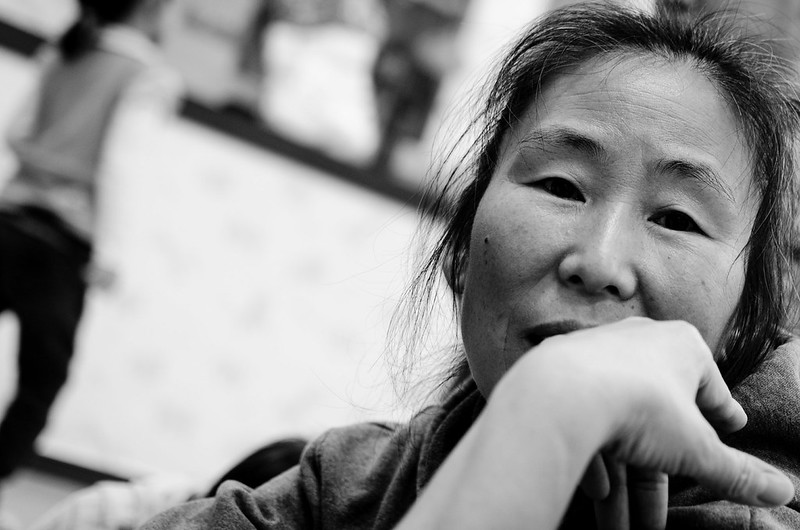
Thoughts by Jarrett_Hunt, on Flickr

Photo was taken of a caretaker at a Orphanage in South Korea. She was watching the little girl that was holding the camera this was taken with. Is it ok if her eye are so dark? Please fill free to edit picture to show me how you would've done it or to show where I made the mistake.

Nikon D7000
No Flash
35mm 1.8g
F-stop: 2

Also who took the picture if the little girl held the camera and composed the shot or myself if I pushed her finger down to capture the shot? :confused::confused:
 
OK, I may be prejudiced because my daughter in law and grandchildren are Korean but I really love this.

However it was taken or by whom, the pose of the subject just fits so beautifully into the space and the conversion gives it that caught on film look.
Yes, it would be better if the arm was darker and maybe a bit more in focus and the eyes were lighter but all in all a lovely shot

. $8321830716_894f2a3b04_olll.webp
 
Wow I see. You made her eye look a lot better, they stand out way better. I can even see the shine without enlarging the picture. I too wish the arm was in focus, I should've kept it on 1.8.

Thank you for the C&C.
 
Wow I see. You made her eye look a lot better, they stand out way better. I can even see the shine without enlarging the picture. I too wish the arm was in focus, I should've kept it on 1.8.

Thank you for the C&C.

To deepen the DOF you need to make the aperture smaller. like 5.6 or 8
Look at DOFmaster.com for an online calculator.

In this situation you could up your iso to 800 easily, probably even higher, then shoot at f8 and still have an acceptable shutter speed and a greatly increased DOF.

(if you are in Gunsan and American, you're most likely at the air base. I'm retired military and have a soft spot for any serviceman so if I can help you in any way, just let me know.)


Lew
 
Wow I see. You made her eye look a lot better, they stand out way better. I can even see the shine without enlarging the picture. I too wish the arm was in focus, I should've kept it on 1.8.

Thank you for the C&C.

To deepen the DOF you need to make the aperture smaller. like 5.6 or 8
Look at DOFmaster.com for an online calculator.

In this situation you could up your iso to 800 easily, probably even higher, then shoot at f8 and still have an acceptable shutter speed and a greatly increased DOF.

(if you are in Gunsan and American, you're most likely at the air base. I'm retired military and have a soft spot for any serviceman so if I can help you in any way, just let me know.)


Lew

Thank you for the app and advice. I never knew that something like that existed. I don't know why but I get afraid of push the ISO up higher than 200. I'm sure my camera can handle something like ISO 800 or higher with no problem. Next time I'm shooting indoors I will push it up higher. I should've known to bump it up because I noticed that I couldn't completely freeze the children even with the flash.

As you guessed I'm station here at Kunsan AFB and will be going to Fairchild AFB next. I've only been in for 3 years now spending all of those years overseas. Also thank you for your service and for giving me the chance to serve.
 
Great pic, and the traveler did a great job of enhancing it. I agree those things needed improving, good job both of you
 
The picture is good... but you need to work in layers when adjusting the exposure so that you can optimize the eyes separate from the rest of the image.

in this case, I'd have:

1. cloned the image into two layers

2. then adjusted the top layer optimizing for the overall exposure.

3. then adjusted the bottom layer optimizing for the eyes.

4. then erased the eyes (little by little with a 50% eraser @ 50% flow) until they looked right.

5. then exported to JPG.
 
I only have lightroom 4 and not photoshop so I don't know if I could create layers with just LR4. I looked around and seen a plugin "perfect layers" which seems to get the job done for $25.
 
Or you can use GIMP which is free.
 

Create an account or login to comment

You must be a member in order to leave a comment

Create account

Create an account on our community. It's easy!

Log in

Already have an account? Log in here.

New Topics

Back
Top Bottom