What's new

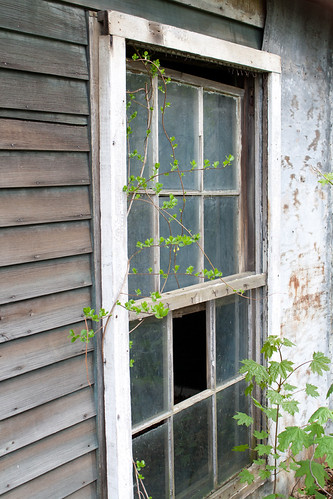
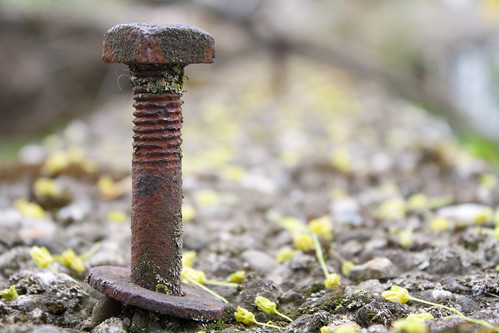
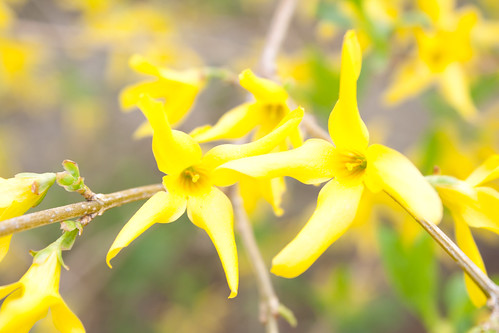
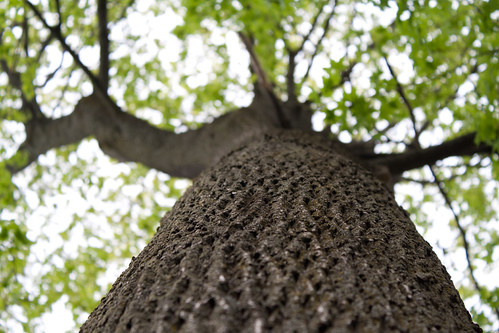
First Photos for C&C. No need to be nice, just honest.

Rancor

TPF Noob!
Joined
Apr 28, 2011
Messages
155
Reaction score
6
Location
Lowell, MA
Can others edit my Photos
Photos OK to edit
To me they all seem to be a bit over exposed. Did you shoot on manual or auto?
 
Over exposed - too bright ?

I was in manual mode all the way other than focus on a few.
 
Did I do something wrong here. 80 views and 2 responses. Even if your new or think you have nothing to say, I'd like any comments, not just pro advice.
 
So these have no PP as I have no idea how to work lightroom yet. But please, give all the C&C you'd like, be as harsh as needed.
There are loads of videos on youtube. In the Develop Module, start by playing with the sliders for WB, exposure, fill lights, blacks, etc. at the top of the right panel. Get your camera and lens profiles near the bottom of the panel.

Did I do something wrong here. 80 views and 2 responses. Even if your new or think you have nothing to say, I'd like any comments, not just pro advice.
It's a numbers game, don't take it personal.
 
Thanks a ton for the replies guys. I have watched several lightroom videos, but its totally different to put the stuff into practice when you have no idea what needs correcting and what doesn't. I try playing around with the suggested settings.

Sorry to sound like a dumb monkey here, and repeating myself is something I try not to do, but:

By over exposed do you guys all mean too bright? I know exposure is aperture, shutter speed, ISO. My ISO was 100 because I was in daylight, my Shutter speed was 1/50 because I know your not supposed to go below your lens in mm, and mine is a 55mm. Plus, my targets weren't moving, so I had no blur worries. So it must have been that my aperture was too large.

Also, I keep hereing this "expose to the right". Isn't to the right - brighter? That's the rule I was trying to follow, did I follow it to harshly?
 
The nail is probably the best exposed of the bunch. The flowers are overexposed which you can see in the white spots of the petals. When you talk about expose to the right, if you're talking about the histogram, you should try and aim for an even "mountain range" across the entirety of the graph. You want to avoid huge spikes or valleys becauset that means the photo isn't balanced. In order to reduce the exposure of these more, I would go with a faster shutter speed to you can preserve your aperture which keeps your depth of field, which is important especially on the nail shot. On that one you want the nail to be the focus of the image, so keeping the background blurry is a good idea, which means keep your wide aperature.
 
Thanks a ton for the replies guys. I have watched several lightroom videos, but its totally different to put the stuff into practice when you have no idea what needs correcting and what doesn't. I try playing around with the suggested settings.

Sorry to sound like a dumb monkey here, and repeating myself is something I try not to do, but:

By over exposed do you guys all mean too bright? I know exposure is aperture, shutter speed, ISO. My ISO was 100 because I was in daylight, my Shutter speed was 1/50 because I know your not supposed to go below your lens in mm, and mine is a 55mm. Plus, my targets weren't moving, so I had no blur worries. So it must have been that my aperture was too large.

Also, I keep hereing this "expose to the right". Isn't to the right - brighter? That's the rule I was trying to follow, did I follow it to harshly?

Expose to the right of for shooting raw. When done correctly you don't blow the highlights and you retain shadow detail. The file actually ends up containing more data for post processing.

This does not mean the image stays that way when rendered and processed. You have to bring it back to the correct exposure using the exposure slider in lightroom. In the develop tab, the auto button near the exposure slider is a good starting point.

Sent from my Droid using Tapatalk
 
By over exposed do you guys all mean too bright? I know exposure is aperture, shutter speed, ISO. My ISO was 100 because I was in daylight, my Shutter speed was 1/50 because I know your not supposed to go below your lens in mm, and mine is a 55mm. Plus, my targets weren't moving, so I had no blur worries. So it must have been that my aperture was too large.

Also, I keep hereing this "expose to the right". Isn't to the right - brighter? That's the rule I was trying to follow, did I follow it to harshly?
The vast majority of image data in your RAW file is in the right side of the histogram. You can "expose to the right" and still retain all the data. It is better to bring down the exposure highlights (right side) (assuming the data is there) than to bring up the shadows (left side). You're more likely to introduce noise by raising the shadows. I have a good example of bringing down exposure in LR, but can't find the thread right now. Maybe I still have the photos somewhere. If I can find, I will post or link here. I really should be working right now. :biggrin:
 
Exposing to the right is a particular school of thought that says you will capture the most data this way. However, the assumption is made that you will pull the exposure back to where it needs to be in post. Some people subscribe to this school, others to the school of expose properly in cam. Expounding on the merits of one school or the other will always begin heated, spirited, and highly entertaining debate. You may want to be careful when mentioning it.

As far as learning your PPing software, go to Amazon and order Scott Kelby's book on LR. It will teach you how to use it, and along the way you'll learn what needs to be done to your pics. It will be money well spent and save a lot of time over scouring teh internets for tuts. You can look at tuts once you have an understanding of the fundamentals.

And yes, overexposed means "too bright".
 
Awesome stuff everyone, I really appreciate it.

So I want my histogram to be slightly jammed up to the right when I shoot (I like that school, I'm good at that school) and then in lightroom, using the auto or manually doing it, adjust exposure until my histogram looks level across and not peaked or vally'ed anywhere. Thats good to know, and explains the over exposure.
 
Other than the exposure, the corner of the window in #1 is cropped out. Try not to crop the main subject of your photo in something like this.
 
Just remember if you expose to the right, it's possible to go too far and clip your highlights. You can recover some of them if you didn't go absurdly far, but often you can't recover all of them. As Kundalini said, pics are more salvageable pulling back from the right vs. pulling up from the left, but there are limits in either case.
 

Create an account or login to comment

You must be a member in order to leave a comment

Create account

Create an account on our community. It's easy!

Log in

Already have an account? Log in here.

New Topics

Back
Top Bottom