What's new

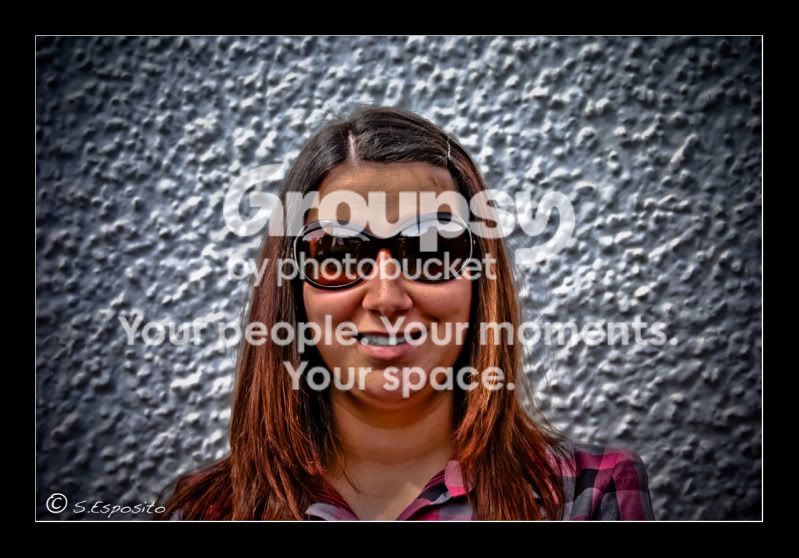
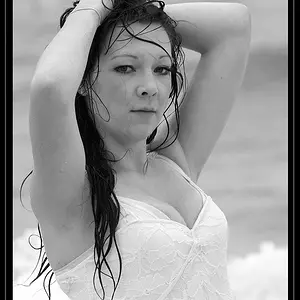
First portrait of me

guest0

TPF Noob!
Joined
Jul 10, 2009
Messages
149
Reaction score
0
Can others edit my Photos
Photos OK to edit
Please C&C

me2-1.jpg
 
Last edited:
anything in particular you want C&C on?....

heres what i see at first glance.
dead center...maybe recrop? (portrait orientation?)
looks way over sharpened...if this is the look you were going for, cool
maybe the jpg compression did it, but it looks slight OOF.

keep shooting..keep posting! :D
 
anything in particular you want C&C on?....

heres what i see at first glance.
dead center...maybe recrop? (portrait orientation?)
looks way over sharpened...if this is the look you were going for, cool
maybe the jpg compression did it, but it looks slight OOF.

keep shooting..keep posting! :D

Yeah I was thinking about recropping. Though the sharpened look i just wanted to try for the heck of it.

You wouldn't know how to make someone's face smoother like porcelain would you?
 
slight smoothening can be done in picasa in glow symbol or in photoshops where ''soft'' option is there....i liked ur portrait, but the bg is too bright---my personal opinion.
 
smoothing skin can be done any number of ways...
i usually use some combination of clone stamping at low opacity with a soft brush, or sampling the skin tone and painting with low opacity and soft brush, or some blurring, or all of the above :D
i guess what i do most is the color sampling and painting...but i do it on a layer above the actual photo. that way nothing you do is permanent.
 
Cool, thanks for the info. Do you guys know how to change a background like If i wanted my pic to be on a beach? :)
 
that would require masking you out to isolate the image so you can place it anywhere...whether it will look real or not will be the question. it's not as easy as just juxtaposing you on a background...you have to take into account lighing conditions, shadow directions...things like that.

*edit* based on your avatar update you found the masking tool :D
 
that would require masking you out to isolate the image so you can place it anywhere...whether it will look real or not will be the question. it's not as easy as just juxtaposing you on a background...you have to take into account lighing conditions, shadow directions...things like that.

*edit* based on your avatar update you found the masking tool :D

PM sent :)
 
if u wish to change the bg, u will have to obtain scenery software, where different types of bgs are provided....my friend does this whole day in his studio, shooting in studio and changing to garden, beach etc.
 

Create an account or login to comment

You must be a member in order to leave a comment

Create account

Create an account on our community. It's easy!

Log in

Already have an account? Log in here.

New Topics

Back
Top Bottom