What's new

Friends family. C&C loved and appreciated:)

rachelrach11

No longer a newbie, moving up!
Joined
Mar 22, 2012
Messages
195
Reaction score
29
Location
Birmingham Al
Can others edit my Photos
Photos OK to edit
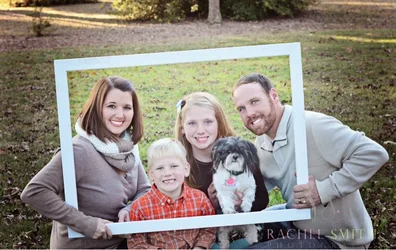
My very best friend and her family yesterday. Funny how I am getting asked " Will you bring your camera?" on outings ,being that this is the time of year for Christmas cards !

Not complaining a bit! I am enjoying the experience :) I LOVE miss Madalyns red hair. She has these amazing blonde highlights in the front that ( believe it or not) are 100% natural!
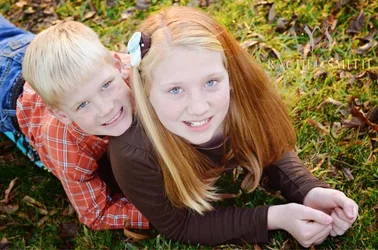
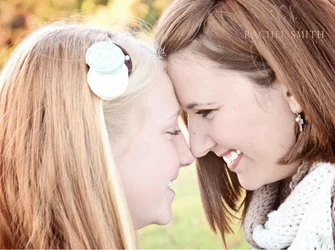
$image-2119501519.webp


$image-1828822924.webp


$image-1497790687.webp
 
faces are VERY pink and very flat/washed out
 
MLeeK said:
faces are VERY pink and very flat/washed out

I see ! What's the best way to fix that ?
 
These look like you pushed up brightness on them? Bring down the lights or brightness.
Did you push to the magenta because the green was reflecting on faces?
 
MLeeK said:
These look like you pushed up brightness on them? Bring down the lights or brightness.
Did you push to the magenta because the green was reflecting on faces?

I did increase the magenta! Thanks so much!
 
SamiJoSchwirtz said:
Love the first two but I don't really like how the 3rd is most bright in the middle!

Thanks ! I wanted to add something that separated the middle from the outside, but the more I look at it, the less I'm liking it myself.
 
Well it does make them pop. But I recently tried doing it on own of my photos loved it at first but then realized how unnatural it looked!
 
Good framing, but yes, the faces are very flat. I'm not a fan of the vignette in the third photo. It looks like you pulled the saturation down on the second. In the second, it looks like the background grass is blown a little. I'd try to do a spot adjustment on it. I prefer darker backgrounds, but that's just me.


Also, I noticed you're in Birmingham also. I thought I was the only one of this forum!
 
Sweetneers said:
Good framing, but yes, the faces are very flat. I'm not a fan of the vignette in the third photo. It looks like you pulled the saturation down on the second. In the second, it looks like the background grass is blown a little. I'd try to do a spot adjustment on it. I prefer darker backgrounds, but that's just me.

Also, I noticed you're in Birmingham also. I thought I was the only one of this forum!

Thanks!!! Small world ! I'm in the Alabaster area (just easier to say Birmingham because its out in the middle of nowhere:) Are you actually in Birmingham?
 
I would crop off the base of the tree and the lawn in the 3rd frame...that stuff up top is a bit distracting.
 
I would crop off the base of the tree and the lawn in the 3rd frame...that stuff up top is a bit distracting.

Agreed! Also, rather than brightening just the center "framed" portion, perhaps a very slight vignette would give you the effect you're going for, in a less in-your-face kind of way.
 
Is your monitor calibrated? All three of these images look very off as far as color goes.
 
Derrel said:
I would crop off the base of the tree and the lawn in the 3rd frame...that stuff up top is a bit distracting.

I thought the same and when I cropped the tree out i cut off the outside elbows of Mom and Dad ( because I brought the sides in some to make it a less odd shape).

Could I get away with just cropping the top ( the tree) without it looking crazy?
 
jowensphoto said:
Agreed! Also, rather than brightening just the center "framed" portion, perhaps a very slight vignette would give you the effect you're going for, in a less in-your-face kind of way.

Great idea! Thanks so much!
 

Create an account or login to comment

You must be a member in order to leave a comment

Create account

Create an account on our community. It's easy!

Log in

Already have an account? Log in here.

New Topics

Back
Top Bottom