What's new

Help, I am getting super annoyed!!!!

KBM1016

TPF Noob!
Joined
May 11, 2011
Messages
189
Reaction score
17
Location
Maryland
Can others edit my Photos
Photos NOT OK to edit
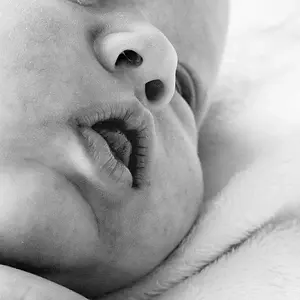
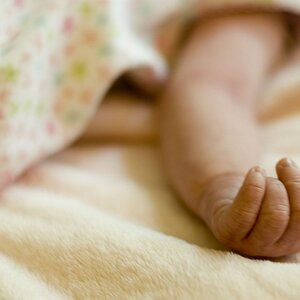
Here is a cute little baby, I am working on her session and this is the first I started to process.

Does the color look off to you? I have 3 monitors and all 3 display a totally different color image!!!! One looks great, the second looks ok, and the 3rd she looks super yellow!!!!!
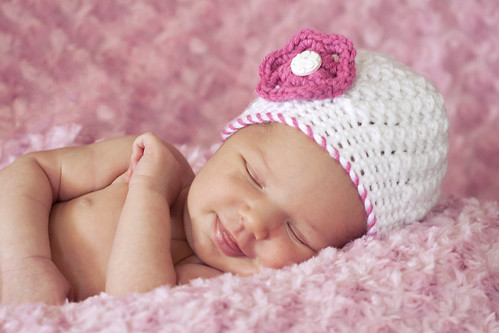

_MG_5822 by Autumnlightsphotos, on Flickr


Any suggestions or comments would really help my nerves (now off to get another cup of coffee before I hurt something)
 
she looks baby pink in my monitor, for what it is worth..
 
get one GOOD IPS monitor, calibrate it... and only use that one for editing!

I am not on my calibrated monitor right now.. but it doesn't look bad.
 
Yes indeed the color is off; this baby is surrounded by PINK. That being said, color contamination is going to be a given. And it is not at all unusual for three monitors to show different color renditions. In order to do critical work, you must calibrate the monitor you are using. There are reasonably priced ($100 or so) kits to calibrate monitors. I would encourage you to get one.

I corrected the color using Photoshop. As you can see there is a noticeable pinkish cast in the image on the top. Also keep in mind that Internet Explorer is NOT "color safe" like Firefox. What you see on your monitor when you are editing the inage and what you may see on your monitor on the web will most likely NOT be the same.

babyinpink.jpg
 
Last edited:
Yes indeed the color is off; this baby is surrounded by PINK. That being said, color contamination is going to be a given. And it is not at all unusual for three monitors to show different color renditions. In order to do critical work, you must calibrate the monitor you are using. There are reasonably priced ($100 or so) kits to calibrate monitors. I would encourage you to get one.

I corrected the color using Photoshop. As you can see there is a noticeable pinkish cast in the image on the top.

babyinpink.jpg

to be honest though.. I think you went a bit to yellow on the edit....
 
"to be honest though.. I think you went a bit to yellow on the edit...."

You already admitted you are not on a calibrated monitor, so you are not in any position to judge color cast. I AM on my corrected monitor and the color is perfect. I used the color tool in PS to neutralize the white in the baby's little cap and it is as neutral as you are going to get it,
 
You already admitted you are not on a calibrated monitor, so you are not in any position to judge. I AM on my corrected monitor and the color is perfect. I used the color tool in PS to neutralize the white in the baby's little cap and it is perfect,

Whatever.. no need to be rude about it!
 
Going to tell you what DiscoJoe told me the other day when I was having the same issue: It's a Caucasian problem. Pale skin relfects surrounding color.
 
You already admitted you are not on a calibrated monitor, so you are not in any position to judge. I AM on my corrected monitor and the color is perfect. I used the color tool in PS to neutralize the white in the baby's little cap and it is perfect,

Whatever.. no need to be rude about it![/QUOTE.

Not being rude, just pointing out the facts. You cannot accurately judge color if you are on an uncorrected monitor.
 
Going to tell you what DiscoJoe told me the other day when I was having the same issue: It's a Caucasian problem. Pale skin relfects surrounding color.

Thanks, now, not only do I need to spend money on calibrating but I also need to spend money on a new keyboard from spitting coffee everywhere. Hilarious (I don't know why I found it so amusing, maybe cause it's Monday and I am already done with this day)

Guess it's off to Google to get some software.....
 
You already admitted you are not on a calibrated monitor, so you are not in any position to judge. I AM on my corrected monitor and the color is perfect. I used the color tool in PS to neutralize the white in the baby's little cap and it is perfect,

Whatever.. no need to be rude about it!

I am on a calibrated monitor and Charlie you're absolutely correct, he went too yellow on the baby's skin tones.

Joe
 
Yes indeed the color is off; this baby is surrounded by PINK. That being said, color contamination is going to be a given. And it is not at all unusual for three monitors to show different color renditions. In order to do critical work, you must calibrate the monitor you are using. There are reasonably priced ($100 or so) kits to calibrate monitors. I would encourage you to get one.

I corrected the color using Photoshop. As you can see there is a noticeable pinkish cast in the image on the top.

babyinpink.jpg

to be honest though.. I think you went a bit to yellow on the edit....

I completely agree. Too yellow.
 
Going to tell you what DiscoJoe told me the other day when I was having the same issue: It's a Caucasian problem. Pale skin relfects surrounding color.

Thanks, now, not only do I need to spend money on calibrating but I also need to spend money on a new keyboard from spitting coffee everywhere. Hilarious (I don't know why I found it so amusing, maybe cause it's Monday and I am already done with this day)

Guess it's off to Google to get some software.....

LOL I did too. Sorry about the keyboard!

Come to think of it, was the exact problem. My little pasty gangsta turned pink from the blanket I used.
 
Here is a cute little baby, I am working on her session and this is the first I started to process.

Does the color look off to you? I have 3 monitors and all 3 display a totally different color image!!!! One looks great, the second looks ok, and the 3rd she looks super yellow!!!!!


_MG_5822 by Autumnlightsphotos, on Flickr


Any suggestions or comments would really help my nerves (now off to get another cup of coffee before I hurt something)

Your original posted photo here is just fine. The white button in the flower on the hat is white and the baby's skin tones are reading just where you'd expect baby skin tones to be. Get one good calibrated monitor.

P.S. Your original is in the Adobe 1998 color space. Seriously consider using sRGB, especially if you're going to post photos on the net.

Joe
 
You already admitted you are not on a calibrated monitor, so you are not in any position to judge. I AM on my corrected monitor and the color is perfect. I used the color tool in PS to neutralize the white in the baby's little cap and it is perfect,

Whatever.. no need to be rude about it!

I am on a calibrated monitor and Charlie you're absolutely correct, he went too yellow on the baby's skin tones.

Joe

Thanks, guys! No big deal.. I know this monitor is close to correct color.. I have just never had a need to calibrate it! It is even a IPS monitor... lol!
 
Last edited:

Create an account or login to comment

You must be a member in order to leave a comment

Create account

Create an account on our community. It's easy!

Log in

Already have an account? Log in here.

New Topics

Back
Top Bottom