What's new

Help w/Settings on D90 M-A-S?

myvinyl333

No longer a newbie, moving up!
Joined
Feb 16, 2010
Messages
535
Reaction score
32
Location
Eastern Iowa
Can others edit my Photos
Photos OK to edit
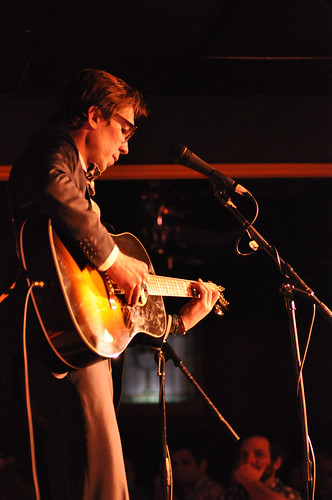
I am doing another concert shoot tonight and am confused as to the correct setting to use in low light. Here is a recent shot. Which setting seeing should I use? Tried M, then my WB is off...Will not have a lot of time to mess with setting tonight. Any suggestions will help....Thanks-jorge
4385025325_6d1e88370f.jpg
 
M/A/S and WB can be set independantly from each other. If you have enough memory space shoot in RAW. If not get more/bigger cards. Set WB to Auto and tweek that in PP. Shoot in M, A, or S, which ever you prefer to favor depth of field-A, shutter speed-S or full Manual control. Hope this helps.
 
I have shot a lot of low light for my church. The lighting on stage is not very good, so it's a challenge. The settings will vary depending on where the subject is on stage and how much action there is, how many lights are currently on, etc, etc.

Generally, this is what I do:

It depends on what lens I am using. I first consider what shutter speed I need to eliminate blurring from camera shake, and I consider what speed I need to capture any motion of the subject.

I shoot in RAW+JPEG, WB=AUTO

I start in Aperture Priority mode. Dial in around 2.8 to 4, depending on the lens and where I am standing. If it’s a 50mm 1.4 I’ll start around f/2.0. I then adjust ISO up to around 2000-2250 (I think 2250 is a partial stop) as needed to get the shutter speed where I want it.

I spot meter on the subject, and will often need to dial in negative exposure compensation to prevent blowing highlights (highly dependent on the lighting, where the subject is if highlights are an issue). Use your histogram and blinkies on the screen as a guide.

Sometimes I choose to go into shutter priority to specify my shutterspeed and let the camera choose the aperture. If the aperture is always wide open, I set auto-iso to on.

Other time, full manual setting the shutter speed I want, ISO I want, and the aperture I want. I then adjust the one that is least important to keep where it is at the time.

If the lighting is more consistent, you may find less need to tweak adjustments as you go.

My general goal is to avoid shooting wide open with high ISO if I don’t have to. I use Noise Ninja to clean-up any undesirable noise.

Not sure if that helps or not. My experience is there are no magic settings. But, if you want some quick settings to start with:

To set Aperture and avoid going to wide open settings:
WB=Auto
Auto ISO
Aperture Priority
Spot Meter
Negative Exposure Compensation as needed

If you are less concerned about how wide your aperture is, and you are having no problems with the lens at max aperture, then do the above only use shutter priority, set the speed you need, and let the camera choose the aperture and auto adjust ISO as needed.
 
You need better lenses.
 
You need better lenses.

Hi Jimmy, can you suggest some? The OP has these in their profile:
Nikkor f/1.4 50 D AF, f/2.8 AF 80-200 ED

Depending on the venue, a 2.8 lens works good for me, and the OP has a 1.4 too if they can get closer.
 
You need better lenses.


Yea like what Jimmy? What will give him more light than f/1.4? What he really NEEDS if low light is the key, is a D700.
 
You need better lenses.

What I have is not considered good? All came from user recommendations.
Thanks for the suggestion-jorge:thumbup:
 
It was a joke, you have amazing low light lenses.
 
It was a joke, you have amazing low light lenses.

I am sorry... I am very frustrated as of late. It seems the harder I try, the worse my pictures are. I am taking a hands on class next Sat so I can learn the D90. I really do not understand the settings, especially now. I do not have time tonight to experiment, so I thought I would ask for some settings going in that would work (Booker T and JJ Grey) Thank-jorge:thumbup:
 
It was a joke, you have amazing low light lenses.

I am sorry... I am very frustrated as of late. It seems the harder I try, the worse my pictures are. I am taking a hands on class next Sat so I can learn the D90. I really do not understand the settings, especially now. I do not have time tonight to experiment, so I thought I would ask for some settings going in that would work (Booker T and JJ Grey) Thank-jorge:thumbup:

Example of confusion:
WB=Auto
Auto ISO
Aperture Priority
Spot Meter
Negative Exposure Compensation as needed
 
The settings have nothing to do with the D90 itself. All camera should have these modes? I am unsure the source of your confusion? I believe perhaps you should have shot in custom WB instead of auto WB. Few camera's will get the WB correct, especially in mix lighting scenarios. One thing you might want to do is try shooting in RAW format. This way, you can adjust the WB in post processing.
 
It was a joke, you have amazing low light lenses.

I am sorry... I am very frustrated as of late. It seems the harder I try, the worse my pictures are. I am taking a hands on class next Sat so I can learn the D90. I really do not understand the settings, especially now. I do not have time tonight to experiment, so I thought I would ask for some settings going in that would work (Booker T and JJ Grey) Thank-jorge:thumbup:

Example of confusion:
WB=Auto
Auto ISO
Aperture Priority
Spot Meter
Negative Exposure Compensation as needed

White balance doesn't matter if you shoot in RAW (as opposed to jpeg), because you can change it afterward if you want. Leave it on auto and the camera will make a pretty good guess, then change it in your RAW software.

Auto ISO I usually leave disabled unless the lighting is constantly changing and I need a specific shutter speed/aperture. You're going to be shooting pretty much wide open in low light like this, so auto ISO might help. If you don't know how to enable it check the manual, it's just an option in the menu somewhere.

Aperture priority is a semi-auto mode, where you set the aperture you want it to shoot at, and the camera will decide what shutter speed will give you the appropriate exposure. Shooting in S, shutter priority, lets you pick the shutter speed and the camera will choose the appropriate aperture size to get a proper exposure. M, manual, lets you choose the shutter speed and the aperture, and gives you the little needle (actually it's more of a line now) that moves back and forth to tell you where it thinks the right exposure is. Looks something like <-----iiiii|------->

Spot metering takes a meter reading from a small area in the center of whatever you're looking at, as opposed to taking an average from the entire scene. It uses this meter reading to tell you what the appropriate exposure should be. Spot metering might be more useful to you since you're probably going to have lots of dark area behind whatever the light is shining on, and the camera might try to compensate for that, making your exposure weird. With spot it'll take the reading from whatever you're pointed at. Also useful for other images with a large dynamic range, like if something is backlit, so you can expose either the background and use a fill flash (for example) or expose the subject and blow the background out. It gives you more control with the meter.

Negative exposure compensation would be just adjusting the exposure further depending on your mode, it usually (always? I dont really use it) changes the shutter speed. If you're shooting in P (programmed auto) it picks the shutter speed and aperture size for you just like in A (auto), but you can move the dial left and right to brighten/darken (positive/negative compensation) as needed.

Hope this was helpful

 
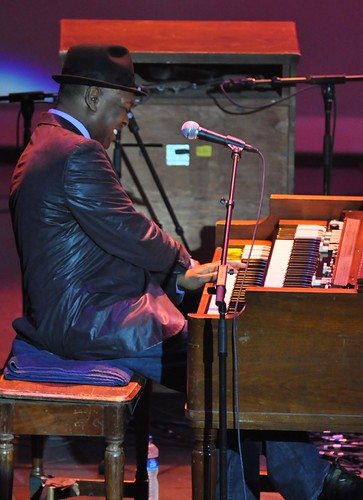
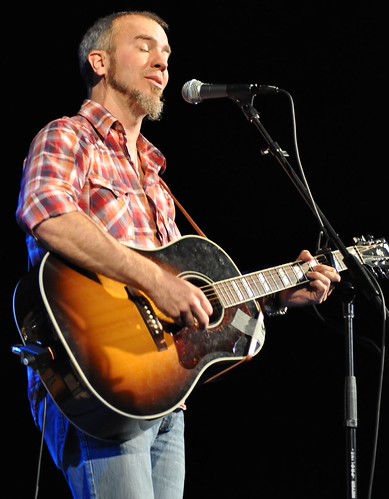
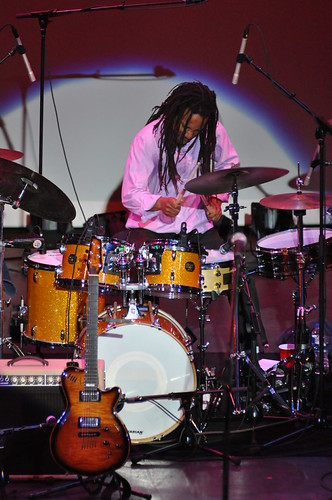
Here are are 3 pictures from the 3-31 shoot. (Booker T and JJ Grey) I used 50 mm 1.4 1600 and 80-200 2.8 (???) LMK your CC and suggestions

4483387653_c7c1bdbcc6.jpg


4484037438_6a091d9c80.jpg


4484037038_78161612c0.jpg
.
 
Last edited:
All three of those photos look technically pretty good. Maybe a bit more of a look at the face of the musicians would be good, but exposure wise all three shots look good. Focus looks good. Shots look sharp. Your vantage points look okay on all three shots. I see a lot of improvement in these results compared with what you were turning in a month ago!
 
The latest are very good compared to the first.
 

Create an account or login to comment

You must be a member in order to leave a comment

Create account

Create an account on our community. It's easy!

Log in

Already have an account? Log in here.

Back
Top Bottom