What's new

Help with lighting and Exposure

allison_dcp

TPF Noob!
Joined
Jun 14, 2012
Messages
274
Reaction score
25
Location
Ohio
Can others edit my Photos
Photos OK to edit
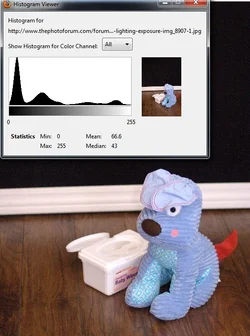
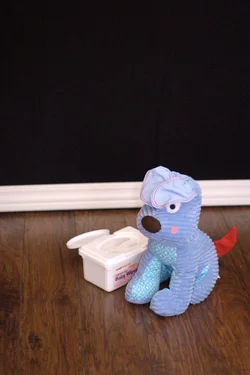
I made a DIY backdrop stand out of PVC pipe, and got some laminate wood floor also. I want to take my sons 1st year photos and am trying to figure out the proper lighting/exposure. I feel like my computer isnt calibrated correctly. Does this photo look properlly exposed in your opinion? (it looks a tad over exposed to me....)
Lighting setup= long windows to right of photo, on camera flash with DIY white card bouncer and tissue against the flash. (I know alot....lol)
Also I shoot with a Canon EOS 20D and a 50mm lens. This shot is un edited at f/1.8 1/250 400 ISO. I also feel like the white trim and the box are over exposed too. WDYT? (Ive also, since then, realized the gap b/w the trim and floor and have fixed it)
Any other tips would be appreciated! $IMG_8907 -1.webp
 
Post the histogram.
 
Okay I feel really dumb..... Where do I find the Histogram?
 
This looks fine (see histo below), nothing burnt out

BUT..... Unless your child is the shade of one of the objects or surfaces in the room, you don't know how well you are exposing.
The point is NOT to get a perfect exposure for everything but to expose perfectly for the content you value and do your best for the others.

Get an inexpensive grey card, put that in the field, and expose for it and see if that falls on middle grey.

Note that direct, on-camera flash, even if diffused some, will remove the micro-shadows that make skin look normal and give it texture.
That is why thin baby skin gets so often blanched out and textureless no matter the exposure.
 

Attachments

  • $doggy.webp
    $doggy.webp
    83.2 KB · Views: 148
This looks fine (see histo below), nothing burnt out

BUT..... Unless your child is the shade of one of the objects or surfaces in the room, you don't know how well you are exposing.
The point is NOT to get a perfect exposure for everything but to expose perfectly for the content you value and do your best for the others.

Get an inexpensive grey card, put that in the field, and expose for it and see if that falls on middle grey.

Note that direct, on-camera flash, even if diffused some, will remove the micro-shadows that make skin look normal and give it texture.
That is why thin baby skin gets so often blanched out and textureless no matter the exposure.

I do have a grey card, and used it to set the custom WB. Do I set the exposure on camera? Thanks for the advice.
 
I am far from either being an expert or a fanatic.
And I rarely shoot set-ups.

So, I know very little or nothing and thus my advice is freely given.
When I do I assemble what I want (if I am working on a tripod), meter the scene to set the ambient, then try a shot with my single flash 9usually bounced off of an umbrella) and adjust from there.
 
If you are using flash/strobe set the cameras white balance away from "auto", and set it to the lights specific kelvin and your WB will be perfect every pop. No gray card needed
 
Get a pure white terry cloth towel and bunch it up into a ball so that there are bits directly facing the flash and crevasses with shadow. Place it just where your subject will be. You will also be able to tell the direction and quality of your light from this.

Adjust the flashes until you get the histogram just to the left of the right edge and not touching. If you keep them right where you had the towel then you will get perfect exposure.


.
 
Last edited:
Get a pure white terry cloth towel and bunch it up into a ball so that there are bits directly facing the flash and crevasses with shadow. Place it just where your subject will be. You will also be able to tell the direction and quality of your light from this.

Adjust the flashes until you get the histogram just to the left of the right edge and not touching. If you keep them right where you had the towel then you will get perfect exposure.


.
Thanks, I'll definately try this!
 

Create an account or login to comment

You must be a member in order to leave a comment

Create account

Create an account on our community. It's easy!

Log in

Already have an account? Log in here.

New Topics

Back
Top Bottom