What's new

Help with sky adjustments

undrtow

TPF Noob!
Joined
Aug 24, 2012
Messages
15
Reaction score
0
Location
St. George, UT
Can others edit my Photos
Photos OK to edit
Hey everyone,

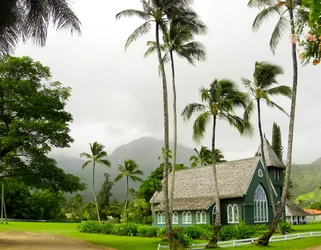
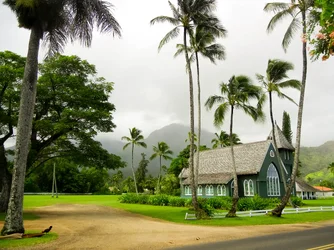
I want to fix the sky in this picture by bringing it back a little, but being a new LR 4 user, I am a little unsure about how to go about this. I would normally use a graduated filter, but don't want to affect the trees. Are there any other ways that I can go about this? Thank you

$DSCN0574.webp
 
You could use the brush tool in Lightroom and just make changes to the clouds.
 
The issue here is that you really don't have clouds so much as you have something more akin to fog. There's simply no real definition to "enhance." I pulled both a curves and a levels adjustment to the radical side of reality and didn't do much to alter the definition until I got to the silly point. You do have a bit of a distortion problem on the green house, mostly limited to the right side. It's an easy fix in PS but not sure if that control exists in LR.

It's a nice image though I'd be hitting the crop tool pretty quickly.
 
For your profile, please choose an edit preference.

With visual art like photographs it is often easier to show than to tell.

There is a little cloud detail that can be brought out using the Camera Raw/Develop module Adjustment Brush if you lower the exposure value of the brush to -.5 to -.75.

Welcome to just one of the many limitations of using Lightroom for editing.In Photoshop we could use Color Range feature to select every scrap of sky, and no scrap of palm tree.
The Secret Life of Color Range | Adobe Evangelists - Russell Brown | Adobe TV
 
Last edited:
There's also some serious chromatic abberation going on... especially on the tree trunk in the top left.
 
There's also some serious chromatic abberation going on... especially on the tree trunk in the top left.

Eeekkk... the screaming purple meanies! lol! Nikon Coolpix at 30mm....
 
Thanks for everyone's input. I recognized that there wasn't much detail in the clouds but was hoping they could be fixed regardless, but perhaps not. Thank you for pointing out the distortion and chromatic abberation. That's something I'll have to get more familiar with. What causes these to happen? This picture was taken with a 300 dollar point and shoot, in JPEG, before I bought my DSLR, so the camera was relatively crappy. I assume a better camera with good glass would be able to get a sharper picture. Anyway, I'll have a look around lightroom and see what can be done. Thanks again and any addition help would be appreciated.
 
Alright, so here is the final edit as it currently stands. I fixed the chromatic aberration the best I know how, played with the distortion slider until the building looked right, and then cropped it a bit. I can't decide if the leaves and branches at the top are distracting. Anyway, just wanted to post the final copy. I don't have any real plans for this picture other than to frame a copy for a bathroom wall. Any input would be appreciated. Thanks guys

$Hanalei church.webp
 

Create an account or login to comment

You must be a member in order to leave a comment

Create account

Create an account on our community. It's easy!

Log in

Already have an account? Log in here.

New Topics

Back
Top Bottom