CGR
TPF Noob!
- Joined
- Oct 7, 2012
- Messages
- 35
- Reaction score
- 4
- Location
- United States
- Can others edit my Photos
- Photos OK to edit
Please help me! I was SO excited to recently start shooting in RAW and editing my first set of photos in Lightroom. I exported from Lightroom in to Photoshop Elements for final edits. Then saved the images as highest quality JPEGS. They look great (for me, as a newbie) on my computer. But I printed them at Costco and the prints look HORRIBLE. Old JPEGS that I printed looked good. The new raw to jpeg files were gray and just gross. What heartbreak! Please help me figure out where I went wrong with this process. Where should I have them printed? I know Costco isn't the best quality but I just wanted something quick to send to a friend in the mail- not necessarily archival. Do I need to save them as a TIFF. Any help would be much appreciated!!!


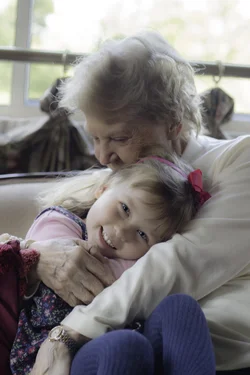
 . I think it is and was set up ok. The pictures look good on facebook (on mine and other computers). I think it may just have to do with how Costco uploads the files. For example, here is one of the pictures and one of the pictures on the Cotsco site (you can see it is grayish on the site, as it was when printed). What do you guys think of sites like mpix that does color correction? I figure since I am doing what I want to the photo in lightroom, I wouldn't whan that- no? Where do you like to get photos printed? I would like something local and not too expensive but if an online mail site is the only way- then let me know which ones you like. And- do you use the auto color correct? Thanks again!!!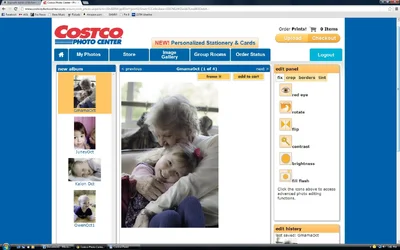


![[No title]](/data/xfmg/thumbnail/31/31046-f1d28c614676726741e90ce5b420a03e.jpg?1734159151)
![[No title]](/data/xfmg/thumbnail/41/41778-1940e957c27e1919c300dfedbc32d1c3.jpg?1734176084)
![[No title]](/data/xfmg/thumbnail/31/31049-df2ef80e523fe4368eb8a82e03ad0b90.jpg?1734159157)

![[No title]](/data/xfmg/thumbnail/36/36101-1d9d7b0215488ea489d3bdb28d87ebeb.jpg?1734168057)
![[No title]](/data/xfmg/thumbnail/31/31050-824a861ee359cd274a794fc7b9ff8f7b.jpg?1734159158)
![[No title]](/data/xfmg/thumbnail/39/39480-e4e26ffe5c6148262ac81eff975a5c0e.jpg?1734173580)