What's new

How could I make these better?

Caty1113

TPF Noob!
Joined
Oct 4, 2011
Messages
31
Reaction score
1
Location
Calgary
Can others edit my Photos
Photos OK to edit
I am just learning, I have a D7000. I would like to make this a serious hobby.. but for now, I just photograph the pets! LOL. I would love some honest CC. These are my Italian greyhounds, Josie and Tess.

DSC_3867.jpg


DSC_3854.jpg


DSC_3856.jpg
 
Proper exposure would help. They're all a bit under exposed. Focus on the second one seems to be the ear instead of the eye. Good composition would help as well.
I like how the first one looks like he's popped up there like a little gopher to say "hi!." LOVE his little tongue going in the last one
 
Thank you! I think my monitor is not very accurate when it comes to brightness! I have two and they look completely different on each one. How would I make the composition better?

And yes I noticed the lack of focus on #2 but I love her floppy ears.. lol. :-)
 
Get a background that's got more separated from the dog tonally (either brighter or darker than the dog) and in terms of color. I would actually put the background a little MORE in focus than it is, use a slightly smaller aperture to get more depth of field. The mysterious blurred background is definitely a look, but I prefer a little more idea of the context.

Having the dog's gaze directed across the frame rather than out of the frame will probably make you like the images better, as well.
 
The ears are what kill it for me in the first two. The tongue kills it in the third.

On the technical side, you need to adjust the black & white points... especially the white. It can come down a lot and that would really help.
 
You need to calibrate your monitor with a calibrator such as a spyder or X-rite product
For composition basics this is my favorite site. It can be a LOT of interesting fun just to do a long and thorough study on good basic composition!
Guidelines for Better Photographic Composition.
 
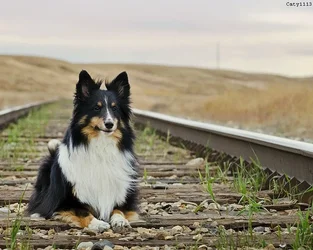
Well that site was amazing! Thank you! I read it and went out again.. is this a bit better? This is my sheltie. I tried to keep some of those rules in mind.

DSC_3966.jpg
 
Quite nice! I am torn between wanting to tell you to push the contract up to make her breast the beautiful white I know it is, and telling you to leave it because it captures the greyness of the day so well.

Do you see that this photograph would be seriously weakened if the radio tower (?) in the distance was not there? There are words for why, but it's really about feeling it.
 
I would use the spot heal tool or clone tools to remove the blurry post from the background but otherwise I like the shot of your shelti! Overcast might make the sky a bit flat, but it makes it a much easier affair for getting a good exposure on that black and white coat!

You might find that if you boost the contrast of the photo a little and then again boost it selectivly on the dog only that it adds a little "pop" to the photo.


Screen calibration is a big thing and as said you'll need hardware to really help you with that. Also note that if you've a cheaper LCD screen you will have the problem that your viewing angle will change the brightness and contrast of what you see - trying to remain as straight on as possible to the screen does help and if you get serious, at a latter date, you can look into an LCD screen that does not have this problem (I forget the name of what this feature is called).

Also when reading tutorials look up the "expose to the right" method and also look up on how to read a histogram. Those two aspects are very important aids that will help you in editing and also out in the field when taking photos (the histogram is very simple, but also very powerful for photo exposure review).

Ron Bigelow Photography Articles

Cambridge in Colour - Photography Tutorials & Learning Community (look under tutorials)

Those two sites are a great pair of resources for shooting and editing advice. Have a check for the mentioned terms and features and you should find good quality articles which will cover them in more depth, whilst being accessible to the beginner.
 
Thank you! And I thought that tower was in the way! LOL. It's kind of a big empty park in the middle of the suburbs in my city. No matter what way I face, there is a building, tower, something in the way, haha!

I really need to work on focusing and such. This pic is fine, but 99% of my pictures, especially action photos, are out of focus. Not sure why. I just suck!
 
Overread, I will have to read those websites! There is so much to learn! LOL.

Other than the basic RAW tools in CS5, I really do not know how to do image editing. It's something I should learn though as I know it will make my pictures better. There is just.. SO MUCH to CS5!

I also find him hard to shoot in sunlight. It's hard to make his coat look good- he is pure jet black but then he looks like a black blob, same with the white.
 
There is a lot to CS5, however a photographer for an average photo does not use all that much. It's more about using a few tools rather well and applying them to select areas of a photo. Once you get the hang of it you'll find it much easier to get around and you'll find that changes are generally fairly fast to make. Note - look up layers and layermasks as those two features combined gives you a lot of freedom in the editing phase and is one of the big advantages of a proper editing package over some lower specification software.


As for the black and white - yeah in strong lighting black and white subjects are always going to be a nightmare. My advice is to always expose for the whites and get the exposure on them right and then let the blacks do what they will. Bright points in a photo draw the viewers eye so they naturally become key points of interest. A digital camera also only ever records "white" data on an overexposed part of the photo, no shape or texture just white. So in editing if you've blown out a patch all you can get is a bright white patch* so you won't be able to fix it.
Black also records just pure black data, but black or shadowed areas don't draw the eye quite as much so they can be left to go shady and wont' affect a photo as strongly as bright areas.


* shooting in RAW mode can let you have a small bit of extra leeway and RAW mode is another thing I'd put on your "to learn list"**

** sorry its a long list - but don't worry. Take each part one bit at a time and it will all fit together in no time. In fact if you're getting serious in the editing I would bump RAW shooting up to near the top of the list
 
This is just my take on the shelti photo, but I think the tower in the background adds balance. Without it there, the photograph becomes too open -- there's a dog, and too much empty space around it. With the tower, there's a dog (the subject, the thing we're supposed to look at and admire) lower left, more or less, and then a second object (less interesting, not the subject, nothing we're really supposed to look at, really) more or less upper right. It doesn't distract from the dog, but I feel that it gives some "visual weight" to that otherwise too-empty region.

This is definitely getting in to territory that's more about opinion and feeling than hard facts, so others may disagree.

 

Create an account or login to comment

You must be a member in order to leave a comment

Create account

Create an account on our community. It's easy!

Log in

Already have an account? Log in here.

Back
Top Bottom