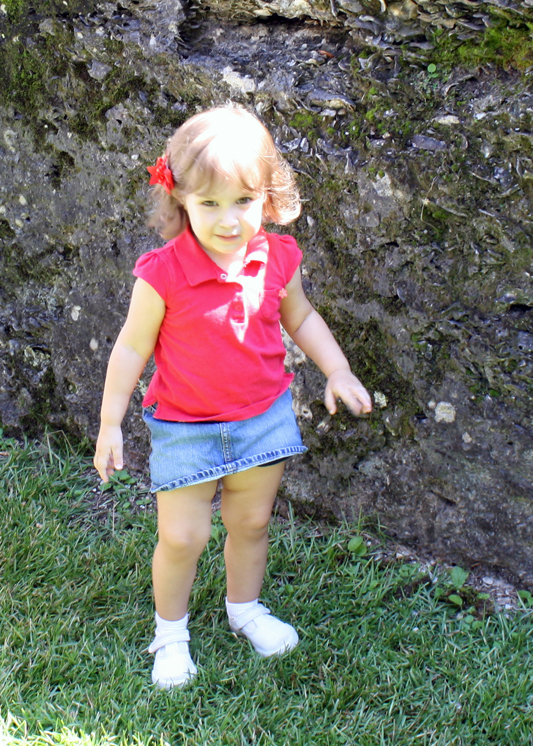
I could not tell on the screen of my camera after I took this shot because of how bright it was, but what adjustments would you make on this photo to clean it up? I have PS Elements 6.0.
As mentioned, if you shot it RAW, you might be able to bring the details of the blown out areas back somewhat, but I don't think you can do it in elements. You'll need Adobe Camera RAW, Lightroom, Aperture, Bibble, or some other RAW editing software.
If you didn't shoot it RAW, it pretty much is what it is on the bright areas being blown out and detail gone.
What camera adjust should I have made at the time I shot it to fix it in the first place?
1. Get her in the shade to avoid the harsh light that blows out the highlights. If you can't get her into the shade, get the shade to her - If someone will assist you, they can hold up something to place her in the shade using anything large enough to do that, even cardboard or a bed sheet. If that's not possible, be sure to expose for the highlights - Using your Rebel XS go to center weighted average metering and get an exposure reading on the brightly lit hair at a fast enough shutter (see 3 below), then dial in that shutter and aperture, on manual if you have to. If that's too much fuss (recognizing that small children don't want to wait for such things usually), set up before hand to bracket your shots +/- 2 EV, shoot 3 frames, then choose the best one later.
(edit)1a. Get into the habit of reviewing the histogram just after you take the shot to see if you're clipping a lot on either end, then adjust accordingly with + or - EV and shoot again.
2. For children, it's a good idea to get the camera down to their eye level or below. Have a seat on the ground if possible.
3. Her hand is blurred because 1/50 is pretty slow for moving subjects like small children tend to be. If you can't get her to be still, increase your shutter speed and sacrifice aperture and even ISO if you need to - focus on the eyes. If shooting hand held, you'll probably want to go with a faster shutter even if you can get her to be still - try to get up to 1/125 or faster. Noise shouldn't be a big problem at higher ISOs as long as you're not planning to make posters from the image. Even then, there are ways to deal with it, actually.
4. Shoot RAW and get a RAW editor if you don't have one. You can pull a lot more detail out of highlights and shadows that are cooked and done for in a JPG straight out of the camera. In a case like this, it can often help significantly. If you shoot RAW and bracket +/- 2, you'll be covered for sure on light.
Hope that's useful to you!






![[No title]](/data/xfmg/thumbnail/38/38292-ab7b4579becf6f3bda3ef5b18219d707.jpg?1734172201)
![[No title]](/data/xfmg/thumbnail/38/38294-cb4a5aa0ded725d4c694e6eebe276f0d.jpg?1734172202)