O ornedbeef TPF Noob! Joined Dec 29, 2010 Messages 23 Reaction score 0 Location leicester Can others edit my Photos Photos OK to edit Jan 15, 2011 #1 SAME AS ABOVE..............
JoshC. TPF Noob! Joined Nov 14, 2010 Messages 400 Reaction score 6 Location Upstate New York Can others edit my Photos Photos OK to edit Jan 15, 2011 #2 Upload the image to a hosting site (I use flickr) and then click the image to large on the hosting site. Right click the image and choose "Copy image URL" Paste that in the thread between: Should do the trick!
Upload the image to a hosting site (I use flickr) and then click the image to large on the hosting site. Right click the image and choose "Copy image URL" Paste that in the thread between: Should do the trick!
Sonoma No longer a newbie, moving up! Joined Aug 9, 2010 Messages 350 Reaction score 36 Location NW Indiana Can others edit my Photos Photos OK to edit Jan 15, 2011 #3 Follow these instructions.......... http://www.thephotoforum.com/forum/...forum-functions-pictoral-guide-using-tpf.html They're about the best.
Follow these instructions.......... http://www.thephotoforum.com/forum/...forum-functions-pictoral-guide-using-tpf.html They're about the best.
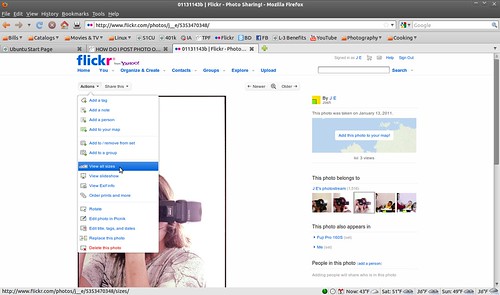
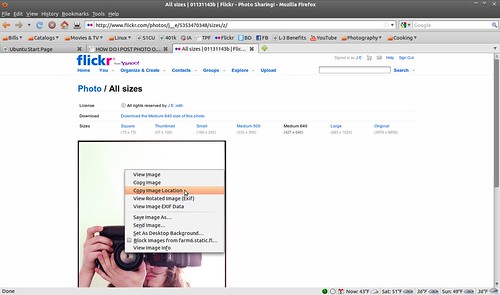
Josh66 Been spending a lot of time on here! Joined Oct 31, 2007 Messages 14,593 Reaction score 1,239 Location Cedar Hill, Texas Can others edit my Photos Photos NOT OK to edit Jan 15, 2011 #4 I use Flickr... There are two ways you can do it on Flickr- Method 1: 01131143b | Flickr - Photo Sharing! - Mozilla Firefox_001 by J E, on Flickr Click 'Share this' and 'grab HTML/BBCode' Then, 01131143b | Flickr - Photo Sharing! - Mozilla Firefox_002 by J E, on Flickr Select the BBCode option and copy the text. Paste that into the thread. Method 2: 01131143b | Flickr - Photo Sharing! - Mozilla Firefox_003 by J E, on Flickr Go to 'Actions' and 'View all sizes'. All sizes | 01131143b | Flickr - Photo Sharing! - Mozilla Firefox_004 by J E, on Flickr Select the size you want, then right click on it and copy the address. Paste that inside the IMG tags.
I use Flickr... There are two ways you can do it on Flickr- Method 1: 01131143b | Flickr - Photo Sharing! - Mozilla Firefox_001 by J E, on Flickr Click 'Share this' and 'grab HTML/BBCode' Then, 01131143b | Flickr - Photo Sharing! - Mozilla Firefox_002 by J E, on Flickr Select the BBCode option and copy the text. Paste that into the thread. Method 2: 01131143b | Flickr - Photo Sharing! - Mozilla Firefox_003 by J E, on Flickr Go to 'Actions' and 'View all sizes'. All sizes | 01131143b | Flickr - Photo Sharing! - Mozilla Firefox_004 by J E, on Flickr Select the size you want, then right click on it and copy the address. Paste that inside the IMG tags.






![[No title]](/data/xfmg/thumbnail/37/37170-3e18af574ed51cce5bdf99af9d3cab40.jpg?1734169892)