What's new

How do you re-size for prints?

robb01

TPF Noob!
Joined
Oct 30, 2008
Messages
555
Reaction score
11
Can others edit my Photos
Photos OK to edit
I have a couple of photos that I would like to make some prints from. Whenever I upload them to printing sites, it always leaves me with a wierd crop on the 11x14's. How should I go about re-sizing the photo for the image size that I want?

Also, which is the best place to get prints from? I've heard that mpix is one of the better places, any other places?
 
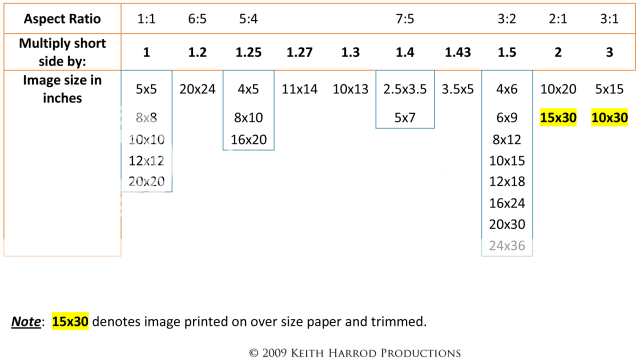
There is a difference in aspect ratio from the original image to 11x14. Your camera's aspect ratio is 2x3.

14/11 = 1.2727
3/2 = 1.5

I use TheGIMP for my editing, but I imagine photoshop and others have a similar feature. Choose the rectangle select tool and fix the aspect ratio at "11:14", this will allow you to crop an area of your image that matches the shape of the paper.
 
Yes, Mpix is a good consumer lab. They have exemplary customer service and use archival (100 year)Kodak Endura professional paper.
As far as other places, do you want a chromogenic print or an inkjet print?

11x14 is one of the oddball aspect ratios:

AspectRatioChartv2.png
 
The strange thing is, what I did was I used photoshop to increase the file to a 16*20 using the biconic smoother. Then I uploaded the photo to 2 different sites, mpix and snapfish, both give me a different crop for the final 16*20 using the same file
 
Last edited:
The last step(s) in my workflow are to crop/resize and sharpen (after I've saved the otherwise fully edited photo). In Photoshop you can set the crop ratio and the dpi - this will ensure that you get the proper number of pixels for a good print. You want to sharpen after resizing, since there will almost certainly be some resampling done by the program in order to resize. I t hen save the cropped photo with a new filename (appending the print size). This way I can a) know exactly what I'm sending to the printer, and b) still have an uncropped version to go back to should I want to crop for another size later.

As for printing sites, I use adorama.com. I've always been very happy with their pricing and quality. Their online tool also allows you to select the crop area if you send files not already at the print ratio. (If you want to save yourself some time, there have been plenty of threads about online printing services - you can search for those rather than wait for people to respond to this post.)
 
The strange thing is, what I did was I used photoshop to increase the file to a 16*20 using the biconic smoother. Then I uploaded the photo to 2 different sites, mpix and snapfish, both give me a different crop for the final 16*20 using the same file
Mpix uses Noritsu equipment to make chromogenic prints and Snapfish makes inkjet prints using Fuji equipment.

IMO, Snapfish is a level of quality below Mpix. For example Mpix provides the ICC profiles for their print equipment and print papers. I don't think Snapfish does.

Read this Mpix Support page. http://mpix.com/support/Help.aspx?id=3
At the bottom of the page you can read about soft-proofing and download their ICC profile information.
 
Last edited:
Very helpful, thanks.
 

Create an account or login to comment

You must be a member in order to leave a comment

Create account

Create an account on our community. It's easy!

Log in

Already have an account? Log in here.

New Topics

Back
Top Bottom