Clarity is the name of a slider control in RAW processing from Adobe (and probably a few others). However the slider is only recreating the effect of highpass sharpening over the whole photo so you can easily reproduce it yourself using the highpass sharpening method with the unsharpen mask (google should give you some good guides)
The Clarity slider only affects the mid-tones, but effectively it does so by only applying to the midtones a soft, wide radius Unsharp Mask. Shadows and highlights won't be affected.
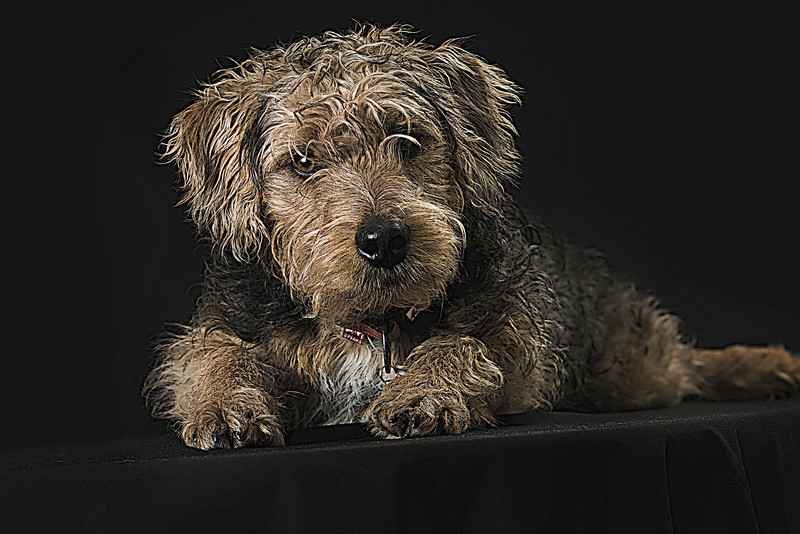
Using Unsharp Mask, instead of ACR's Clarity slider, with a very wide (100+) Radius, and a small value for the Amount (around 10), produces a local edge contrast enhancing effect.
There are many online tutorials that describe various ways to get the same look, using both ACR (Camera Raw/Lightroom) and Photoshop.
Try looking up "Photoshop Dragan Effect" as well as "Dave Hill Effect". These may not be exactly the same, but they quite similar effects. There are a million variations ( noone really knows Dave Hill's workflow other than he, so everyone guesses and often misses but you still end up with some cool effects ) Obviously lighting still plays a large role as well.
Try looking up "Photoshop Dragan Effect" as well as "Dave Hill Effect". These may not be exactly the same, but they quite similar effects. There are a million variations ( noone really knows Dave Hill's workflow other than he, so everyone guesses and often misses but you still end up with some cool effects ) Obviously lighting still plays a large role as well.






![[No title]](/data/xfmg/thumbnail/35/35967-ee5e7220e6f5cbd7d70fb99fe8ce5038.jpg?1734167844)
![[No title]](/data/xfmg/thumbnail/36/36133-8b29212f67c25fcf353a0c2f376b1501.jpg?1734168234)
![[No title]](/data/xfmg/thumbnail/40/40297-5b7d12c4c72c43b505a6f575d338d573.jpg?1734174708)
![[No title]](/data/xfmg/thumbnail/40/40296-1e3931509698e96fed6a0e43f5cb4adc.jpg?1734174707)