What's new

How to improve the distracting background

MiFleur

No longer a newbie, moving up!
Joined
Jan 3, 2013
Messages
885
Reaction score
206
Location
Colebrook, NH
Can others edit my Photos
Photos OK to edit
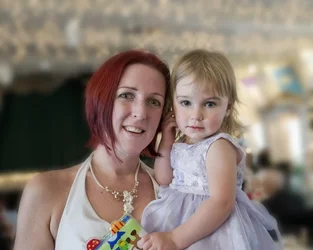
I took this portrait on New Year's Day, it was just a snap shot, but she wants to have it printed,
I am not satisfied with the background, although I find the bokeh quite interesting at the top of the photo.

Any suggestions, I am not sure what to do?
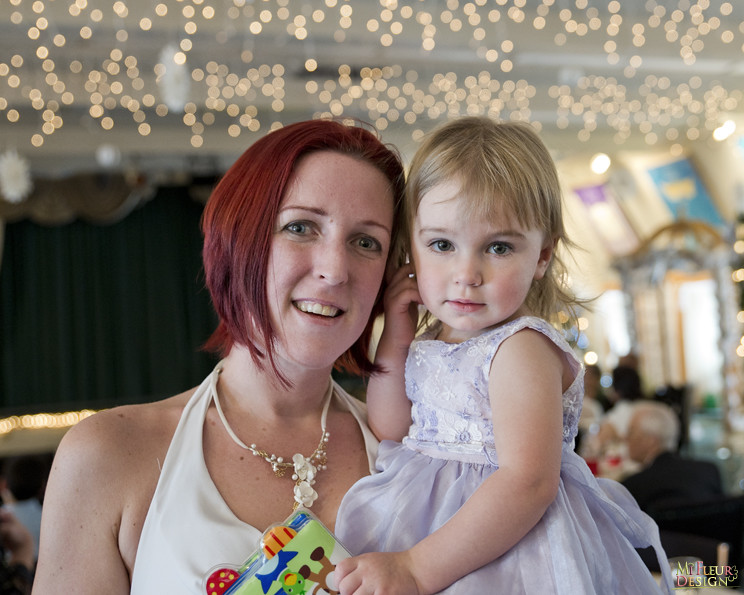

130101_6791 On New Years Day by MiFleur, Back to normal, on Flickr
 
I would/could show you some alternative but the image is too small to get a good result.
Put the original up somewhere and post a link.
 
If you have photoshop you could use layer to blur the background even more to seperate it from the subject, this might work.
 
You have disabled downloading so I'd have to clip and paste screen grabs to get the large one.
Please allow downloading or send me the original at the email in my signature and I'll have a try.

Lew
 
Flickr's "disabled downloading" is a joke. But it is slightly technical to work around.
 
$reworked.webp
 
First and foremost you can crop it. Secondly, you can separate the background from the subject with a little layer masking or similar, and then I would experiment with the following ideas, with a gentle hand:

- darken
- blur
- de-saturate

the separated background. If you use a light touch with the effects, the "cutting out" or masking job doesn't have to be very good at all.
 
I didn't take a long time with this, but you get the idea, sorry traveler i'm sure you'll do a better job, i only used the screen resolution.
 
I generally go to view the largest available size, then toddle around to firefox's Tools -> Page Info tool, click on the 'Media' and scroll down to the actual large image, and the firefox gives me a handy "download" button that actually works, you can cut and paste the link given there. There's probably plenty of other ways to do it. Ultimately "preventing downloads" and "permitting viewing" are incompatible goals. Viewing it IS downloading it, technologically.
 
You have disabled downloading so I'd have to clip and paste screen grabs to get the large one.
Please allow downloading or send me the original at the email in my signature and I'll have a try.

Lew

I have changed the setting on Flickr, I feel embarrassed, I did not think about that, I am not so familiar with forums, this is new to me.
I am not even sure what is the best way to post my images... or where else I could put the image other than flickr.
 
I generally go to view the largest available size, then toddle around to firefox's Tools -> Page Info tool, click on the 'Media' and scroll down to the actual large image, and the firefox gives me a handy "download" button that actually works, you can cut and paste the link given there. There's probably plenty of other ways to do it. Ultimately "preventing downloads" and "permitting viewing" are incompatible goals. Viewing it IS downloading it, technologically.

Very informative to me, thanks!
 
If you have photoshop you could use layer to blur the background even more to seperate it from the subject, this might work.

I do have photoshop cs5
did you just blur everything? make a mask and erase the portrait part on the new layer?
 
Either blur it or darken it up a bit.
 

Create an account or login to comment

You must be a member in order to leave a comment

Create account

Create an account on our community. It's easy!

Log in

Already have an account? Log in here.

Back
Top Bottom