What's new

how to postprocess like this:

kayeseven

TPF Noob!
Joined
Nov 27, 2010
Messages
2
Reaction score
0
Location
philippines
Can others edit my Photos
Photos OK to edit
garysalter3.jpg
[/URL] Uploaded with ImageShack.us[/IMG]


garysalter3.jpg]
[/URL] Uploaded with ImageShack.us[/IMG]


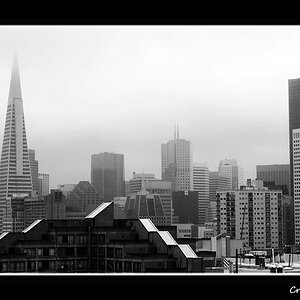
one of gary salter's work, the post-processing made it look a bit cartoonish/animated (the lighting contributed too i suppose?), are there any tips on how to edit photos to look like this one? thanks! ;)


here's another photo with this effect, only this one is more extreme than gary salter's. i believe this is dave hill's work:

cowboy9975b.jpg
[/URL] Uploaded with ImageShack.us[/IMG]
 
Last edited:
People with more post production experience can call me out on this one if they want to, but there is very little post here. I would bet the photographers adjusted contrast, ran an unsharp mask and a high pass filter to more or less accomplish this look. The majority of this look is in the lighting, like 99%.
 
First, don't post other peoples work. You can link to the file on their website or flickr or something.

Second, most of this is lighting based. In many of these types of shots with multiple subjects, the subjects are shot and lit seperately from the background and each other. Then they are composited together. Many people have tried to find a quick way to get Dave Hill's effect and failed. You can try to mimic it, but the fact of the matter is his shots are planned and set up meticulously. You can't take the lazy way out and mimic it in a photoshop action. With that said, he does use a lot of post as well as evident in the contrast ( partly light based as well ) and also by the tone of the colors.

Also, here is one of the easier and fairly decent "fake Dave Hill" effects I have come accross. http://www.scottkelby.com/blog/2008/archives/1094
 
ooops! sorry for that! didn't know i couldn't do that haha thank you for informing me gooniesneversaydie11 :)

and your link was helpful, thank you!
and thanks too for the additional infos themedicine! :)
 
Dave Hill's work consists of immense wrap around lighting, he uses an 8 light setup and then takes his work into photoshop to do with it what nobody knows, ive just spent a month studying hsi work - it's so hard to recreate or get much information on.

Some people have achieved the 'Dave Hill Look' with as few as 3 lights, JoeyL uses only one light and achieves similar feels to his work.
 
garysalter3.jpg
[/URL] Uploaded with ImageShack.us[/IMG]


garysalter3.jpg]
[/URL] Uploaded with ImageShack.us[/IMG]


one of gary salter's work, the post-processing made it look a bit cartoonish/animated (the lighting contributed too i suppose?), are there any tips on how to edit photos to look like this one? thanks! ;)


here's another photo with this effect, only this one is more extreme than gary salter's. i believe this is dave hill's work:

cowboy9975b.jpg
[/URL] Uploaded with ImageShack.us[/IMG]


I love this and I really would like to learn how to do this as well.:thumbup:
 
Outside of amazing lighting techniques- heavy dodging, burning, painting, and adjustment layers go into work like this. There isn't a "how to" you need to become an image editor to deal with work like this.

If you really want to become a photographer/editor take painting and drawing lessons as nothing helps more with editing than understanding how to draw. The techniques Dave Hill uses must be complex simply because the photos he starts with look nothing like the final image. Although I'd love to know what it is he does, I can only speculate and watch the very few and far between BTS he has.
 
Or just open your image editing software and take a shit all over the picture.

Questionable taste ITT.
 
you can get similar effects with the topaz adjust during the post processing
 

Create an account or login to comment

You must be a member in order to leave a comment

Create account

Create an account on our community. It's easy!

Log in

Already have an account? Log in here.

Back
Top Bottom