rambler
No longer a newbie, moving up!
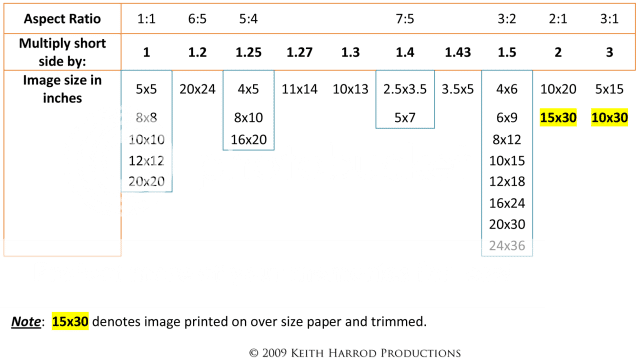
After I have a raw image, I know with editing software, I can zoom in on a portion of the image or enlarge the entire image. Can I then print the enlarged version or zoomed in portion of the original image?
For example, I have a photo of a bird taken at 20 feet away. After zooming in with editing the bird looks to be a lot closer. Let's say I zoomed in so that only the head was showing, can I then print that close-up image?
At a site one day, I talked to another camera-holding-person who said he was a professional. He told me it could be done in photoshop, but he did not explain how.
For example, I have a photo of a bird taken at 20 feet away. After zooming in with editing the bird looks to be a lot closer. Let's say I zoomed in so that only the head was showing, can I then print that close-up image?
At a site one day, I talked to another camera-holding-person who said he was a professional. He told me it could be done in photoshop, but he did not explain how.




![[No title]](/data/xfmg/thumbnail/38/38293-15e3a85f038b239e3c60bf9f38f5d56c.jpg?1734172201)

![[No title]](/data/xfmg/thumbnail/32/32156-d6cfe2865ceed861a0633752a006ea20.jpg?1734161046)
![[No title]](/data/xfmg/thumbnail/36/36664-a1f71b488f6761523649a87f8465fc3d.jpg?1734169172)