What's new

I took this picture with

Joined
Dec 7, 2010
Messages
45
Reaction score
3
Location
Tennessee
Can others edit my Photos
Photos NOT OK to edit
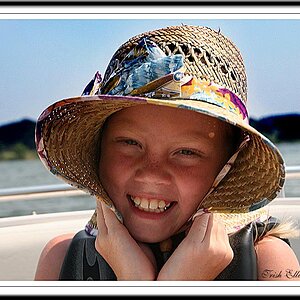
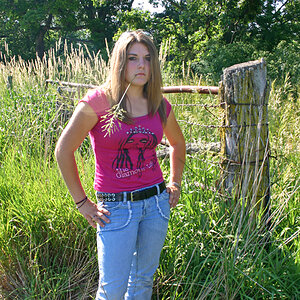
... with a Canon Rebel Xti. F stop was at 4.5. My exposure was at 1/25 and my ISO was at 200. What are your thoughts.

tumblr_lbdeguOTMi1qez1nyo1_1280.jpg
 
I think its a bit overexposed. Also, you could use some fill on the face- either with a flash at 2 to 3 stops below ambient or a reflector.
 
I think she looks beautiful, and the background directly behind her looks great...but the huge white blownout background, that takes up half the pic, is a little distracting (and blinding) I don't know....maybe some might like it, but that's just me.
 
I like the way it feels but I think I'd like to see it a touch warmer.
 
I like the way it feels but I think I'd like to see it a touch warmer.

when you say a bit warmer.. can you define that for me. because i have heard a couple different definitions of making a picture.. warm.
 
I like the way it feels but I think I'd like to see it a touch warmer.

when you say a bit warmer.. can you define that for me. because i have heard a couple different definitions of making a picture.. warm.

A "warm color" tint. Warm colors are like red and orange, you know? Warm. :)

Depending on what pp program you use, there are a few ways to do this. There's often a slider for temperature, in which case you just slide it toward the yellow/orange/red end. Or maybe you could add a filter in an orangey color. There's lots of ways to do it. A different white balance setting in the camera would have made it "naturally" come out warmer. I set mine to "cloudy" for warm pictures.

We could edit it and show you a warmer variation, but you have the "my photos are not ok to edit" option.

I'd also like to see it warmer, and the girl a little brighter. She's not exactly underexposed, I don't think, but the background is so bright that she seems that way. To me.
 
Last edited:
Blowouts show unprofessionalism... It would have been very easy to control here. A simple reflector ($5 white foam core board) and if you shot .raw files you normally get +/- 3 stops of detail that you could bring out during post.
 
Blowouts show unprofessionalism... It would have been very easy to control here. A simple reflector ($5 white foam core board) and if you shot .raw files you normally get +/- 3 stops of detail that you could bring out during post.

Wrong! "Blowouts show unprofessionalism"

This photo is almost perfect. I would select the left edge 3/4 inch or so, feather it about 100 plus and wash it out by increasing brightness. Then it would be perfect photo art. But the highlight by the eye/nose needs to go.
 
Last edited:
That is just your opinion, and your opinion is not the only one that counts.

I think the photo is less than "almost perfect" myself.
 
Why oh why would you take this in landscape orientation? I do not get it. The blown out areas kill this for me, and 99% of them could have been avoided by just turning your camera the other way.
 
I think she looks beautiful, and the background directly behind her looks great...but the huge white blownout background, that takes up half the pic, is a little distracting (and blinding) I don't know....maybe some might like it, but that's just me.

The white vignette doesn't help with the blown out background, either.
 

Create an account or login to comment

You must be a member in order to leave a comment

Create account

Create an account on our community. It's easy!

Log in

Already have an account? Log in here.

Back
Top Bottom