What's new

Learning off-camera flash techniques

OrionsByte

No longer a newbie, moving up!
Joined
Jul 6, 2010
Messages
1,500
Reaction score
261
Location
N. California
Can others edit my Photos
Photos OK to edit
So I've finally started reading through the stuff over at Strobist and things are starting to click. I just wanted to share these 'cause I thought they were cool and I'm excited about how this can really open up my creative opportunities.

Here's the setup shot: ISO 800 f/5.6 1/500 at 50mm. The flash was about 4-5 feet away from the subject at a 30-degree angle to the camera.
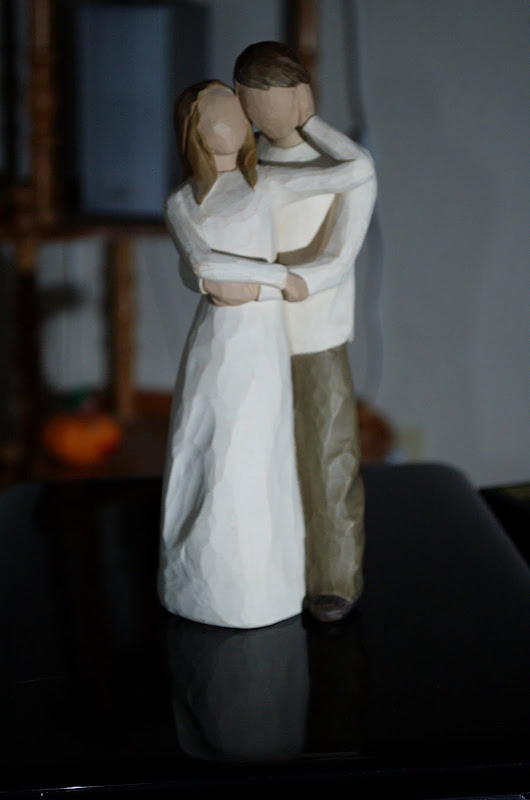
DSC_9509.jpg


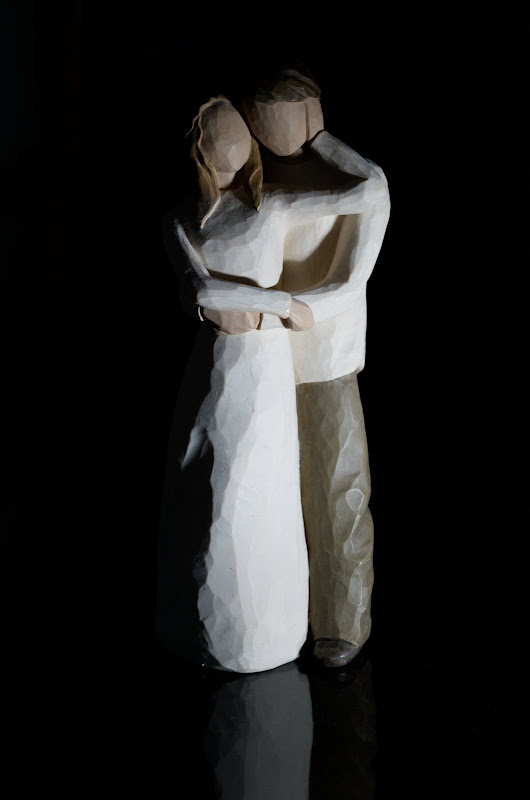
This one, on the other hand, was shot at ISO 200 f/11 1/500 at 50mm, but the flash was moved up so it was only about 9 inches away from the subject. It also ended up at more of a 45-degree angle which is why some of the light dropped off on the left.
DSC_9505.jpg


Both shots had the exact same post processing applied to them, the subject was not moved, the camera was not moved (though it was hand-held, so it's approximate) and the same ambient lighting was used. I'm blown away by this effect and it suddenly explains how a lot of shots I've seen were accomplished.

Now I just need to invest in a nice light stand and umbrella setup... why is it that every time I learn something about photography it makes me want to spend more money? :)
 
Very nice, I read through all of that stuff for a second time today. How did you trigger your flash?
 
The popup flash on my Nikon D70 can be used as a commander for my SB-600 (part of their Creative Lighting System), so basically it was triggered optically. Eventually I'll probably end up investing in some Pocket Wizards or something but for now it's nice to have a system that works, and that I can learn with, without any additional investment.
 
The second one is awesome. Also, the lower the ambient light, the lower your shutter speed can go and still freeze motion. I like how the model is more geometric than curvy. It gives a lot of different fall of and looks really cool.
 
That's what I've been doing with mine for now... but I haven't experimented that much technically. If you turn your on camera flash all the way down (1/64th or 1/128th, I can't remember which it goes to), does it have any problems triggering the off camera flash?
 
The popup flash on my Nikon D70 can be used as a commander for my SB-600 (part of their Creative Lighting System), so basically it was triggered optically. Eventually I'll probably end up investing in some Pocket Wizards or something but for now it's nice to have a system that works, and that I can learn with, without any additional investment.
Ive been lurking here for a while and you finally got me to register with this topic:D. If your on a budget eBay will be your friend with getting more into off camera flash. The pocket wizards would be nine but you can find cheaper wireless triggers that work as good. Im using Cactus V4s form Gadget Infinity. I think if I where to do it again I would go with some RF-602s tho, search eBay for those. As for as your picture you did a great job. Next you should pick up a cheap reflector or DIY one to add a little fill light to the left side. Keep up the good work!
 
That's what I've been doing with mine for now... but I haven't experimented that much technically. If you turn your on camera flash all the way down (1/64th or 1/128th, I can't remember which it goes to), does it have any problems triggering the off camera flash?

Im not sure if the D70 or the D80 have this setting.. but on my D90 you could set it so that basically the on camera flash is sooo low as to now affect the exposure of the subject but just bright enough to set off the flash. As long as you're in line-of-sight of course. But without triggers you're limited to a few feet and sometimes the flash wont register the flash off the camera. So triggers are definitely the best way to go.
 
The first interesting wedding pictures I see! Just joking :) .
I'm also learning off-camera, nice exercise you did and nice result in the second picture. This pushes for being more and more attentive to light qualities (flash or not).
 
The popup flash on my Nikon D70 can be used as a commander for my SB-600 (part of their Creative Lighting System), so basically it was triggered optically. Eventually I'll probably end up investing in some Pocket Wizards or something but for now it's nice to have a system that works, and that I can learn with, without any additional investment.
Ive been lurking here for a while and you finally got me to register with this topic:D. If your on a budget eBay will be your friend with getting more into off camera flash. The pocket wizards would be nine but you can find cheaper wireless triggers that work as good. Im using Cactus V4s form Gadget Infinity. I think if I where to do it again I would go with some RF-602s tho, search eBay for those. As for as your picture you did a great job. Next you should pick up a cheap reflector or DIY one to add a little fill light to the left side. Keep up the good work!
Thanks for the kind words, and for the tip on eBay. Most likely I'm not going to get around to buying any triggering system for quite some time, but I'll definitely keep my mind open as to what I actually spend my money on. I think I'd rather upgrade my camera body first, and that's going to take me a long time to save up for. :lol:

That's what I've been doing with mine for now... but I haven't experimented that much technically. If you turn your on camera flash all the way down (1/64th or 1/128th, I can't remember which it goes to), does it have any problems triggering the off camera flash?

Im not sure if the D70 or the D80 have this setting.. but on my D90 you could set it so that basically the on camera flash is sooo low as to now affect the exposure of the subject but just bright enough to set off the flash. As long as you're in line-of-sight of course. But without triggers you're limited to a few feet and sometimes the flash wont register the flash off the camera. So triggers are definitely the best way to go.

The D70 doesn't have this setting. You can set the power for the remote but the pop-up flash in commander mode always fires at the same level. It's not enough to really contribute to the lighting at all unless the camera is really close to the subject.

I didn't have to do it for these shots, but in some other test shots I took yesterday, where I was in close to the subject with my camera, I just put my hand in front of the pop-up flash such that it blocked any of its light from hitting the subject, but still set off the remote. Seemed to work just fine.

The first interesting wedding pictures I see! Just joking :) .
I'm also learning off-camera, nice exercise you did and nice result in the second picture. This pushes for being more and more attentive to light qualities (flash or not).

Definitely. I'm excited to read through the rest of the Strobist stuff and see if I can train my brain to think about light a little more actively.

Thanks everyone!
 
The D70 doesn't have this setting. You can set the power for the remote but the pop-up flash in commander mode always fires at the same level. It's not enough to really contribute to the lighting at all unless the camera is really close to the subject.
By going into the Commander menu and setting the Master (that'll be your pop-up flash) to (--), it will pre-flash only to trigger the OCF and not contribute to the scene. However, if you're close to a reflective object, there will be some effect. I did some tests shots to proves this somewher. I'll try to locate.

I don't understand the settings though. Why ISO 800? You're unnecessarily adding noise to the shot. You should be able to easily shoot this at ISO 200.

Good on you for getting off camera with the flash. :thumbup:
 
one thing to remember, the D70 is the only cam that will sync at 1/500 of a sec.
when you change over to strobes or even pocket wizards you will need to drop your shutter speed to 1/200 or slower.
 
one thing to remember, the D70 is the only cam that will sync at 1/500 of a sec.
when you change over to strobes or even pocket wizards you will need to drop your shutter speed to 1/200 or slower.

No it's not, thats why i kept my 1Dmk1
 
The D70 doesn't have this setting. You can set the power for the remote but the pop-up flash in commander mode always fires at the same level. It's not enough to really contribute to the lighting at all unless the camera is really close to the subject.
By going into the Commander menu and setting the Master (that'll be your pop-up flash) to (--), it will pre-flash only to trigger the OCF and not contribute to the scene. However, if you're close to a reflective object, there will be some effect. I did some tests shots to proves this somewher. I'll try to locate.

I don't understand the settings though. Why ISO 800? You're unnecessarily adding noise to the shot. You should be able to easily shoot this at ISO 200.

Good on you for getting off camera with the flash. :thumbup:

When i first started with lightning, I was using the - setting on my d90 to fire my strobe using the optical triggers. I am not sure if the popup flash contributed to the exposure of my pictures but i could clearly see 2 catch light in the models eyes, 1 for my key light and 1 from my popup flash.

You can the small catch light that came from the popup.

These are really low rez pictures, resized down with a really low compression quality for web use.

5121999437_a8f026102f_o.jpg
 
The D70 doesn't have this setting. You can set the power for the remote but the pop-up flash in commander mode always fires at the same level. It's not enough to really contribute to the lighting at all unless the camera is really close to the subject.
By going into the Commander menu and setting the Master (that'll be your pop-up flash) to (--), it will pre-flash only to trigger the OCF and not contribute to the scene. However, if you're close to a reflective object, there will be some effect. I did some tests shots to proves this somewher. I'll try to locate.

Unless I'm looking in the wrong place, the D70 doesn't have that ability. I can set the Flash mode setting (CSM 19) to "Commander mode", and then I can choose TTL, AA, or Manual (and then choose a manual setting for the remote flash power), but I can't set the master unit separately.

I don't understand the settings though. Why ISO 800? You're unnecessarily adding noise to the shot. You should be able to easily shoot this at ISO 200.

Well I was really just doing this as an exercise, to do some experiments with flash position and examine the results. I'd done some other tests throughout the day so I kind of new what to expect, and I set this shot up knowing that I wanted to lose the background completely by putting the flash way up close. So the darker shot was actually shot first, after I got all my settings dialed in, and that one was shot at ISO 200.

After I got the shot I wanted, I started physically backing the flash up a little at a time, just as a training exercise to see how the lighting changed. Every time I backed it up, I had to bump up the aperture to account for the difference in light. Eventually I got to my lens' widest aperture for that focal length (f/5.6) so I increased the ISO instead. I could have also increased the power output on the flash and stayed at ISO 200, but as I said, I was just experimenting and the ISO was the quickest thing for me to change (I even remembered to change it back before I put the camera away!).

So basically the dark shot is the only one I was really "trying" to get, and the other one is just the end of a chain of different exposures to teach myself what to expect. If I'd been actually trying to get a nice photo out of it, I would have chosen a less distracting background. :lol:

I shared them both so other folks like me, who are just learning, can see the difference too, and I posted the lighter one first because it's what beginners tend to expect from flash photography (at least it's what I tend to expect), while the darker one is more counter-intuitive (More light = darker background? What?!) but it makes perfect sense once you understand the underlying concepts.

Thank you very much for asking the question though - sometimes being forced to explain myself helps me learn a little more because I have to put more thought in to it than I did at the time. :)

Good on you for getting off camera with the flash. :thumbup:

Thanks, I'm in the infant stages of learning this aspect of photography but I'm looking forward to learning more!
 

Create an account or login to comment

You must be a member in order to leave a comment

Create account

Create an account on our community. It's easy!

Log in

Already have an account? Log in here.

Back
Top Bottom