What's new

Lighting C&C

andynrach

TPF Noob!
Joined
Mar 30, 2011
Messages
65
Reaction score
8
Location
Maine
Can others edit my Photos
Photos OK to edit
Ok. I've been working on my lighting since my last C&C and trying to get it right. I have come to the conclusion that I simply cannot blow out every drape and wrinkle in my muslin and will eventually go seamless paper. However, I have looked at my photos so long that I am going cross eyed. How does my lighting look? Does this look better? Thank you!:D Any pp ideas?

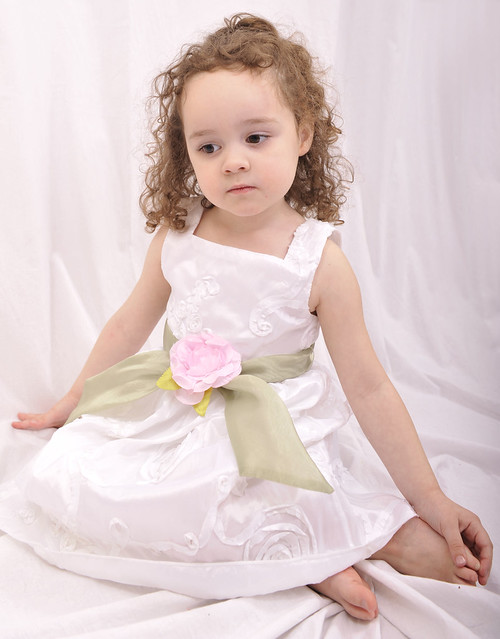
1.
5882a_edited-1 by andynrach, on Flickr

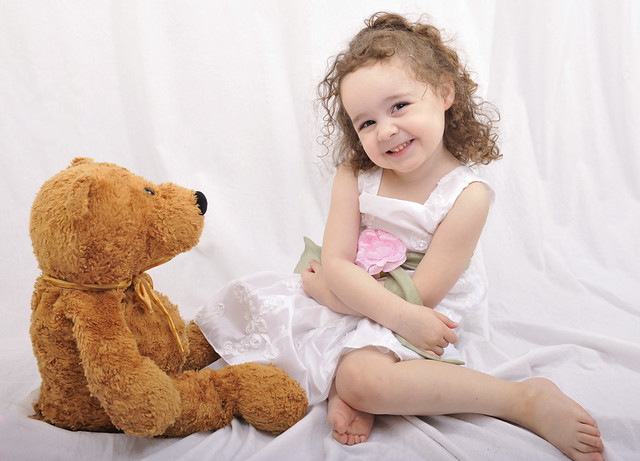
2.Cut off a toe on this one...phooey

5870edit by andynrach, on Flickr

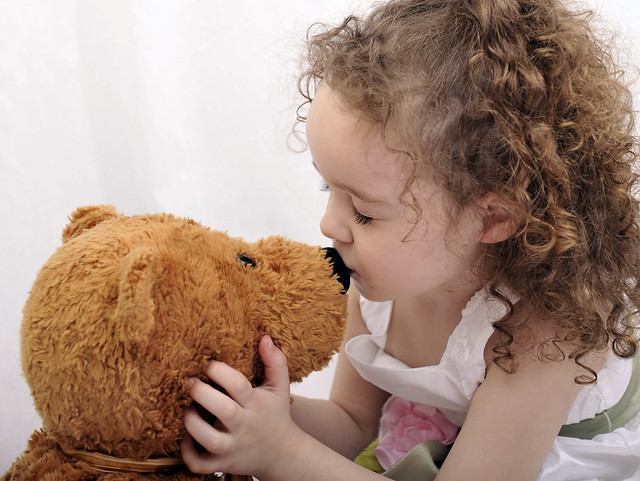
3.
5869edit by andynrach, on Flickr

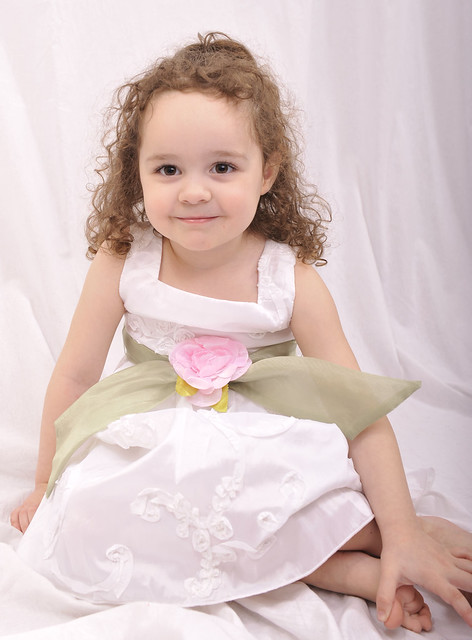
4. Sheesh, got some fingers and toes on this one...

5890edit by andynrach, on Flickr
 
What kind of lighting setup did you use? I don't know if you were going for a high-key look or something, but there's not much separation between her dress and the background. The light seems a bit flat to me.
 
I like the background .. I think it works with the photo ... I think the lighting is a little harsh IMO .. but I too am still learning lighting ...
 
Yeah, Brian, it is flat. I'm about ready to throw the camera/lights out the window. I have two lights through umbrellas on the background. One softbox just above and to the right of the camera, pointing down on subject. I metered her, ISO 200, synced at 250 and meter gave me an fstop of 5.6. So, tada, that's what I shot at. I don't know if I'm going for high key, perse. I want something soft and white for kids, newborns, and maternity. When I think high key I think contrasty or slightly blown out. What will make it less flat?
 
Are you sure the umbrellas you have on the background aren't falling on her as well? How are you firing the remotes? Do you have them in separate groups or are they all firing at the same power?
 
Just some ideas as I'm learning all this as well...

I'd try underexposing the background up to a stop by powering down your b/g lights.... then power down your key light a stop and bring it half the distance to her face. That will separate her from the background, allow more light falloff toward the floor so her dress isn't blowing out, and give more direction to the light on her face. Try getting that umbrella closer (adjusting power as needed) for even more falloff toward the floor.
 
It's a tiny room with white everything, so I bet there is light falling all over the place. I hate a transmitter on my hotshoe which fires the softbox, which in turn fires the photocells on my b/g lights. B/G is set at 3, the softbox at 1/8 (it's lowest setting) I apologize in advance for my lack of knowledge on strobe stuff, it is COMPLETELY new to me. Any literature you could recommend would be greatly appreciated as I have read every book in our public library system and while there are a lot of set ups in the books, there aren't any that actually explain the theory of strobe lights, what the stops technically are, etc. They simply discuss the different types of lighting, i.e. broad vs. short, butterfly, rembrandt, etc. without actually going into detail of how to achieve these lighting effects. What I want is that light which is on the Bubblegirl ad in the upper right corner of this page. The newborn on the far left, actually.....I love it. It looks like window light, and yet it doesn't....thank you all so much for your patience.
 
A great place to learn about lighting as you posted is in youtube.com. I have found some really good videos on lighting setups, the butterfly and how to do it etc. etc. Give it look ..
 
Check out strobist.blogspot.com and look for the Lighting 101 and Lighting 102 sections. Absolutely the best place to start in my opinion.

Also, when you ask questions like, "what the stops technically are" I have to ask if you might need to learn your camera and general photography techniques a bit more before diving in to multiple-light setups.

No offense intended. Start with one light, figure out how that works, then build your way up from there. Before that, though, you have to have a foundation of basic photography principles. If you already have that knowledge, I apologize.
 
Last edited:
Its not as hard to go seamless as some people think.

I was looking at spending $170 for a vinyl but I just didn't have the cash. So I took a trip to the craft store and I found a great deal! There were rolls of papers 12ft. by 4ft. for only $5 each. So I bought 4, and I have 3 hanging up and an extra incase one rips.

But I have found that it is a lot easier to blow out compared to muslin fabric.
 
..... I have two lights through umbrellas on the background. One softbox just above and to the right of the camera, pointing down on subject. .......?
What size are your modifiers? And I'm guessing all your lights are speedlights (hotshoe type) ?

Here's an article on umbrella lighting that you may find useful. Also take note of the related articles links at the bottom of the page. More reading on light patterns and stuff.
Tutorial: Umbrella Lighting
 
I think the answer as to why the lighting is so flat has been broached above: the room is small, and there is a LOT of ambient spill in a small, white-painted room, plus the background fabric is a highly-reflective pink. There are two umbrellas on the background, but one of them has more fall-off than the other, and I do not like that all that much in this case, with a light pink-hued fabric background, the dark side (camera right) draws attention away from the subject, the cute little girl. In the first shot, the main light is awfully high up, and her eyes are dull and lifeless, due to lack of a catchlight from the main light.

In shots #1 and #4, it appears that the brightest parts of her dress are blown-out, overexposed. Overall, if you think the lighting is too flat, and it is indeed rather low-ratio, then you need to control the spill light bouncing off of the walls and ceilings. You do not mention what type of umbrellas you are using; shoot-through umbrellas send bout 60% of their light backwards, toward the walls, and 40% shoots through and hits the subject, thus providing a HUGE amount of often undesired ambient spill. Look at the depth of the shadow under the little girl's chin in shot #4---that shadow is getting a TON of fill-in light from "the environment"...probably a combination of the walls,ceiling, and the pink fabric, plus the light from a larger softbox is quite soft and wraparound. The softbox itself, it it is flush-faced and big, is also giving ample light to the set.

It's helpful to describe the size and type of the modifiers; umbrella size and style (shoot through? convertible? silvered, etc); softbox dimensions and brand/style/accessories, etc. Anyway: in terms of how does the lighting look? Photo #2 is my favorite, since it does not have any blown highlights, and it has a bit more sparkle, a bit more contrast, than some of the other shots. Overall, this lighting is not terrible, not is it superb--it's somewhere in the middle. Many people would be happy with these results, but the images do lack the really superior "quality of light" that most people really would love to be able to get. If you want better C&C and better,more-pointed suggestions, you'll need to specify the exact size and type of modifiers used, otherwise all we can do is look and guess; my guess is 1) too much spill light in the shooting area, due to the umbrellas lighting the backdrop.

 
Thanks all!! I will DEFINITELY be reading this stuff and watching some videos over the next week or so. I have surgery scheduled on Friday, so I will now have plenty to keep me busy! :)

I know you're not trying to be picky or mean or whatever, no worries. While charm doesn't ALWAYS translate properly in writing,;) I know everyone is intent upon giving good advice and helping, which is what matters. My ego is less important to me then my photography.

As far as knowing my camera and those fundamentals, I think I'm doing okay but I can always stand to learn more. I know what "stops" are as it relates to the ISO, Shutter, Fstop triangle....aperture down, shutter up, etc. and how that reads on your camera's reflective light meter. (with the 1 on the plus side reading one stop over exposed, and each subsequent dot or line being 1/2 or 1/3 of a stop depending on how you have your meter stops set up in your camera menu) I also understand reflective vs. ambient light metering. However, when it comes to translating that to my lights, I've never really had anyone explain how a "3" on my two monolights translates to the "stops" on my meter....or better yet the dial on my other monolight which goes from 1/8 to 1 with little clicks in between. Again, I know my knowledge is in the infant stage as far as studio lighting goes, but that's why I'm here :)

Thanks again for the help :) It's invaluable to have a place to ask questions and get feedback.
 

Create an account or login to comment

You must be a member in order to leave a comment

Create account

Create an account on our community. It's easy!

Log in

Already have an account? Log in here.

New Topics

Back
Top Bottom