What's new

Lunar shots

Scarecrow

TPF Noob!
Joined
May 18, 2011
Messages
184
Reaction score
0
Location
Yokosuka Kanagawa Japan
Can others edit my Photos
Photos OK to edit
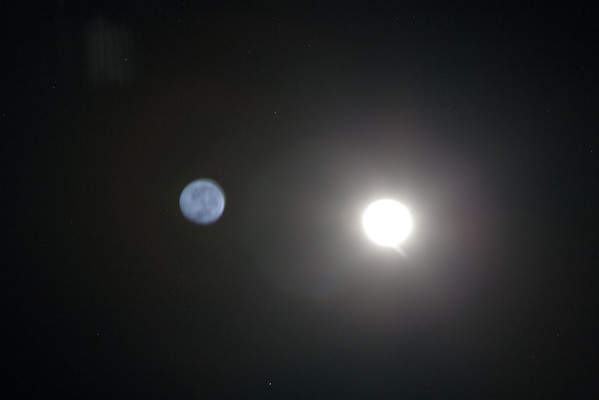
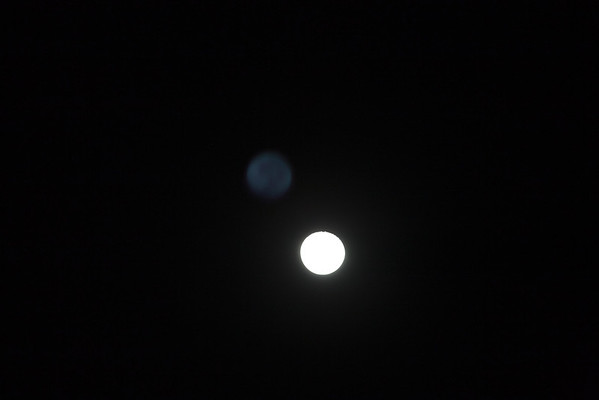
ok tonight I was trying some shots of the moon first time and can't figure out what exactly I did wrong. I got this big white spot from the moon and then off to the left you see something in the sky that looks like the moon only not in focus. any help would be great. Note I have not croped any of these yet as I do not think they are worth saving but I want to know what I did wrong. I was using a tripod and switch when taking these however I did not lock the mirror as I dnt know how to with my 5D if that really matters.
ISO 400 300MM F4 1/6 SEC
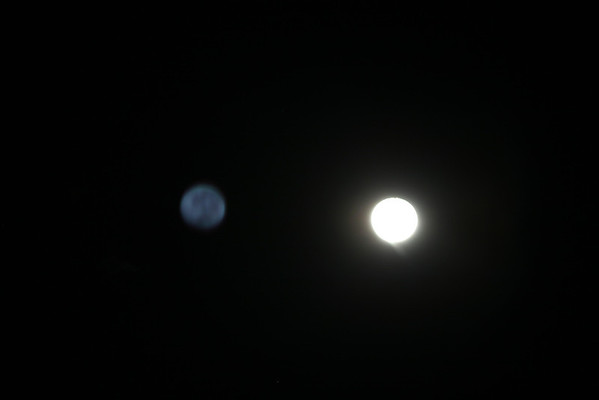
I
SO 320 300mm F/8 3 SEC

I
SO 320 300mm F/4 1/13 sec


Thanks for any help and tips you guys and gals can offer.
 
You have a filter on the lens, don't you? Take it off and try again.. problem should go away! :)
 
OMG I am just going to burry my head in the dirt!!!!!!!!!!


hahahaha... no need for that! It happened to me long ago... that is how I know what it is! :)
 
ok the filter is one problem. The second is that it was shot in auto mode and matrix metering. The shots are way overexposed. Put it on spot metering and adjust settings to the brightness of the moon not the whole frame. That is why the moon seems blurry is because of the massive overexposure.
 
ok the filter is one problem. The second is that it was shot in auto mode and matrix metering. The shots are way overexposed. Put it on spot metering and adjust settings to the brightness of the moon not the whole frame. That is why the moon seems blurry is because of the massive overexposure.

Good call.... I agree! Didn't address in earlier reply as I am at work, and was busy at that moment! :)

Scarecrow... go manual.... try F11 at 1/250 (ISO 100) as a starting point.. shoot.. then assess... should get you close...

also.. GOOGLE hyperfocal distance.. read up. Then go to http://www.dofmaster.com/dofjs.html and figure out the hyperfocal for your lens
 
Last edited:
The moon is sunlit, just like your back yard on a sunny day. Use the Sunny 16 rule.
 
I went to the depth of field calculator mentioned in this thread and found it very interesting. When the calculator wants "focal length" inserted this would be in the case of a zoom lens eg 18-105, whatever number you set your zoom at? ie, if I set the zoom to 50, this would be a focal length of 50?
 
Ok.. so your hyperfocal distance is at 871 ft, with a 300mm at F11. You will have to "guesstimate" this probably.. but this will give you the longest range of focus you can get. (or 616 ft at F16.. per the Sunny 16 rule)

In your previous shots.. you used Program, with matrix metering. On a shot like this, the camera's meter will be fooled by that vast expanse of black sky and will overexpose the shot to try to get all of the black to 18% gray. Not what you want. The Program mode also chose an aperture of F4 @ 1/13 at ISO 320. Not optimal for this kind of shot.

I don't know Canon's.. but you should have a spot meter. You can set it to that for a more accurate metering if you want. If you have a Spot Focus mode... you can use that also. The moon has enough contrast to allow focusing.

Like Sparky said above... you can use the sunny 16 rule to set the exposure in Manual..... Sunny 16 rule - Wikipedia, the free encyclopedia

The basic rule is, "On a sunny day set aperture to f/16 and shutter speed to the [reciprocal of the] ISO film speed [or ISO setting] for a subject in direct sunlight."[1] For example:

On a sunny day and with ISO 100 film / setting in the camera, one sets the aperture to f/16 and the shutter speed to 1/100 or 1/125 second (on some cameras 1/125 second is the available setting nearest to 1/100 second).
On a sunny day with ISO 200 film / setting and aperture at f/16, set shutter speed to 1/200 or 1/250.
On a sunny day with ISO 400 film / setting and aperture at f/16, set shutter speed to 1/400 or 1/500.

I would use ISO 100... assuming you are using a tripod. If handheld... Use ISO 400... for a good, fast shutter speed. Hope this helps!
 

Create an account or login to comment

You must be a member in order to leave a comment

Create account

Create an account on our community. It's easy!

Log in

Already have an account? Log in here.

Back
Top Bottom