What's new

More kids

THANKS for your tips. Well taken. AND if you saw the size of THAT head, you'd crop it too!!!
Just kidding!
DANG, I need to act like a loving GRANDMA -
 
We do a lot of studio portaits but I think kids are best photographed OUTSIDE in natural light (their most natural environment!). I want them playing in the light...

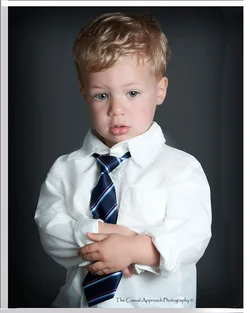
These portraits work, in the studio environment, because of his wardrobe! Even your usage of the dark background--that goes well with his tie--holds the image together. (Note: if you had used black I would have objected--I NEVER use a black background for children; it's too funereal!)

#1. Good lighting and great interaction to the camera! Crop is , of course, too tight for an 8x10" print (that's what we sell, so that's the rule!)

#2. You flattened out the lighting--so you lost the three dimensionality in his face--and now you're blowing-out detail in the shirt.

#3. I agree with Lew, this is really nice! I like his pose--his hands are great but because of the framing you would have to cut them off to make an
8x10" print! LIGHTING IS GREAT, TOO!

#4. This should be the very next image: One second after you did #3--you get his attention back to the camera--I WANT HIM LOOKING INTO OUR
EYES! ( that's THE money shot! )

#5. The image of him wearing the hat is less effective and has lost drama with the flat lighting. ( I don't use FILL flash at all in the studio )

Overall, I like what you've done here. Good job!
 
We do a lot of studio portaits but I think kids are best photographed OUTSIDE in natural light (their most natural environment!). I want them playing in the light...

These portraits work, in the studio environment, because of his wardrobe! Even your usage of the dark background--that goes well with his tie--holds the image together. (Note: if you had used black I would have objected--I NEVER use a black background for children; it's too funereal!)

#1. Good lighting and great interaction to the camera! Crop is , of course, too tight for an 8x10" print (that's what we sell, so that's the rule!)

#2. You flattened out the lighting--so you lost the three dimensionality in his face--and now you're blowing-out detail in the shirt.

#3. I agree with Lew, this is really nice! I like his pose--his hands are great but because of the framing you would have to cut them off to make an
8x10" print! LIGHTING IS GREAT, TOO!

#4. This should be the very next image: One second after you did #3--you get his attention back to the camera--I WANT HIM LOOKING INTO OUR
EYES! ( that's THE money shot! )

#5. The image of him wearing the hat is less effective and has lost drama with the flat lighting. ( I don't use FILL flash at all in the studio )

Overall, I like what you've done here. Good job!


Thanks Jerry, what's your typical lighting set-up for Studio work
 
Last edited:
but because of the framing you would have to cut them off to make an
8x10" print! LIGHTING IS GREAT, TOO!
Overall, I like what you've done here. Good job!

To make this fit, I would be sore tempted to add enough to get it to a 4 x 5 aspect ratio by filling in the sides with content aware and adding the 1/4 margin white that fits under mat at the bottom where content aware might fall short.
Quickly and inaccurately done here but you get the idea.

$14170526701_d8006c7dc4_blllll.webp
 
We do a lot of studio portaits but I think kids are best photographed OUTSIDE in natural light (their most natural environment!). I want them playing in the light...

These portraits work, in the studio environment, because of his wardrobe! Even your usage of the dark background--that goes well with his tie--holds the image together. (Note: if you had used black I would have objected--I NEVER use a black background for children; it's too funereal!)

#1. Good lighting and great interaction to the camera! Crop is , of course, too tight for an 8x10" print (that's what we sell, so that's the rule!)

#2. You flattened out the lighting--so you lost the three dimensionality in his face--and now you're blowing-out detail in the shirt.

#3. I agree with Lew, this is really nice! I like his pose--his hands are great but because of the framing you would have to cut them off to make an
8x10" print! LIGHTING IS GREAT, TOO!

#4. This should be the very next image: One second after you did #3--you get his attention back to the camera--I WANT HIM LOOKING INTO OUR
EYES! ( that's THE money shot! )

#5. The image of him wearing the hat is less effective and has lost drama with the flat lighting. ( I don't use FILL flash at all in the studio )

Overall, I like what you've done here. Good job!


Thanks Jerry, what's your typical lighting set-up for Studio work - any tips on composition to get the ideal 8x10


You're very welcome! I've simplified my studio lighting these past five years for the drama of three dimentionality:

Main light: 7-foot, Photoflex, Octodome. A Superb, soft, wraping main that requires NO FLASH FILL--not even for groups! (usually placed about 6-feet from the subjects)

Hair Light: Larson RS 9"x24" Striplight (ceiling mounted)

Background light(s): One light with a Grid most of the time (that lights the center well with a steep fall-off to the sides).
Two lights with NO grids on Scenic backgrounds for even lighting.

Reflectors: Westcott 42" white/gold reflector (using the White side) in close to subject--opposite the Main of course.
If I'm using SHORT LIGHTING on a person carrying some body weight I'll back-off the reflector or even eliminate it entirely.
Westcott 42" Silver reflector for groups ( I may use TWO of these for larger groups ).

In camera FRAMING for 8x10" format: Look at it this way...with your camera horizontal ( landscape mode ) your vertical is the 8-inch side of the print....now mentally CROP THE SIDES CREATING A SQUARE ( that creates an 8"x8" )--then just add a little out from there and you're there.

If you're using a pro-level camera ( 20 MP or so ) you can afford to shoot "loose" like this even for groups! With individuals shooting "loose" for the 8x10" crop is no problem even if your camera is only 12MP.

Hope this helps, Jerry V.

 
Thank you LEW...
Thanks Jerry
 

Create an account or login to comment

You must be a member in order to leave a comment

Create account

Create an account on our community. It's easy!

Log in

Already have an account? Log in here.

New Topics

Back
Top Bottom