What's new

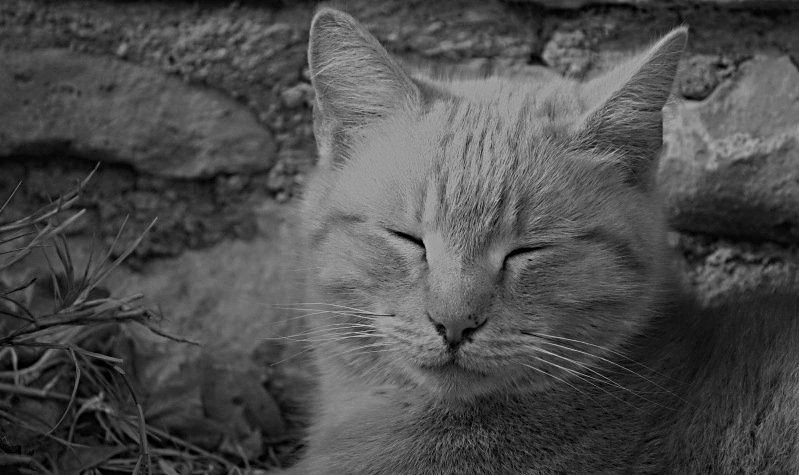
My attempt at a B&W for C&C...Feral cat

You may want to change the title from Feral Cat to Cute Kitty...I don't see feral at all...it looks domesticated to me...cute kitten...but just that...a family photo of a pet cat...

Haha well, it may not look feral, but believe it or not this cat is completely wild. I shot it at my grandmother's ranch where there are 3 cats that live out there. They won't let you get too close. Thankfully though, this guy let me get close enough to him when he was basking in the sun. It wasn't long before he took off.

You're right though, the picture doesn't really scream "feral," even though that's exactly what he is.

One thing that I have always wondered but have never experimented with yet because I don't do much b&w. Would you get better results shooing in b&w mode in-camera? Or does this essentially do the same thing that software does.. just de-saturate the colors. I know that with film photographing with b&w film will give better results then converting a color negative to b&w.
I think I have noticed that the quality is a little better when it's shot in monochrome originally...but I'm always hesitant to do that in case I decide it would have been better in color later. It would suck if I had a great shot that didn't turn out the way I had hoped in B&W.
 
One thing that I have always wondered but have never experimented with yet because I don't do much b&w. Would you get better results shooing in b&w mode in-camera? Or does this essentially do the same thing that software does.. just de-saturate the colors. I know that with film photographing with b&w film will give better results then converting a color negative to b&w.

My understanding of shooting in B+W is this:

When the shutter is tripped a vast array of colour sensors record light and produce an image.
These are mostly green but also contain reds and blues.
The camera processes these and assesses each colour and presents a relevant saturation, hue and luminosity for each of the colours.

We can use RAW editors or post-processing programs to amend the values of each colour from the sensor array allowing you to get any kind of colours you want, include greyscale/monochrome shots.


If you shoot in B+W mode on the camera, as well as not being able to convert it colour afterwards (which may be a wasted opportunity) the camera is doing all of the legwork for you - deciding which sahde of grey needs to be realised to produce a picture.

This end result, with only one colour bracket (Black sliding through to white) means you have very limited control over what you can do to the photo.


Someone much more learned than me (probably KmH cos he's a bloody encyclopedia of camera knowledge :D) will probably come and correct me - but that's what I think...
 
I found a process that I like. I treat it as an IR process.

I switch the red and blue channels and set the green channel to 0. I then set saturation and hue to 0. A little adjustment with brightness and contrast and apply an unsharp mask.

Here is my result with your picture.
5555612116_278e7b532e_b.jpg


I have several more examples on flicker taken at Mammoth cave National Park.
Flickr: amocholes' Photostream
 
Would you mind if others took a shot at it? Personally, I would like to see a bit more contrast, but that may not be possible given the results of the colour image.

WesternGuy

By all means, have a go at it. I don't mind at all.

I've heard of Silver Efex before...isn't it around 200 dollars? That always seemed a little crazy that a plugin could be that high. I'm sure it's worth it though.

Here is my attempt. I used Photoshop CS5 with a Channel Mixer adjustment layer, converted the image to "Monochrome" and then applied the "Darker" option. I tried a couple of other approaches using a Gradient Map adjustment layer and using filters, but I didn't like them as well.

5565074857


Hope this works. Didn't work...PM me with an e-mail address and I will send you the images.

Cheers,

WesternGuy
 
Last edited:

Create an account or login to comment

You must be a member in order to leave a comment

Create account

Create an account on our community. It's easy!

Log in

Already have an account? Log in here.

Back
Top Bottom