What's new

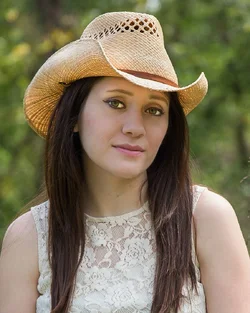
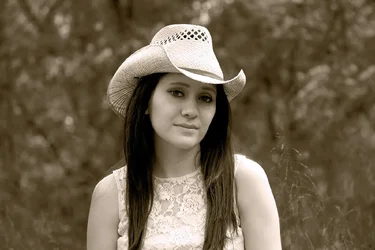
My favorite model - Re-Edit - Sepia

t the luminosity mask is beyond my meager Photoshop skills.

I would suggest you read this thread by Tim Tucker. He explains things in way that's easy to understand. Been a while.

As to the other comments about the OP's choice of look, processing, etc., it really shouldn't be an issue. While some don't like the High Key look, or Sepia, it was his vision. The helpful thing would be to make suggestions on how he can improve the image (in his vision), rather than criticize his direction, unless his choice was so far off base that there was no improvement possible. Learning is a process of experimenting with techniques. There are some people far more talented than I on here that hopefully will step in to help the OP.

thats how C&C goes sometimes. you dont always get to choose how its given, and all you can do is sift through what you feel is relevant, and ignore the rest.
the OP posted that picture with the caption, " Please comment and critique", which is a pretty broad request. nothing specific was asked, so we can only assume that they are looking for any and all opinions on the picture.
 
the OP posted that picture with the caption, " Please comment and critique", which is a pretty broad request. nothing specific was asked

True, and most everyone who's posted here for awhile, learns how harsh that critique can be. Actually that's one of the advantages of this forum, it's not a "pat everyone on the back and tell them how great they are site", you get honest feedback (good or bad). Although the OP shows an old join date, he obviously hasn't posted that much on here, so in the case of Noobs it wouldn't hurt to have some constructive advice mixed in with the negative feedback.
 
the OP posted that picture with the caption, " Please comment and critique", which is a pretty broad request. nothing specific was asked

True, and most everyone who's posted here for awhile, learns how harsh that critique can be. Actually that's one of the advantages of this forum, it's not a "pat everyone on the back and tell them how great they are site", you get honest feedback (good or bad). Although the OP shows an old join date, he obviously hasn't posted that much on here, so in the case of Noobs it wouldn't hurt to have some constructive advice mixed in with the negative feedback.

hence my advice of sifting through what you feel is relevant and ignoring the rest.
but your post bring up another relevant point, which is that there is a common misconception that
critique that is perceived as "negative" is not constructive. this is not entirely the case, and is largely, and subjectively, dependent
on how that negative feedback is presented.
just because someone doesnt like the work that is posted, and perhaps even states as much, doesnt mean that their critique is irrelevant, or unhelpful.
it is true however, that when offering critique, either positive OR negative, one should always strive to offer it in the spirit of helping the poster, and not simply to put down someone elses work.
 
hence my advice of sifting through what you feel is relevant and ignoring the rest.
but your post bring up another relevant point, which is that there is a common misconception that
critique that is perceived as "negative" is not constructive. this is not entirely the case, and is largely, and subjectively, dependent
on how that negative feedback is presented.
just because someone doesnt like the work that is posted, and perhaps even states as much, doesnt mean that their critique is irrelevant, or unhelpful.
it is true however, that when offering critique, either positive OR negative, one should always strive to offer it in the spirit of helping the poster, and not simply to put down someone elses work.

Yes!!! I think we have accord, though you probably said it better! LOL
 
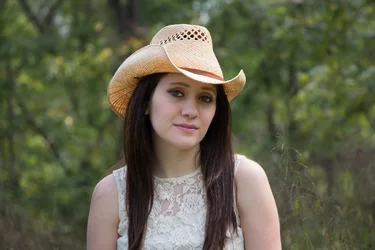
Her is a jpeg of the original raw file in case anyone would like to edit. I really appreciate the help. I am self taught in Lightroom and trying to do the same for Photoshop, with the help of Youtube.
BethanyOriginalWeb.webp
 
I forgot to mention that this model, Bethany, is my 22 year old Granddaughter and she does not like modeling.
 
I didnt spend much time on this in LR, but this is how I would have imagined this picture edited.

BethanyOriginalWeb.webp
 
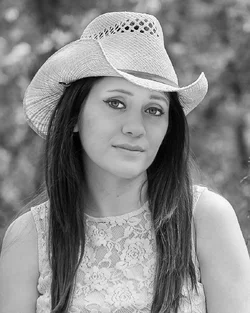
Serious amateur, but I'm always up for some processing practice. I did a color and a BW take.
jctedits-2.webp jctedits.webp
 
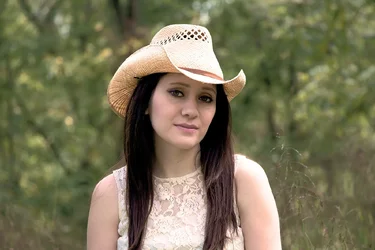
I personally like what you were going for with the Sepia but I do agree with much of the critique above and think its a bit too much. In my pinon this work a bit better using a cream tone instead of sepia. I softened the skin and brightened the eyes but tried to keep the the "porcelain" look to the skin you were going after. Overall I like what you were going for.

Edit** Wasn't sure if I should be using Photo bucket for someone else picture so I added as an attachment instead and removed from photo bucket.

20150924-BethanyOriginalWeb-Edit-3.webp
 
Last edited:
I forgot to mention that this model, Bethany, is my 22 year old Granddaughter and she does not like modeling.[/QUO

Very pretty young lady. I'm a know it all amateur , so take what I say with a grain of salt!!! I tried a few things, not perfect and I think I could get it better, but I it's late and I'm tired (not a good combination for me). Couple of choices one color one a B&W tint. I tried to soften the face, and give her a creamy complexion while still shooting toward the High Key. I wasn't happy with the eyes, and the highlights on the right side, but like I said I'm past the concentrating stage. :02.47-tranquillity:
BethanyOriginalWeb 1.webp BethanyOriginalWeb2.webp
 
Wow, nothing like a little challenge to bring out a LOT OF TALENT. Looks like you have a nice choice of looks now!!
 
This is my original edit of this pic, before I played with the sepia / softer look.
BethanyPS.webp
 
This is my original edit of this pic,

This image has so many good things to work with, and I like so many things about what you've done with it. There's still a little highlight area on the left shoulder that's blown. If you go back to the raw file, you may be able to do a little better there. The only other thing that I see is still the tone issue. I thought it was white balance, but when I opened this in LR I'm not sure now. On the image below, on the left is a clip from your image on the forum. On the right is that same image (with no other changes) imported into LR then exported as an sRGB. Can you see the difference? The tone/WB on the left may be the look you're shooting for, but I should be seeing something a lot closer when I open it in LR. Is there a chance that you're not exporting the image as an sRGB color space????? Or have you calibrated your monitor recently? I don't do it with everything, but every so often i will upload a photo to a private web site, and view it on different devices, just to double check myself.

3 of my grandchildren are girls, one 1 year old, a 19 year old, and a 22 year old. The 1 year old is the only one of the bunch that will allow PaPa to tie her down for photos!!

1.webp
 
This is my original edit of this pic,

This image has so many good things to work with, and I like so many things about what you've done with it. There's still a little highlight area on the left shoulder that's blown. If you go back to the raw file, you may be able to do a little better there. The only other thing that I see is still the tone issue. I thought it was white balance, but when I opened this in LR I'm not sure now. On the image below, on the left is a clip from your image on the forum. On the right is that same image (with no other changes) imported into LR then exported as an sRGB. Can you see the difference? The tone/WB on the left may be the look you're shooting for, but I should be seeing something a lot closer when I open it in LR. Is there a chance that you're not exporting the image as an sRGB color space????? Or have you calibrated your monitor recently? I don't do it with everything, but every so often i will upload a photo to a private web site, and view it on different devices, just to double check myself.

3 of my grandchildren are girls, one 1 year old, a 19 year old, and a 22 year old. The 1 year old is the only one of the bunch that will allow PaPa to tie her down for photos!!

View attachment 127584
Thanks for the tip about sRGB. My Lightroom is set as sRGB for export but to ProPhoto RGb for Edit In and this image do go to PS prior to saving . The 2 images you have here are vastly different in tone/WB but I think my color version above, falls somewhere in between. I was trying for a "warm" feel to this shot.
 

Create an account or login to comment

You must be a member in order to leave a comment

Create account

Create an account on our community. It's easy!

Log in

Already have an account? Log in here.

Back
Top Bottom