What's new

My first attempt at some portraits

jsauve

TPF Noob!
Joined
Mar 4, 2013
Messages
10
Reaction score
1
Location
Brantford ON, Canada
Can others edit my Photos
Photos OK to edit
Hi all,

I wanted to post up my first try at doing some portaits of my wonderful(and patient!) wife. Being that this is my first ever attempt, I'm hoping for some feedback/critique on what you like/don't like/would change. Since I'm new here, and I haven't found anything yet about permitted image sizes, I'm only linking to one that I had resized to post in a different forum, but I would love it if you could check out my flikr photostream and check out all of the other shots of her as well! All shots are taken without flash, and all are at f/4.0 if i remember correctly, but if anyone would like to know specific EXIF for any of the photos just ask and I'll look it up!

Thanks for looking!
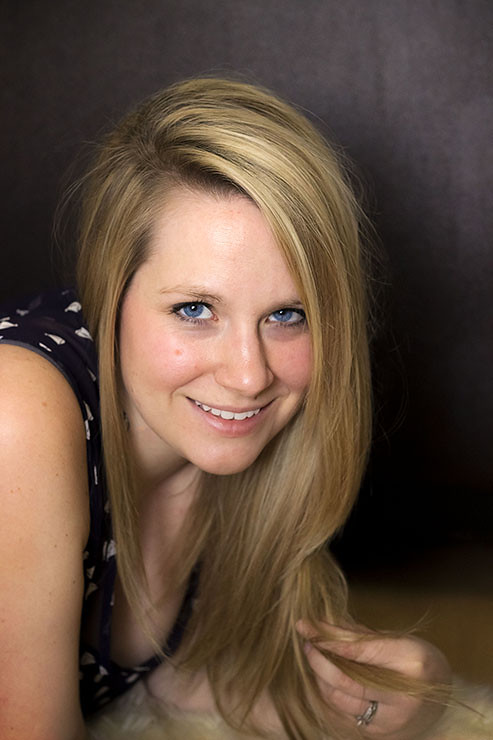

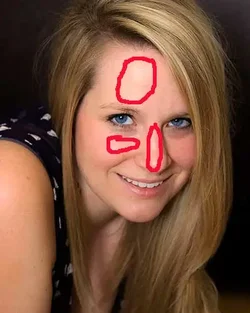
lovely wife by jsauve86, on Flickr
 
Welcome to the forum!

Not a bad start. I would have had her place her left hand on the ground like her right hand is. It takes my attention away from her blue eyes and down to her hand that's twisting her hair. Also, I can't tell if it's the angle I'm viewing my monitor or not, but her right cheek and forehead seem a bit too bright/shiny. Looking at some of the others on your Flickr account, it seems like the shine is there in other images too.

I see you didn't use flash, but what type of ambient lighting did you have for these?
 
Thanks for the comment! I'm hoping some others may be able to weigh in on the forehead/cheek brightness, on my monitor at home, and also on my monitor here at work they are certainly brighter than other areas of her face but they don't seem overly bright to me. But of course that could very well be down to how I have my monitors set up! My wife is very fair skinned as well which I'm sure is contributing. If anyone else believes they are too bright as well then I'll definitely have to re-visit my monitor setups/calibrations!

The lighting was natural light coming in through a window. I had the curtains about 70% closed I believe for most of the shoot.
 
Your wife is naturally pretty and that helps a lot.
but I think the pose is awkward and leaves a lot of non-contributing space.
There are definitely bright spots on her cheek, forehead and nose and the is a blemish right in the center of her right cheek.

This is a terrific start so lets see more.

$8527379658_2f6a86e3e0_blll.webp
 
Thanks for the feedback, I'll have to try to pull back on the lighting a bit it in the future. And the blemish is actually a "beauty mark", and I didn't photoshop it out since I still want it to look like my wife and it is a defining feature of her face :)
 
I am assuming that by pulling back on the lighting, you mean increasing the distance between the lighting and your subject? That will only make the light harsher... not a good idea. If you mean reducing power, that will help a little but it won't fix that glare. The best thing to do is soften the light better... with either a larger light source, or at least a more diffused light source. Pretty lady!

Edit: Oops.. missed the No Flash Used part...!
 
Last edited:
By having your curtains mostly closed you're making a smaller, harder light.

With a window i'd open it fully and move further away if you have room to get out of the direct sunlight - the indirect light will have less glare

I had a look at you flickr. Its a great start and you have a great in-house model, but her shoulders are by her ears on most of them. I'd start with standing or sitting, rather than on the floor - it should make the posing easier
 
Good start. One of the things that jumps out for me, is that even though you said you didn't use flash, you have placed her in a position where whatever lighting you did you, pretty much emulates on-camera flash.

The light is, relative to her, pretty close to the camera position. Look at the catch lights in her eyes, they are almost dead center. Look for the shadows on her face (the nose shadow is always a good tell tale sign). The nose shadow is just a tiny bit to one side. The result is that overall, the lighting is pretty flat. Not completely flat, so that's good. But I think that more 'side light' would make for a better portrait.

As a nice starting point for portrait lighting, try to have the nose shadow point toward the corner of the mouth (but not touching the mouth). Another thing to look for, is the key light being at more of a 10 or 2 o'clock position, rather than in the middle of the pupil. Also, it's usually more beneficial to use 'short' lighting, as opposed to 'broad' lighting, like you have here. (have her looking toward the light, rather than away...or move the camera to the other side of her face).
 
Really appreciate the great feeback everyone!

I'm going to have to try a different location in my house, where we took these shots there is next to no room for much of any movement, but I will certainly try to work on short lighting next time. For the first 20 shots or so, I was actively trying to do short lighting, but fell victim to not liking what I was automatically seeing on the LCD and aborted it. I forgot how powerful post processing is when you shoot RAW, so I may have actually been able to work with some of them, but I will definitely be trying this next time. Having the catchlight at 10 or 2 is a rule I'll definitely drill into my thought process.

Jumping back to moving further away from the light source, I could move her away from the window(she was probably no more than 6ish feet from the window, which is approximately 3 feet wide by 5 feet high), but then I won't have anything as a backdrop. I need a bigger house! Still I will give that a try and see if I can manage to create a half decent blurred out backdrop with aperture use since that may be my only choice for now until I buy a speedlight and can have other location options to shoot from.
 
Moving away from the light source probably won't solve any problems. In fact, it would just make the light harder. Usually, you want softer light for portraits, so getting closer to the window (so that it's larger, relative to her) will probably be your best bet. Put her right beside the window, and shoot her from the side (along the wall).
 
^^^Not always true; depending on whether it's cloudy or sunny, which way the window is facing, etc.

If it's sunny, and the sun is shining into the room, moving away is the best bet - adding another 3 feet to 93 million miles doesn't make much odds in terms of light source size, the main thing is to get out of the direct light - the window is bigger than the light source (the sun), so the window does not become the light source in terms of size.

If it's cloudy, or your room is north facing, then your light source (the sky) is bigger than the window, so the window effectively becomes the light source, so moving closer is better.

Standing next to the window has more or less the same effect as moving away from it - it removes it as a direct light source, and you're mostly being lit be the reflected light from the room.


Edit: Slight thread derail... hey Mike, which Edmonton are you in? The north London one, which is actually not that far from where I live, or the Alberta one? Also been there (much nicer than the original Edmonton btw - certainly the locals are a LOT more friendly!!!
lol.gif
, although I was a bit sad when I found that the Russian teashop didn't have any milk to put in my tea! :( )
 
Last edited:

Create an account or login to comment

You must be a member in order to leave a comment

Create account

Create an account on our community. It's easy!

Log in

Already have an account? Log in here.

New Topics

Back
Top Bottom