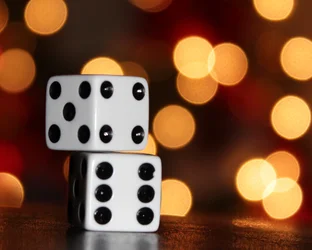
Not bad at all! It's very difficult to get a nice out-of-focus background on that particular lens. At the wide-angle end (18mm) you can use a low f-stop except the short focal length (wide angle of view) tends to stretch the depth of field and reduce the blur intensity. At the long end (55mm) the depth of field isn't stretched by the focal length or angle of view, except the lens restricts the lowest focal ratio (f-stop) to f/5.6... which tends to reduce the intensity of the blur. About the only way to create this effect is to have a very close foreground subject and a very large distance between foreground and background.
You'll find it's MUCH easier to create the effect if you can use a lens which allows you to have a normal to long focal length AND still have a low focal ratio.
The dice are a little "soft" on the focus. I'm not sure how far away they were but it's possible you were sneaking inside the minimum focus distance for your lens. Also, the image isn't "level". It's trivial to "straighten" a digital photo using computer software. In the days of film it was a HUGE no-no to have images that weren't "straight" (meaning a level camera.)
It's still good practice to learn to keep a nice level camera for two reasons:
(1) Shots that can offer a lot of detail often "look" better than shots that lack detail. As the saying goes "If your pictures aren't good enough, you're not close enough." (Robert Capa said that... Capa was a famous photojournalistic photographer.) Getting close provides DETAIL. Detail makes the photo intimate and interesting. That means you'll often want to "fill the frame" with your subject. BUT...
(2) if you "fill the frame" and the frame isn't straight, it'll show. When you try to level the shot on the computer, it'll have to crop a bit of your edges off... possibly cropping into your subject much to the detriment of the photo.
Some people advocate leaving some room around the photo and not cropping in tight when you take the shot. Turns out that may be good advice for certain types of framing (if you print to canvas, the canvas is "wrapped" around the frame... if you don't leave an extra border to allow for the wrap around the frame then you'll lose some of the image.) Still it doesn't matter... because if you plan to print to canvas and leave a border for the "wrap" BUT STILL have to straighten the image then it'll just take away from the space you created.
Good job squeezing that much out-of-focus blur from that particular lens.




![[No title]](/data/xfmg/thumbnail/38/38740-d1a7721cf77e9309a9b4a4829c65fdd4.jpg?1734172602)
![[No title]](/data/xfmg/thumbnail/33/33447-c3f5563c9b8b1f19498a3062f60f92b1.jpg?1734163486)