What's new

my girl

sarah_19_nz

No longer a newbie, moving up!
Joined
Apr 1, 2013
Messages
411
Reaction score
148
Location
New Zealand
Can others edit my Photos
Photos OK to edit
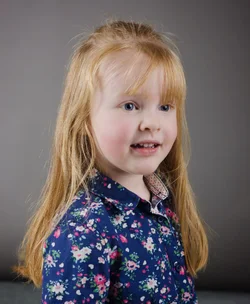
I have posted the 'unedited' version of this is the 'beginners, photography basics' forum, but posting here to get a critique... Yes I'm beginner/intermediate level photography but completely new to studio set up. Let me have it! but please explain in detail what you mean and HOW to physically improve my work when pointing out the flaws :)

Thank you so much. :)

$laraheadshot.webp
 
I have posted the 'unedited' version of this is the 'beginners, photography basics' forum, but posting here to get a critique... Yes I'm beginner/intermediate level photography but completely new to studio set up. Let me have it! but please explain in detail what you mean and HOW to physically improve my work when pointing out the flaws :)

Thank you so much. :)

View attachment 42646

$laraheadshot_LR export.webp

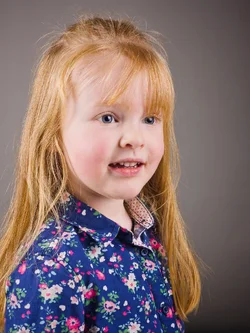
Well, I think it's a little bit cool,in terms of both white balance and tint. It might be accurate, but it's more-pleasing to be ever-so-slightly warmer-rthan-accurate or warmer-than-neutral on little kid shots.

The background: we can see the floor/wall juncture, and that takes some emphasis off of the little girl, so I cropped that out. I took this image into Lightroom and cropped a tiny bit off the left sider and a bit off the top, and a fairly significant,yet small, amount off the bottom. What did that do? It got her eyes more space to look "into". It eliminated the wall/floor juncture and it made her bigger in the context of the frame.

I added a tiny bit of clarity, added a tiny amount of saturation, and added a little bit of contrast. Very small amounts. I warmed up the image, a slight bit with tint. NOT much, but just a little. I added a Lightroom preset called Matt's Edge Darkening, #1 (light) to make the corners of the frame a bit darker.
 
I have posted the 'unedited' version of this is the 'beginners, photography basics' forum, but posting here to get a critique... Yes I'm beginner/intermediate level photography but completely new to studio set up. Let me have it! but please explain in detail what you mean and HOW to physically improve my work when pointing out the flaws :)

Thank you so much. :)

View attachment 42646

View attachment 42647

Well, I think it's a little bit cool,in terms of both white balance and tint. It might be accurate, but it's more-pleasing to be ever-so-slightly warmer-rthan-accurate or warmer-than-neutral on little kid shots.

The background: we can see the floor/wall juncture, and that takes some emphasis off of the little girl, so I cropped that out. I took this image into Lightroom and cropped a tiny bit off the left sider and a bit off the top, and a fairly significant,yet small, amount off the bottom. What did that do? It got her eyes more space to look "into". It eliminated the wall/floor juncture and it made her bigger in the context of the frame.

I added a tiny bit of clarity, added a tiny amount of saturation, and added a little bit of contrast. Very small amounts. I warmed up the image, a slight bit with tint. NOT much, but just a little. I added a Lightroom preset called Matt's Edge Darkening, #1 (light) to make the corners of the frame a bit darker.

great! Thank you I love it and have learnt a lot from your posts Derrel!! :)
 
What a cutie.

The one thing that stands out to me, that would make it a better photo, is if she were looking at the camera. That helps to create a connection to the viewer, making it a more 'effective' portrait.
The usual problem we have as parents and photographers, is considering what the casual viewer will think/see. You were there (taking the photo) so you probably have a good idea of what she was looking at. You are her (mother?) so you know her personality and that look/expression probably has a lot of meaning to you (you probably know what she was thinking).

A causal viewer doesn't know what she may be looking at or what her personality is like. So in that sense, there is a disconnect between the subject and the viewer.
If you want to create strong, successful portraits...it usually helps if the viewer does have a connection with the subject. One was is to have the subject looking at the camera but another way is to have the subject looking or interacting with something tangible. The issue here is that she's interacting with something that we don't know. This can be used to add mystery to the portrait...but I don't think that you're going for mysterious here.

And of course, you may not even want or need to have that connection from subject to viewer. If this is just going to be a personal family photo, where all the viewers will know her...then it's not so important. But as a formal portrait goes...I think it could be better with that connection.

You probably knew this...and are just wanting to tell me that "she's a kid, YOU try getting her to look at the camera". :lol: My twin daughters won't so much as acknowledged my presence when I've got a camera in hand. :roll:

As far as the lighting goes, it's a little bit confusing in that the light that we see in her eyes is from our right, but the brighter side of her face is on our left. Another way of putting it, would be that the catch lights are from the 'fill' light. That's not the worst thing in the world, but it's usually not as good as the catch lights showing up as reflections from the main/key light.
You may have intended the light on your right to be the main light...and in some sense it is, as we can see a shadow to the left of her nose. But the light on your left is then too bright IMO. It works great on her hair, but that whole side of her face is getting to be too bright.

What I'm thinking would be to bring the light on your right, in closer to her. Making it softer and brighter on her. Then move the light on your left, a little higher and further back so that it's mostly lighting up her hair, but not so much the side of her face.

Again, I know...kids: they don't tend to sit still for precise portrait lighting but since you asked for C&C... :)
 

Create an account or login to comment

You must be a member in order to leave a comment

Create account

Create an account on our community. It's easy!

Log in

Already have an account? Log in here.

New Topics

Back
Top Bottom