What's new

Need Help editing this photo...Please!

Tracybug

TPF Noob!
Joined
Dec 20, 2011
Messages
53
Reaction score
10
Location
United States
Can others edit my Photos
Photos OK to edit
Hello,

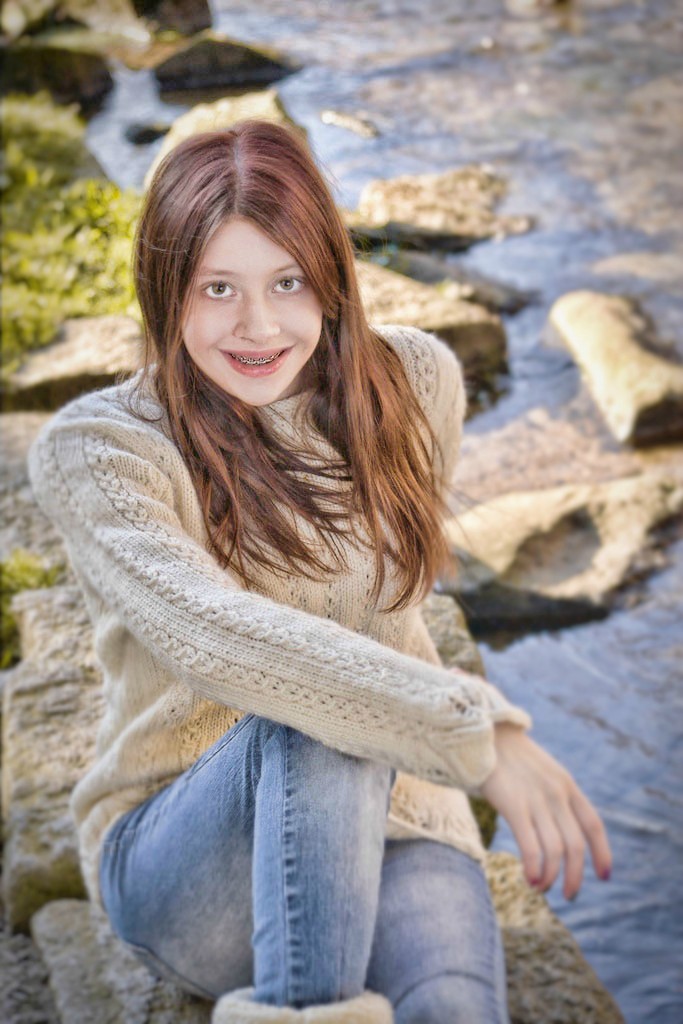
I know that this picture is far from perfect but it is Christina's favorite of the photo's we took of her yesterday. Her only real complaint....Her knees got wet when we did some photo's of her kneeling and that is very obvious in this picture!
She would LOVE if someone here could fix that for her!!! Anyone have any magic edits for her??

Thanks!
Tracy


LIKE by joecrisjon, on Flickr
​
 
I'll play. Two versions:

wetknee1.jpg


wetknee2.jpg
 
WOW!!!! Christina says "IMPRESSED!!!!" She loves it and wants to know how you did it!!! My editing skills are well not very impressive!!! :)
 
I'm not sure if I'm correct but it looks like he MAY have used the clone tool and took parts of the dry pant and placed it over the wet spot, please correct me if I am wrong. I am still learning about editing as well.
 
WOW!!!! Christina says "IMPRESSED!!!!" She loves it and wants to know how you did it!!! My editing skills are well not very impressive!!! :)

1. Selected "wet" area with lasso tool.
2. Started up a Hue/Saturation adjustment layer, which used my selection for the mask automatically.
3. Changed the layer style to "Lighten".
4. Increased Lightness to taste in the Hue/Saturation adjustment layer, ending up at +10
5. Adjusted the mask edge a little to feather it in.
6. Saved for web: Version 1 (in sRBG, which is why it's a tad bit more colorful than the original)

For Version 2, I went an extra step. I copied everything to a new layer using CTRL, ALT, SHIFT, E. Then used the patch tool to copy the denim pattern from the dry part below into the newly lightened area, and saved it out as Version 2.
 
Hey Buckster, thank you for posting that, I really appreciate that.
 
Use fill flash, or get the camera out of matrix/evaluative metering and use spot metering instead.

You want her to be the brightest part of the image, not the background. The human eye is naturally drawn to the brighter part of any image.

In the art world it's described as "light advances, dark receeds".

In photography circles it's called making a photo subject 'pop'.

another issue is that under exposure adds image noise in the under exposed parts of the photo. When, edits are done in those under exposed parts of the image the image noise becomes a lot more noticable and the photo begins to look like BAD.

Did you notice the bright rock growing out of the top of her head?

I hate having to go to Flickr to look at the photo EXIF data. What shooting mode did you use, the EXIF data is ambiguous. But the EXIF indicates you did use strobed light (flash)?
 
Last edited:
I wonder where all the "Get it perfect in your camera instead" harpers? They should be here to suggest you have a couple dozen wardrobe changes handy instead of 'cheating' by editing in post.
 
I like your edit CC.
 
Ooops I forgot her hand
 
Here is a really quick edit that I did.... its not great but I hope you like it. :)


ry%3D400
 

Create an account or login to comment

You must be a member in order to leave a comment

Create account

Create an account on our community. It's easy!

Log in

Already have an account? Log in here.

Back
Top Bottom