What's new

Need tips/advice using push pulls lens.

Patriot

No longer a newbie, moving up!
Joined
May 10, 2012
Messages
810
Reaction score
117
Location
Spokane, Washington
Can others edit my Photos
Photos OK to edit
I would like to ask for any advice anyone can offer using a manual push/pull lens. I have regular manual lens that are easy to use, but the push/pull has been the hardest to try and master so far. Finding the focus is giving me the most trouble. I'm using the exact same lens as the photographer in this set 70-210mm f/3.5 Vivitar Series 1 (Kiron) - a set on Flickr. His photos are all sharp and I don't understand how he does it, unless he uses a tripod. I figure that if I could master this type of lens thing it would really help me later on down the road.

Any advice or tips on using these type of lens would be much appreciated.
 
Most of those are in bright light so I suspect using depth of field to his advantage is helping.

I do have a lens like that, but haven't used it in a very long time since it's for my 35mm body. Push-pull to focus, twist to zoom, or perhaps the other way around. After a while I got to the point that I just "Did It", it became natural with that lens, and I didn't have problems with it any more. It does take some time though.

Just give it some time and use DOF whenever possible.
 
I'm familiar with push-pull, manual focus lenses. Not too long ago, I bought a Nikkor 80-200 f/4 AiS...it works great!!! Anyway...one tip is to zoom in by sliding the collar close to you, and focus from Infinity and inward, coming closer, RAPIDLY, until things look "good", then STOP; at that point you will be very close to the right focus distance....take a peek at the in-viewfinder AF confirmation "dot", and you mighty just need to nudge the focusing ring a teeny bit to get dead-on focus. THEN, zoom back out, to the right framing. On a well-made zoom of this type, usually the focusing distance will not tend to change as the lens is zoomed. If you are wondering, the red index line to the white of the visible light focusing index line is for Infrared film. The yellow line I am surmising is the index used with the macro feature engaged.
 
Many older zoom lenses are 'parfocal'. A parfocal zoom lens lets you zoom in close and focus nice and sharp, and then zoom back out without having the focus change.

I don't know if that Vivitar lens is parfocal or not.
 
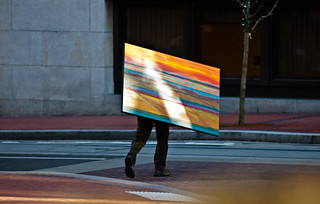
Ohhh-I LIKE that shot, "Art Imitating Life"!!! Wayyy cool man!
 
Thanks Derrel and yep proves my points about practice. Had a whole 3-4 seconds to see and capture before missing the optimal position and continuing street traffic. Which means for me practice until becomes ingrained automatic reflex without thinking about operating the equipment kind of thing.
.
 
Thanks for all the help and advice. I will go out and practice until my arm gets tired. That lens is not "parfocal" which would've been nice. I don't know how the Nikkor 80-200 f/4 compare to the Vivitar in terms of sliding the collar, because it has some resistance to it.
 
The collar on the Nikkor is kind of stiff...it is not "loosey-goosey" in its sliding action...which seems to be the way the majority of push-pull lenses from Nikon were designed--they have the ability to be zoomed back and forth without the focusing collar rotating very much, or at all...so, if the Vivitar is the same way, that would make sense. The Series 1 lenses they marketed were always designed to be pretty good, and well-made lenses.
 
Well I have been practicing for some time now and I can say that I've gotten better at it. I brace my arm against my body to hold the weight of the lens. I also used my sb-910 to help with any arm movement. Now I need to get faster at moving the slider and dialing in the right settings so I can shoot moving subjects.


Bokeh f3.5 (2) by Jarrett_Hunt, on Flickr


Bokeh f8.0 by Jarrett_Hunt, on Flickr


This goblin and hedgehog has been my test subjects for bokeh, sharpness, and to see how long it takes me to find that sweet spot.
 
Last edited:
Jarrett,
One thing that often helps is to focus from FAR to NEAR...the rate of focus going from far to near is faster than when going from close to far, and the human eye is good at spotting differences, but less adept at discerning between things that are nearly identical in appearance...so...focus from FAR and inward, and turn the ring FAST. When it looks good, STOP! Then, perhaps a teeny-tiny little hitch backward, and you SHOULD BE GOOD TO GO!!!

Learning what "looks good" as far as in-focus thru the finder is a learned skill, and that is where practice comes into play. again,focus far to near,and when it looks good, STOP focusing, and you ought to be very,very close. Then if need be, refine the focus with a very small movement, or two, and SHOOT!

Try this method a few times in some practice sessions, and I think it will pay dividends.
 
A split prism focussing screen might be of some help. They do tend to 'go dark' in dim light and might affect spot metering at the centre point but they are helpful. I believe Katzeye have them for D7000.

edit: I've used manual focus lenses for much longer than AF ones and the technique Darrel describes works very well. With a bit of practice it becomes instinctive. Remember, shooting at maximum aperture makes focus critical. Stop down the lens a bit when you start out just to get the feel of it.
 
I did add a split prism screen to my camera to help out. Hopfully this weekend I can take it out and used the tips you gave me.
 
Oh, lucky you!! If you have a split image screen, HERE is a little tip: when focusing is tough, aim the split image rangefinder area at a straight-edged item within the shot. Look closely at the split image rangefinder zone, and wiggle the camera up and down, up and down, up and down, and look CLOSELY at the straight-edged item in the split image area. If the focus is dead-on, the straight line's image will remain straight!!! If the focus is off,even a tiny bit, the straight line's image will appear to move back and forth as the camera is wiggled up and down!!! This is most useful in really,really,really BAD lighting conditions.
 

Create an account or login to comment

You must be a member in order to leave a comment

Create account

Create an account on our community. It's easy!

Log in

Already have an account? Log in here.

New Topics

Back
Top Bottom