What's new

New Camera ~ new to photography~ Amish

LLD

TPF Noob!
Joined
Jan 23, 2013
Messages
77
Reaction score
15
Location
Midwest
Can others edit my Photos
Photos OK to edit
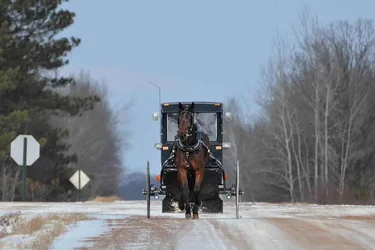
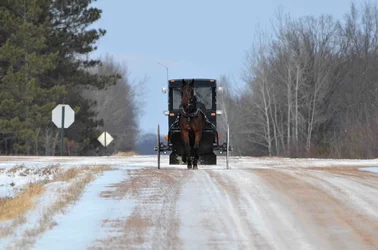
New to the site and new to Nikon D7000. Took this through the back car window that was cover with slush. I tend to use the preset settings under scene. My daughter encouraged me to join this forum to gain advice. I got so excited when this fast moving buggy came around the corner I just began snapping and not thinking of focusing or positioning.

Also took me an hour to figure out how to upload here. Might have made the photo too small.
 

Attachments

  • $DSC_4285.webp
    $DSC_4285.webp
    155.4 KB · Views: 168
This is a nice shot and a good opportunity to learn something.
The camera will try to expose so that the entire scene is medium grey (assuming that the camera is set to meter off the entire frame)
So the dark horse will be under-exposed and will meld into the carriage.
Also there is lots of road - which is sort of unnecessary.
I would brighten the carriage and horse - then crop away some of the extra space because it doesn't add anything to the image.
It would have been much better to have gotten the other side of the signs so they were a spot of color rather than a blank figure.

$DSC_4285lll.webp
 
Welcome :D

Yes the Horse and cart is a bit under; Lew has worked on it well. Original image has the potential which was unveiled by Lew
So regards to both :D
 
I think this has the potential to be a very nice picture. The snow probably fooled your camera's meter into thinking the scene was brighter (I believe) than it really was, so the picture came out somewhat under-exposed. A tighter crop to lose the road signs would also help, but I wouldn't crop too tightly - I think having the extra space adds to the mood and the idea of isolation. (Maybe you could crop symmetrically just inside the stop sign and clone out the other sign.)

People also often advise you to not center your subject in the frame, but in this case I think having the horse and buggy centered actually adds to the picture's impact.
 
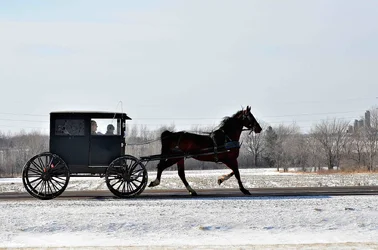
Thank you Lew I'll try that. I'll post another I took of a family and see what you think. I only have the program that came with my camera ~ which I'm also just learning.
 
I tend to over adjust and can't get it "quite right"
 

Attachments

  • $DSC_4368.webp
    $DSC_4368.webp
    448 KB · Views: 127
I see what you mean when you brightened the horse.. looks much better!
 
I tend to over adjust and can't get it "quite right"

You won't be able to fix the second one for two reasons.

First, you need an editing program more powerful and able to select and adjust specific areas within the image. (get PS Elements or something similar)

Second, the horse and cart are so underexposed that there is no workable detail in them.
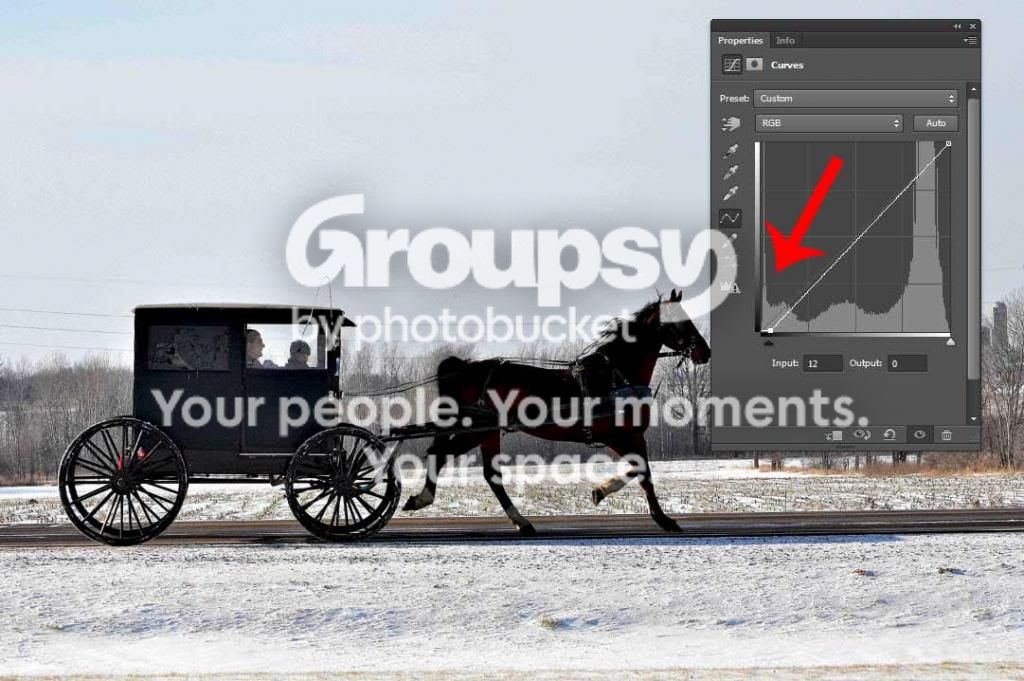
The image below is a histogram of the number of pixels at every darkness level.
The red arrow points to that amount that is at the very darkest level - note the spike-.
There is no detail so that can't be lightened much.
And if you try you will be also magnifying the noise in the shadows.

Search and read about dynamic range, digital noise.

horse_zpsce1f2df8.jpg
 

Create an account or login to comment

You must be a member in order to leave a comment

Create account

Create an account on our community. It's easy!

Log in

Already have an account? Log in here.

Back
Top Bottom