You can use the "Loony 11" rule: Set the focal ratio (aka "f-stop") to f/11, then set the shutter speed to the inverse of the ISO (e.g. at ISO 100, then use 1/100th second exposure. At ISO 200, use 1/200th... ISO 400... use 1/400th, etc.)
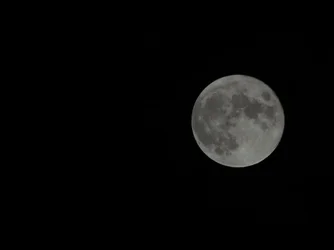
Your exposure looks good... often I see photos of the moon in which the moon is over-exposed. Cameras tend to do that because they're pointing at a black sky ... tricking the camera into thinking it needs a brighter exposure -- but this over-exposes the moon. Your image does not appear to be over-exposed. You could have increased the exposure a little, but this is workable.
Its tough to get a detailed photo of the moon without a telescope or long lens.
I've posted this more than once before, so I'll just post a link to my flickr image this time (instead of the image):
Gibbous Moon | Flickr - Photo Sharing!
But that's taken through a telescope... the scope is natively a 101mm aperture, 560mm focal length apochromatic refractor (quick math will tell you that's f/5.6). But that would have left me with a small-ish moon in the middle of the image. So I used a 2x double... in my case it's a TeleVue 2x Powermate (TeleVue is a high end maker of telescopes and other optical gear for astronomy.) That brings me to f/11 (1120mm).
The next thing that can work against you is the stability of the atmosphere (or rather the lack of a stable atmosphere). The atmosphere can distort the image quality... like looking at something through wavy water. Ideally you capture a shot when the atmosphere is stable. The guideline is that you want to make sure that there is no warm front, cold front, or jet stream within 200 miles of you. Also land creates turbulence. Shooting over water (but we're talking massive bodies of water... oceans, great lakes, etc.) tend to smooth out the airflow. The reasons stars appear to "twinkle" is due to this instability (in astronomy it's proper name is "atmospheric scintillation"). Image "stacking" helps a lot... you shoot several seconds to perhaps a minute of video then process it through a program such as "Registax" (numerous YouTube video tutorials exist for this) and it helps create a much better image than you could get from a single frame.
Lastly, you can't have good "light" without good "shadow". When the moon is full, the moon is on the opposite side of the Earth relative to the Sun rather on the side. This means you're getting a more-or-less front/flat lighting. All those mountains and craters don't cast shadows. When the moon is on the side of the Earth (1st quarter or 3rd quarter moon phase) then you get LOTS of shadow detail and suddenly the moon looks very 3-dimensional rather than flat.
If you look at my image you'll see the far right side of the moon doesn't have any shadow detail (the side nearest the sun) but the closer you get to the lunar "terminator" or "limb" (the line that separates the bright side from the dark side) the more you see shadow detail and the moon is much more interesting.



![[No title]](/data/xfmg/thumbnail/37/37124-e3a7364a555409b3504415a982f9dfe0.jpg?1734169833)