What's new

Noob First attempt photo for c&c

Matt24138

TPF Noob!
Joined
Jun 20, 2011
Messages
113
Reaction score
7
Location
Delaware
Can others edit my Photos
Photos OK to edit
I used an iso of 100 in bulb aperture was set at f11. I think it turned out ok I did some others but my subject was to dark any tips should I raise my iso for dark subjects?
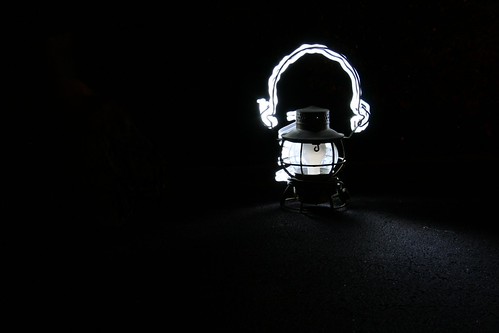

lp1 by Misfit0138, on Flickr

I really have some cool ideas for this stuff I was trying to get photos of my kids car its one of those red and yellow ones with the eyes using light to make it seem like its doing a burnout the burnout turned out great but you could barely see the car. I dont want to put the car in direct light because I will be too noticeable in the photo. I am tinking higher iso like I said above let me know.
 
Not sure what this is a picture of. Not sure what you wrote under the photo either. I think you are asking about exposure? Just take your time and retype out what you mean in a little better way I can understand and I will try to help.
 
  • Thread Starter 🔹
  • Banned
  • #3
That is a Light painting of an old lantern. I am pretty happy withthe way that photo came out. I was trying to do some other objects but they didn't come out as clear. So what I was wondering the lantern is rather small so the led light lit it fairly well. For larger objects would I need to raise my iso or use a larger aperture or both to for an object to be more visible in the dark.
 
I would remove whatever is on the left side of the picture, other then that it's kind of cool :P
 
  • Thread Starter 🔹
  • Banned
  • #5
That's where I went a little too far with the light. It's was hard to judge in the dark where to stop. I wanted it to be backlit to bring out the lantern so I made circles behind it with my LED I took about 5 shots to get it that close I will load it up in gimp and take those edges out. Thanks glad at least 1 person likes my photo :)
 
  • Thread Starter 🔹
  • Banned
  • #6
Can anyone help me with my question. The other objects I shot came out too dark. I need a really dark area so I don't show up in the exposure the led light comes out great but my object doesn't so would I need to adjust the iso up and use a larger aperture?
 
Ok, now I understand. Using the exposure triangle I would try a few shots just adjusting one thing at a time. By that I mean, first try raising your aperture. Raise it a little more for another shot and a little more for the next. Then set the Aperture back to the original setting and try raising the ISO. Then a little higher ISO with another shot and so on. Any of these steps should bring more light into the scene. I suggest doing this way so that you can see how each setting will change it. With higher ISO's at some point you will start to introduce noise into the images. With a higher aperture you might see a little more of you. Just experiment with it.
 
Keep ISO at 100...30 second exposure...brightest light you can find...and a suitable aperture for the distance away from the subject...further away the larger the aperture you can use (f/5.6, maybe even f/4), if its close...go for a smaller aperture f/11 or similar...

Here's a piece of junk 30-second-exposure-shot with cellphone flashlight app for lighting:

5955228265_ba3d8b43b1_b.jpg
 
  • Thread Starter 🔹
  • Banned
  • #9
I don't want to use a bright light to illuminate the object. I want to use my led as a paintbrush lighting only certain areas. I may need to use a dim light in order to get the subject lit in certain scenarios. If I use a bright light I will become visible atanding there painting the light.
 
You could always try wearing dark black...and its such a small object I don't know how you would be in the shot long enough to be captured...I'll try to do something similar and see what I can come up with. At this point, I unfortunately have no suggestions. I apologize.
 
Even in this photo as dark as it is I had to edit myself out in gimp my legs showed up in the left as I had to kneel beside it to do the light. I dressed in black and used a black bag over my hand. I am trying to figure out how to do bigger objects I think I may have to do the lighting step out of frame and than light the object with a flashlight it will just be a long exposure.
 
Yup, I would agree...that's what I'm thinking. Like I said, I'll make an attempt as well...
 

Create an account or login to comment

You must be a member in order to leave a comment

Create account

Create an account on our community. It's easy!

Log in

Already have an account? Log in here.

New Topics

Back
Top Bottom