What's new

Oh Goodness...1st wedding c&c...

tmjjk

No longer a newbie, moving up!
Joined
Mar 28, 2012
Messages
550
Reaction score
61
Location
Cleveland
Can others edit my Photos
Photos OK to edit
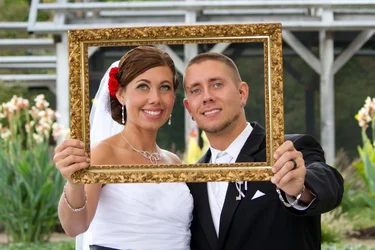
1 $tpf2.webp


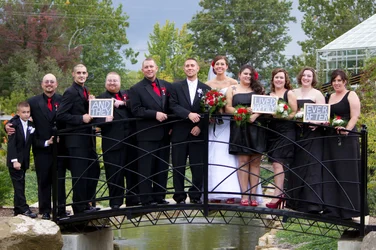
2$tpf3.webp


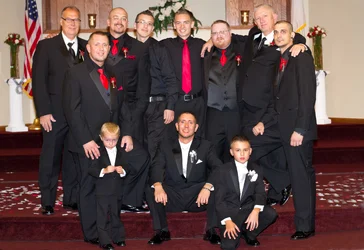
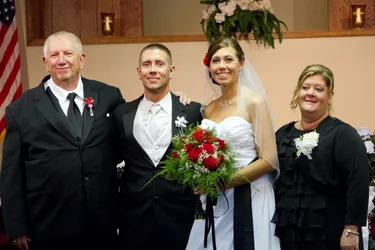
There are of course quite a few more... but I thought I would start slow and post a couple for critique. This was my first wedding. The father of the groom is a photography hobbyist and was the main photographer for the wedding. He knew I wanted the experience of a wedding without the pressure, so he invited me to second shoot for him. Please offer me any advice to improve these images... and if you don't mind there are more I will post later.
 
Great job!! What lens/setting did you use?
 
Looks like they are trying to invoke Murphy's law there on #2
 
I have to say it-and I am really not being mean, I promise-these are the cheesy shots that will come back to haunt you. They go on that list we have somewhere of the overdone shots that we cringe when we see them. Aside from your props they are well exposed with great focus. First one is a bit on the warm side on their faces, otherwise color is great.
Bride looks like she is trying to actually fit into the wedding party in the second one. Both are going to have a problem in printing to any standard size because of crop factor.
 
The props were brought by the bride :) there were some even worse I wouldn't even post lol. The groom making a heart shape on her butt while embraced in a hug... Ick! Haha :) I don't take your comments as mean at all! I struggled quite a bit with the indoor lighting ... The exposure was best on these so I thought I would start here :)
 
The props were brought by the bride :) there were some even worse I wouldn't even post lol. The groom making a heart shape on her butt while embraced in a hug... Ick! Haha :) I don't take your comments as mean at all! I struggled quite a bit with the indoor lighting ... The exposure was best on these so I thought I would start here :)
Is what you struggled with something we can help you with for future? You have some lenses that are pretty weak for indoor shooting, even on your 7D. Your primes are great, but the wide and the zoom hurt a bit. Those are my go to's for weddings. I shoot with a 70-200 f/2.8 on one body and a 17-50 f/2.8 on the second. I am guessing you ended up using your 50 a LOT?
 
tmjjk said:
The groom making a heart shape on her butt while embraced in a hug...

L.....O.....friggin..L...!!!!!!!
 
The next lens I will purchase is the 70-200 2.8, I am saving for that now. I have a 430 speedlite that I just purchased along with a light sphere. The images I struggled with the most were inside the church... I will post those in the morning when I am back at my pc. They are pretty bad... If I posted them first I don't think some of you would give me the time of day :/ but I promise if you tell me what I did wrong that I will work on it until I get it right.
 
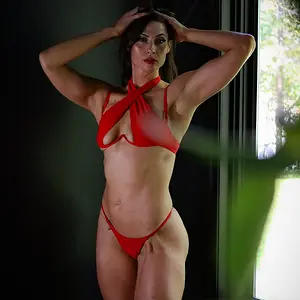
3$tpf123123.webp Here is where the trouble is...
 
4$tpf345234.webp
In this photo... I know it is crooked and the crop is awful and I cut off her hands, and the subjects are not looking at me....lol.... This is not the only image from this series. I am posting this one because it is the best example of the issues I was having regarding different light temperatures. What could I have done differently... my gear is listed in my signature. Please help!
 
Flash to cancel out the different lighting problems. Although I'd probably want to use at least two flashes off camera for this situation so you aren't getting the dead on flash in the face look to it.
If your flash is the light which is illuminating your subjects completely it's one temperature and would be overpowering the other light sources therefore canceling out their color problems.
For these problems in processing I'd use the adjustment brush in ACR/LightRoom on the subjects to bring them all to the same color.
 
Thank you MLeek.... I am using Lightroom and photoshop, so I will research on using the adjustment brush to fix coloring...
 
Do you prefer using the raw editor in LR or in Photoshop?
 

Create an account or login to comment

You must be a member in order to leave a comment

Create account

Create an account on our community. It's easy!

Log in

Already have an account? Log in here.

New Topics

Back
Top Bottom