What's new

One photo for C&C, and a question...

SNBniko

TPF Noob!
Joined
Apr 1, 2011
Messages
210
Reaction score
24
Location
Indiana, Purdue
Can others edit my Photos
Photos OK to edit
This is a picture of my dog, Olivia. Things I like? The softness of the foreground and the background, and her expression (she needs to be in a humane society commercial, eh?). I also like the lighting in her eyes. Things I don't like: I would like a little more of her face to be in focus, wish the coffee table wasn't on her right, and I'd like her to be a different color other than black. =P This photo is straight out of the camera, no editing.

_MG_3225.jpg


Okay, and for the question. I was flipping through this thread from another forum (I picked the link to it off of here...) and I was wondering how some of these people get the whole face in focus while using the lens wide open? I can never do that... the nose or mouth or what have you ends up blurred. Unless the people are just specifying the lens and not the f-stop? I don't know, but lots of tack sharp pictures in here...

Prime Lens Portraits - Post Your Best!! - Canon Digital Photography Forums
 
Last edited:
Can't help you with the coffee table or with the color of your dog but as for getting more of its face in focus it's a question of aperture. You shot this photo at f/2.8, at close distances this aperture gives you a very shallow depth of field. Had you closed down your lens to f/4 or even f/5.6 then you would have had more depth to the zone of focus and thus more of her face would have been in focus. Of course this would have reuired you to either slow down your shutter speed or increase your iso.

Look up 'depth of field (dof)' and 'circle of confusion'.

Your camera has a depth of field preview button. When you press it while looking through the viewfinder you will notice two things: the image will darken if you are not at maximum aperture and you will see which parts of the image are in acceptable focus.
 
Oh haha. It sounded like I was confused about that... I know how to change it, however it would have changed the quality of the bokeh, and made less 'blur' out of the foreground and background. Hey, at least her eyes are the focal point, haha. =) Thanks for commenting!
 
A few things:
- you can get free apps that tell you the hyper focal distance. This is the amount of image that will be in focus given the focal length and distance to the subject. Knowing the hyper focal distance helps you to determine where to set your focal point on tough subjects like a dog with long snouts.
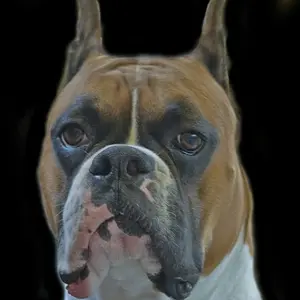
- The couch and coffee table might be nice for setting but, for me, they don't help the composition. You have already clipped the dog on the left and right side, so I have tried a horizontal crop on the image below. It gets rid of the background and puts the eyes at a thirds point.
- added a little sharpening and colour correction. The colour correction is personal taste. I know many people would want to keep the warm cast of the original.

dogRv.jpg
 
Oh cool! It's weird that the picture has a warm cast (it does, I can see it too), because the lighting was supplied by really cold, white, CFL bulbs (I *hate* CFL bulbs). I like your edit. Thanks so much!
 
For any specific lens focal length, hyper focal distance is the focus distance at x f/stop where DOF behind the focus plane reaches infinity and not beyond. In a landscape photo that includes infinity setting hyper focal distance allows for maximum DOF. In a photo like this with the focus plane so close to the camera there is no hyper focal distance.

Joe
 
For any specific lens focal length, hyper focal distance is the focus distance at x f/stop where DOF behind the focus plane reaches infinity and not beyond. In a landscape photo that includes infinity setting hyper focal distance allows for maximum DOF. In a photo like this with the focus plane so close to the camera there is no hyper focal distance.

Joe

A good distinction, thanks for keeping me on my toes. What I was really getting at, though, is to use the DOF that the hyperfocal app will give you to best determine where to focus. So you are correct, I really should have been talking about the DOF calculator.
 
For any specific lens focal length, hyper focal distance is the focus distance at x f/stop where DOF behind the focus plane reaches infinity and not beyond. In a landscape photo that includes infinity setting hyper focal distance allows for maximum DOF. In a photo like this with the focus plane so close to the camera there is no hyper focal distance.

Joe

A good distinction, thanks for keeping me on my toes. What I was really getting at, though, is to use the DOF that the hyperfocal app will give you to best determine where to focus. So you are correct, I really should have been talking about the DOF calculator.

Yep, I'm only on my second cup of coffee so what I said wasn't precisely correct either. With a subject this close and no need to reach infinity in the back, hyper focal distance isn't useful. A DOF calculator on the other hand could help.

Joe
 
......however it would have changed the quality of the bokeh, and made less 'blur' out of the foreground and background. ....
Bokeh (Circle of Confusion, CoC) is not adjustable. Changing the lens aperture would not have affected the quality of the bokeh at all, though changing the lens aperture does have an affect on the depth-of-field (DOF).
 
But wouldn't changing the DOF change the look of the bokeh? As in, it would be still out of focus, but *less* out of focus, thereby changing the look of the bokeh? Or am I totally lost here...
 
SNBniko said:
But wouldn't changing the DOF change the look of the bokeh? As in, it would be still out of focus, but *less* out of focus, thereby changing the look of the bokeh? Or am I totally lost here...

What KmH is saying is that you can't change bokeh. The blur you are talking about is cause by DOF. By changing the DOF more of the dog would have been in focus while some of the background wouldn't have been.

This is how I understand it. I'm a noob though and might be WTO g
 
MTVision said:
What KmH is saying is that you can't change bokeh. The blur you are talking about is cause by DOF. By changing the DOF more of the dog would have been in focus while some of the background wouldn't have been.

This is how I understand it. I'm a noob though and might be WTO g

Sorry about the spelling error ^^^^. Suppose to be "wrong"
 

Create an account or login to comment

You must be a member in order to leave a comment

Create account

Create an account on our community. It's easy!

Log in

Already have an account? Log in here.

Back
Top Bottom