What's new

Only at Walmart! (Naruto Product Shot)

DGMPhotography

Been spending a lot of time on here!
Joined
Mar 23, 2012
Messages
3,160
Reaction score
717
Can others edit my Photos
Photos OK to edit
Hi guys,

So I finally set up my own product background type thingy... my options are limited, but I did what I could. This is a photo I took of one of my favorite games, and a controller. Yes, it is simply that - no hidden meaning. I was experimenting with lighting, as I know that's something I need experience in, and with setting up a scene. Tell me what you think!
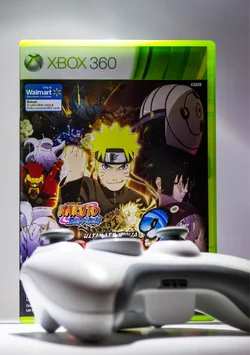
$NarutoProduct.webp

I also took a picture with my phone of my setup for you guys to check out.
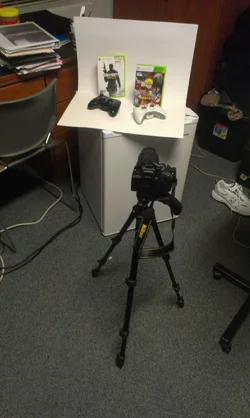
$IMAG0423.webp

Thanks!
 
Not bad.

I like the light and the background. It seems to be pretty evenly lit. Color temperature looks spot on, which can be tough indoors, especially with ambient light in the mix.

I'd like to see a bit more light on the face of the game itself. The controller being so large and out of focus doesn't quite work for me visually in this particular setup.
 
It frustrates me that I can't see the name of the game. Both from a photography and gamer aspect.
 
I might would move the controller behind the game, sticking out to the right. And I agree about lighting up the front of the game a little more.
 
I agree that it frustrates me to that I can't see the name of the game. I think instead of moving the controller behind the game that a top down 3/4 view would be better. Move the controller a little to the side and move the camera up looking down on the product. Pan out a little bit more and you will be able to see title and controller then. Ottherwise great shot and good lighting. For a product shot though it is a little bit on the softer end.. but that is on the controller only though and it is more because of DOF. But it does make it difficult to see what it is the product then.. the controller or game without the title.
 
In product photography it is important to "show the product" ...you are off to a good start but I can't see the product. Move the controller way behind the box so you feature the box and you only need to show a small amount of the controller..and tilt it up to see the playing surface.
 
I think everyone said it all! I think this is a great start, but follow the advice of the posters on here. :) You will do great!
 
Thanks! Yeah when I was processing I realized I couldn't see the name of the game and felt pretty dumb about it. I will try again and post the results.
 
When staging a product shot, it is paramount to assess the scene and establish if the supplementary elements (if there are any) make sense where they're placed and tie into the product. This should happen before the first shutter drop.

The fact that the name was so wildly obscured by the controller and the fact that the controller is totally OOF makes it seem like the epitome of an afterthought.
 
Yeah, it was. But that's why I took the pictures - to learn! And now, thanks to you guys, I know what to change :)
 

Create an account or login to comment

You must be a member in order to leave a comment

Create account

Create an account on our community. It's easy!

Log in

Already have an account? Log in here.

Back
Top Bottom