What's new

Photo Advice Please

Steve56

TPF Noob!
Joined
Mar 28, 2011
Messages
80
Reaction score
0
Location
U.K
Can others edit my Photos
Photos OK to edit
Hello everyone,

Can an established Photographer (or anyone that knows how) tell me how to accomplish a specific photograph I'm trying to capture?

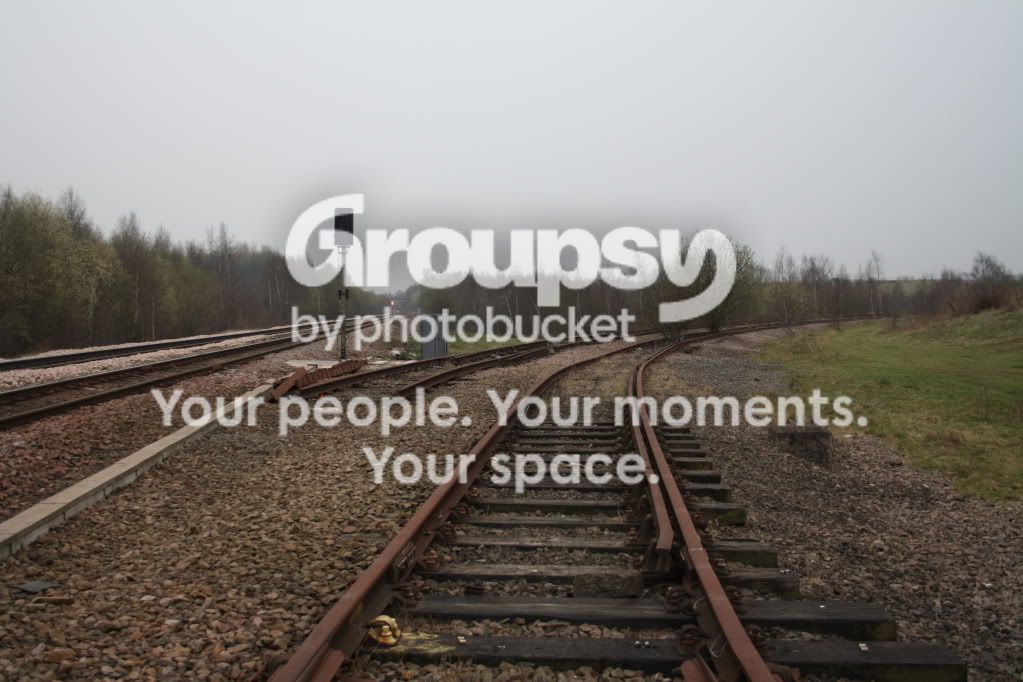
Please see the photo below : I'm trying to blur out the background of the image so that as the railway track goes further away into the background, it becomes blurry (out of focus).

I'm new to photography and am just experimenting with my first DSLR (Canon EOS 1000D) and just have the standard lens (18-55mm). I've gone to the extant of buying a "For Dummies" series of my specific camera, which has advised to change Aperture or Shutter Speed etc. Unfortunately, neither option is resulting in the desired effect.

I'm also reluctant to use Photoshop considering I'm unable to purchase it and it scares the life out of me just looking at it.

Can someone advise on how I would go about getting the effect I want? Happy to learn.

IMG_0378.jpg
 
At 18mm, the lens will have a lot of depth of field even at f/3.5, which is what this was taken at.

Are you shooting in autofocus, or manual? If auto, go to manual and you should be able to get the effect you want.
 
At 18mm, the lens will have a lot of depth of field even at f/3.5, which is what this was taken at.

Are you shooting in autofocus, or manual? If auto, go to manual and you should be able to get the effect you want.

Yes, I'm shooting in Autofocus. I've not started shooting in Manual Focus as of yet but I'll give it a try.

If in Manual, is it still recommended to shoot at 18mm?
 
If you need the 18mm to get the framing you want, then you'll need to shoot at 18mm. Keep the lens at it's widest aperture (smallest number).

Go to manual focus, then turn the focus ring to the closest it allows. Look through the viewfinder, and you'll see a totally blurry image. Turn to focus ring slowly towards infinity until the part you want comes into focus.

That's all there is!
 
You could always use a longer focal length but just move backwards. then you can keep your fstop around 5.6-8 and you should still get nice DOF.

The lighting is really flat though, and the black and white conversion makes it even more flat.
 
You could always use a longer focal length but just move backwards. then you can keep your fstop around 5.6-8 and you should still get nice DOF.

The lighting is really flat though, and the black and white conversion makes it even more flat.

I know what you mean. This is taken after I finish work around 5.00 or 6.00 and was taken a few weeks back when it was getting darker earlier. I thought the Black & White may have added a bit of interest to it. I'll try the same shot again in colour as the sun is going down later.
 
Ideal time would most likely be anywhere from 20 minutes before sundown to maybe 30 minutes after. After sundown the light allows more depth and creates really nice, soft shadows that really bring out the dimensionality of the photography.

Also, I would recommend losing the tilt. in some situations it can be effective, but I dont feel that this is one of those situations. also try using the tracks to lead to somewhere, rather than leading out of the photo (a person, building, horizon point, etc). im intrigued to see your next shot!
 
Unfortunately, the railway is on a bridge which is now disused. An old railway that is gradually being taken apart by thieves. The railway doesn't really lead into anything since it's on a bridge.

That's why I'm wanting the blur effect really, just to add a sense of mystery and unknown. The tilt really isn't anything specific. Rather that I found out how to do that on my tripod and felt it added a different dimension to the overall composition.

But I'll certainly give your suggestions a try and I'll post my outcome.
 
Having an understanding of depth-of-field (DOF) would help you know how to have the focus of the tracks get softer with distance.

Visit www.cambridgeincolor.com, click on the tutorials and scroll down to the one that dicusses DOF.

I used Photoshop ACR and CS5 to do a quick edit to your photo. I used a lens blur filter, some gradient, exposure, contrast, mid-tone contrast, and some dodge and burn adjustments. I did no sharpening.

IMG_0378.jpg
 
Having an understanding of depth-of-field (DOF) would help you know how to have the focus of the tracks get softer with distance.

Visit www.cambridgeincolor.com, click on the tutorials and scroll down to the one that dicusses DOF.

I used Photoshop ACR and CS5 to do a quick edit to your photo. I used a lens blur filter, some gradient, exposure, contrast, mid-tone contrast, and some dodge and burn adjustments. I did no sharpening.

IMG_0378.jpg

Thank you for your advice.

I've read through the D.O.F tutorial on your website and in all honesty, it has gone straight over my head. I'm afraid it is too technical for a beginner like me.

Thanks for editing my photo. It does look a lot better. Unfortunately, I don't have any software like Photoshop but am having to rely on a watered down version of Photoshop called Splashup which is used via a website rather than downloadable software.

I'm still attempting the D.O.F but I'm not getting the desired effect. I'm experimenting with Manual Focus instead as mentioned earlier but that seems to blur the whole scene rather than just in the distance.
 
I've read through the D.O.F tutorial on your website and in all honesty, it has gone straight over my head. I'm afraid it is too technical for a beginner like me.
That's unfortunate, because DOF is all about how camera focus works and is one of the basic photographic concepts one has to understand.

Perhaps the illustration in the DOF explaination section of the Aperture post on my Blog will help: How Do I Use My Digital SLR? - Exposure...Part 1 - Aperture

DOF varies by the lens focal length, focus point distance, and lens aperture.

There are other technical aspects to doing photography that also have to be understood if you are to use the tools to do what you want to accomplish.
 
Last edited:
I've read through the D.O.F tutorial on your website and in all honesty, it has gone straight over my head. I'm afraid it is too technical for a beginner like me.
That's unfortunate, because DOF is all about how camera focus works and is one of the basic photographic concepts one has to understand.

Perhaps the illustration in the DOF explaination section of the Aperture post on my Blog will help: How Do I Use My Digital SLR? - Exposure...Part 1 - Aperture

DOF varies by the lens focal length, focus point distance, and lens aperture.

There are other technical aspects to doing photography that also have to be understood if you are to use the tools to do what you want to accomplish.


I had a very basic understanding of Aperture as I had bought a book specifically for my Canon EOS 1000D. I understand that F-Stop effects the size of the Aperture and ISO & Shutter Speed also effect the D.O.F. But that was as far as my understanding went.

Your first article went into a lot more detail and seemed to be more about the technical aspect. Which I read one in all honesty. So perhaps, I need to re-read until it sinks in.

Although your latest link is more understandable.

Can I ask though, I switched to Manual Focus instead of Autofocus under the recommendation of other posters. However, when I alter the focusing ring, the whole scene is either in focus or completely out of focus. Am I not understanding fully?
 
I've read through the D.O.F tutorial on your website and in all honesty, it has gone straight over my head. I'm afraid it is too technical for a beginner like me.
That's unfortunate, because DOF is all about how camera focus works and is one of the basic photographic concepts one has to understand.

Perhaps the illustration in the DOF explaination section of the Aperture post on my Blog will help: How Do I Use My Digital SLR? - Exposure...Part 1 - Aperture

DOF varies by the lens focal length, focus point distance, and lens aperture.

There are other technical aspects to doing photography that also have to be understood if you are to use the tools to do what you want to accomplish.


I had a very basic understanding of Aperture as I had bought a book specifically for my Canon EOS 1000D. I understand that F-Stop effects the size of the Aperture and ISO & Shutter Speed also effect the D.O.F. But that was as far as my understanding went.

Your first article went into a lot more detail and seemed to be more about the technical aspect. Which I read one in all honesty. So perhaps, I need to re-read until it sinks in.

Although your latest link is more understandable.

Can I ask though, I switched to Manual Focus instead of Autofocus under the recommendation of other posters. However, when I alter the focusing ring, the whole scene is either in focus or completely out of focus. Am I not understanding fully?
F stop is calculated from the aperture. Shutter speed and ISO dont affect DOF at all, they simply change the length of time that the shutter is open and the sensitivity in the photo sensor.

Generally, when you look through the viewfinder, you are not seeing what the difference in f stop will do. Some cameras have a preview button that will show you what your DOF will look like.

The basic premise is that the lower the f stop number, the wider the aperture and the less DOF you will have (higher f stop number = smaller aperture = larger DOF). When looking through your viewfinder, use the focus ring to get whatever you want in focus, in focus! Once you take the photo you will see the difference. Try taking a shot of a scene using a really low f stop and a high f stop to see the difference yourself, but you must try it on something where the focus of the lens is not at infinity, or close to it. Try taking a photo of an object semi close to you with a background, set your f stop to 3.5 and then f11 or f16. Because the higher f stop numbers have a smaller aperture, there is less light getting through, and you must compensate with a longer shutter speed, higher iso, or both to achieve proper exposure.
 
That's unfortunate, because DOF is all about how camera focus works and is one of the basic photographic concepts one has to understand.

Perhaps the illustration in the DOF explaination section of the Aperture post on my Blog will help: How Do I Use My Digital SLR? - Exposure...Part 1 - Aperture

DOF varies by the lens focal length, focus point distance, and lens aperture.

There are other technical aspects to doing photography that also have to be understood if you are to use the tools to do what you want to accomplish.


I had a very basic understanding of Aperture as I had bought a book specifically for my Canon EOS 1000D. I understand that F-Stop effects the size of the Aperture and ISO & Shutter Speed also effect the D.O.F. But that was as far as my understanding went.

Your first article went into a lot more detail and seemed to be more about the technical aspect. Which I read one in all honesty. So perhaps, I need to re-read until it sinks in.

Although your latest link is more understandable.

Can I ask though, I switched to Manual Focus instead of Autofocus under the recommendation of other posters. However, when I alter the focusing ring, the whole scene is either in focus or completely out of focus. Am I not understanding fully?
F stop is calculated from the aperture. Shutter speed and ISO dont affect DOF at all, they simply change the length of time that the shutter is open and the sensitivity in the photo sensor.

Generally, when you look through the viewfinder, you are not seeing what the difference in f stop will do. Some cameras have a preview button that will show you what your DOF will look like.

The basic premise is that the lower the f stop number, the wider the aperture and the less DOF you will have (higher f stop number = smaller aperture = larger DOF). When looking through your viewfinder, use the focus ring to get whatever you want in focus, in focus! Once you take the photo you will see the difference. Try taking a shot of a scene using a really low f stop and a high f stop to see the difference yourself, but you must try it on something where the focus of the lens is not at infinity, or close to it. Try taking a photo of an object semi close to you with a background, set your f stop to 3.5 and then f11 or f16. Because the higher f stop numbers have a smaller aperture, there is less light getting through, and you must compensate with a longer shutter speed, higher iso, or both to achieve proper exposure.

Here's a few examples taken prior to me reading your previous posts tonight. :thumbup:

IMG_0873.jpg


IMG_0871.jpg
 
These are more interesting scenes, and you have accomplished shallow DOF in the second shot. Perhaps you just don't have a long enough piece of track in the first picture to get the effect you want with the lens you have.
 

Create an account or login to comment

You must be a member in order to leave a comment

Create account

Create an account on our community. It's easy!

Log in

Already have an account? Log in here.

New Topics

Back
Top Bottom