What's new

Photo Back by Popular Demand.

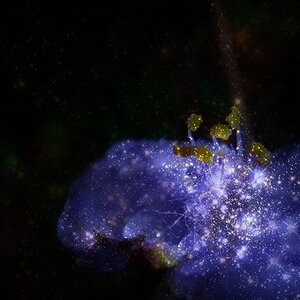
And the skywatcher in me is trying to figure out which nebula Jazzie is hiding. Not to mention that the star pattern superimposed over the silhouette needs to be brighter. As for the pose, I'm no expert but I think it's following proper form. :afro::guitar::icon_flower: (hey, where's the tied-died emoticon???)
 
I thought you superimposed a star over your sacral chackra.
 
Last edited:
Not going to lie, I had to Google "sacral chakra". :D
 
Well dang

I actually think it's really cool. Psychedelic, genie in/out of the bottle, hippie kinda vibe.

Thanks for reposting.
I knew if anyone would appreciate it it'd be you!

And the skywatcher in me is trying to figure out which nebula Jazzie is hiding. Not to mention that the star pattern superimposed over the silhouette needs to be brighter. As for the pose, I'm no expert but I think it's following proper form. :afro::guitar::icon_flower: (hey, where's the tied-died emoticon???)
carina nebula

I thought you superimposed a star over your sacra chackra.
I put the brightest burst there. :-)
 
I really like the blue-left, red-right highlights. Well done.
 
As for the pose, I'm no expert but I think it's following proper form. :afro::guitar::icon_flower: (hey, where's the tied-died emoticon???)

Actually the pose is a little off. Usually your arms are resting at your sides, but I was hopingthat lifting them a bit would add to the whole "zero gravity" concept.

Trippy!!! now I LOL @ the comment about where the remote is!
:giggle:
*sigh* majority rules.
A PHOTO WAS HERE

Ah! Well, even though I'm an old fuddy-duddy, I think that's actually pretty creative and well done.

But I still don't know what a sukhasana or chakalaka suka hookie has to do with anything. :D
:dob:
Sukhasana is "easy pose" a common meditation position.
The sacral chakra is your second chakra.
Sacral Chakra - 2nd Chakra
I really like the blue-left, red-right highlights. Well done.
thank you!
 
Ah yes. Carina, carina, you are my Dulcina...

Jazzie, I think your concept was/is pretty good. I'd consider increasing the star overlay, because at present it's 'way too subtle (and your audience is anything but). It may not be straight photography, but then Chris Crossley's stuff isn't straight photography either and we all love what he does.
 
Ah yes. Carina, carina, you are my Dulcina...

Jazzie, I think your concept was/is pretty good. I'd consider increasing the star overlay, because at present it's 'way too subtle (and your audience is anything but). It may not be straight photography, but then Chris Crossley's stuff isn't straight photography either and we all love what he does.

How is this? I found on my other screens that I thought I should brighten it up, but thought it looked okay at 50% brightness on my desktop. I didn't want to take it too far and loose the silhouette......

16377440995_6b528e8be5_c.jpg
 
Perhaps you need to apply a selective mask with 0% opacity in the interior regions of the silhouette, and 80-100% along the edges. Don't know if that idea would work, but it just might... That would then preserve the contours of the silhouette, while letting the star "interior" be more clear and distinct.
 
Perhaps you need to apply a selective mask with 0% opacity in the interior regions of the silhouette, and 80-100% along the edges. Don't know if that idea would work, but it just might... That would then preserve the contours of the silhouette, while letting the star "interior" be more clear and distinct.
Yeah, ill have to do some googling to figure out how to do that.... I agree with what you are saying. At one point I tried to brush in the "chakra star" at 100% but it just looked weird....so I'm just not sure HOW to acomplosh that.
 
What software are you using for the image synthesis?
 
What software are you using for the image synthesis?
Cs6.... I have the background and the shadow (which unfortunately have been merged into one layer so those have to stay as is without a ton more work) and then the overlay with a mask around the figure. It has an opacity of 14% on the brighter image.
 
I'm no Photoshop expert, but I remember reading that the mask can be "painted" any tone from black to while, with black being 100% opaque and white being 100% clear. Using the gradient tool, it is possible to set up the transition from white to black on the mask, which will then control how much of the associated layer gets displayed. That may be the way to go.
 

Create an account or login to comment

You must be a member in order to leave a comment

Create account

Create an account on our community. It's easy!

Log in

Already have an account? Log in here.

New Topics

Back
Top Bottom