What's new

photo too bright.

PaulBac

TPF Noob!
Joined
May 16, 2016
Messages
6
Reaction score
0
Can others edit my Photos
Photos NOT OK to edit
h.o.p. 2.webp
 
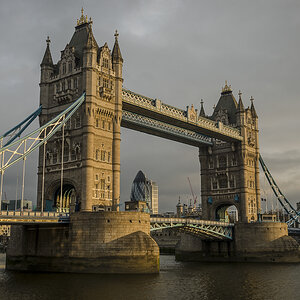
Can anyone help me please im pretty new to photography, basically i want to see what time it is i had iso on 100 why is it too bright.
 
Can anyone help me please im pretty new to photography, basically i want to see what time it is i had iso on 100 why is it too bright.

At the settings you used for the image, the lights of the clock were simply too bright and ended up getting overexposed.
 
Can anyone help me please im pretty new to photography, basically i want to see what time it is i had iso on 100 why is it too bright.
Ordinarily, we would read the EXIF on this shot, but it seems to have been stripped. You might be able to read the EXIF by moving the original file into your editing software. If your camera's clock is set right, you should be able to see the time of day (in your time zone) the shot was made.

The clock face appears to be way overexposed, so you would have to be lucky to get any detail in there.
 
Understanding Dynamic Range in Digital Photography

You have chosen Photos NOT OK to edit, which to me means I can't copy your photo so I can open it in my editing software to see if there is any hope of recovering any detail in the clock face.

Also be sure to hold your camera level when you release the shutter.
 
i had iso on 100 why is it too bright

That is only one part of the exposure triangle. What were the other setting?
Also since your profile says not OK to edit, nobody can help with the picture itself.
 
Look at your iPhone.
 
Ordinarily, we would read the EXIF on this shot, but it seems to have been stripped.
I have no trouble viewing the EXIF data (using PIE Free Downloads | Picmeta Systems) and I notice that the OP is using spot metering. This leads to the question, just what element of the picture were you metering? It looks to me as if you metered on the bridge pavement since it appears a nice mid tone. I would think that spot metering on the face of Big Ben and then increasing the exposure by 1 to 2 stops would give a more pleasing exposure
 
Camera Maker: Canon
Camera Model: Canon EOS 7D Mark II
Lens: Canon EF 24-70mm f/2.8L II USM
Image Date: 2015-12-07 17:34:14 (no TZ)
Focal Length: 24mm
Aperture: ƒ/2.8
Exposure Time: 0.800 s
ISO equiv: 100
Exposure Bias: -0.33 EV
Metering Mode: Spot
Exposure: program (Auto)
White Balance: Auto
Flash Fired: No (enforced)
Orientation: Normal
Color Space: sRGB
GPS Coordinate: undefined, undefined
Software: QuickTime 7.7.1
 
Welcome to Photography
You have various exposures you have to deal with
1 - the Sky
2/3 - different parts of the building are lighted up differently
4 - the Clock is backlight
5 - the bridge area

Each of those parts are exposed differently thus you have to
1 - find a single exposure where each element is exposed to your liking
2 - post process the image to bring up/down the exposure in each area, but make sure when taking the photo not to overexpose and lose details from any single area.
3 - learn how to do HDR photography which does this type of stuff in camera

and practice and repeat.
also, it looks like you have camera movement blur.
 
Thanks everyone.
 
In addition to chosing which part of the inahe you are exposing forx the idea of combining multiple exposures, and other things i am sure others have mentioned I believe I saw that your aperture was 2.8. That is why so much light is being let in. It also narrows your depth of field ao less of the umage will be in focus. That means less detail/sharpness throughout which is not ideal for landscape tyype stuff

Sent from my SM-G925P using Tapatalk

 
In addition to chosing which part of the inahe you are exposing forx the idea of combining multiple exposures, and other things i am sure others have mentioned I believe I saw that your aperture was 2.8. That is why so much light is being let in. It also narrows your depth of field ao less of the umage will be in focus. That means less detail/sharpness throughout which is not ideal for landscape tyype stuff

Sent from my SM-G925P using Tapatalk

Closing down the aperture would require a longer exposure.... which is already 0.8 seconds. That, or an increase in ISO, which may not be desirable.

Lens is 24mm. F/2.8 on a 24mm has plenty of DOF for a scene like this.
 

Create an account or login to comment

You must be a member in order to leave a comment

Create account

Create an account on our community. It's easy!

Log in

Already have an account? Log in here.

New Topics

Back
Top Bottom