What's new

Photography - Constructive Feedback

Avengerx77

TPF Noob!
Joined
Jan 25, 2016
Messages
30
Reaction score
3
Location
Costa Rica
Can others edit my Photos
Photos OK to edit
I am not sure if I am posting this properly, but I want to start getting constructive feedback on some of my photos. I have already uploaded 3 of them, but not sure if I need to open a thread or there is another way where people can provide it (maybe on the gallery itself?) In any case, if this is not the right place please move accordingly and let me know how it is done. Anyway, here are the three pics I want feedback from:

33519-1458935932-d8f66663881dabbc9889cb090c695e72.jpg
33520-1458936043-a63aec6cd134ab6f68b810c0d72a0edc.jpg
33521-1458936498-cb279ce0718682b5a3311cfcb11dbbeb.jpg


Thanks!!!
 
All three have some serious composition issues.

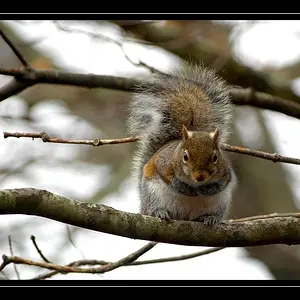
The first (bird in three) has too much competing with the bird for the viewer's attention. The flower in the bottom left and the branches across the op.

The bird on the feeder... the left half of the image is utterly blank and adds nothing. The pole or rod on the right commands too much attention.

Both bird shots would be much better simply by shooting with a longer lens and in portrait orientation.

The water scene is just nothing in the bottom half, and one wants to view more of the trees that have been cut off at the top.
 
My first thought is that there is a lot of empty space in all three that is not contributing to the aesthetic of the picture.

The second picture, the bird needs to dominate and needs to look into the picture, rather than out of it.

The third picture, I am not sure what the picture is of. It it saying nothing to me at all.

Removing the empty space in the second picture gives me this:
c44a24449a33d5925418c88504901fe1.jpg


www.johns-old-cameras.blogspot.co.uk
 
Last edited:
Thanks, so what I am getting on the bird pics is that they should be tighter to the subject and less background. On the first one I was able to edit/clean the branches on the top, so it only shows the branch where the bird is standing.

On the second one, it is hard know to recompose as crop will be too heavy and therefore loose quality, right? Next time in that situation if better if I shoot a vertical pic rather than horizontal.

On the third one was aiming on the water reflection and did not want to cut the light trail. But maybe as mentioned more of the tree probably was more appealing than a larger water portion.

I just noticed that if I redownload the pics from the gallery they look really bad/smaller pixels, but I am able to see them fine from my computer directly in the computer. Am I doing something wrong when uploading? The third one was too heavy and was not able to upload first, so I had to resize using a free application, seems that I might have over done it.
 
Will this link works better for pics quality? In the meantime we can discuss this one as well.

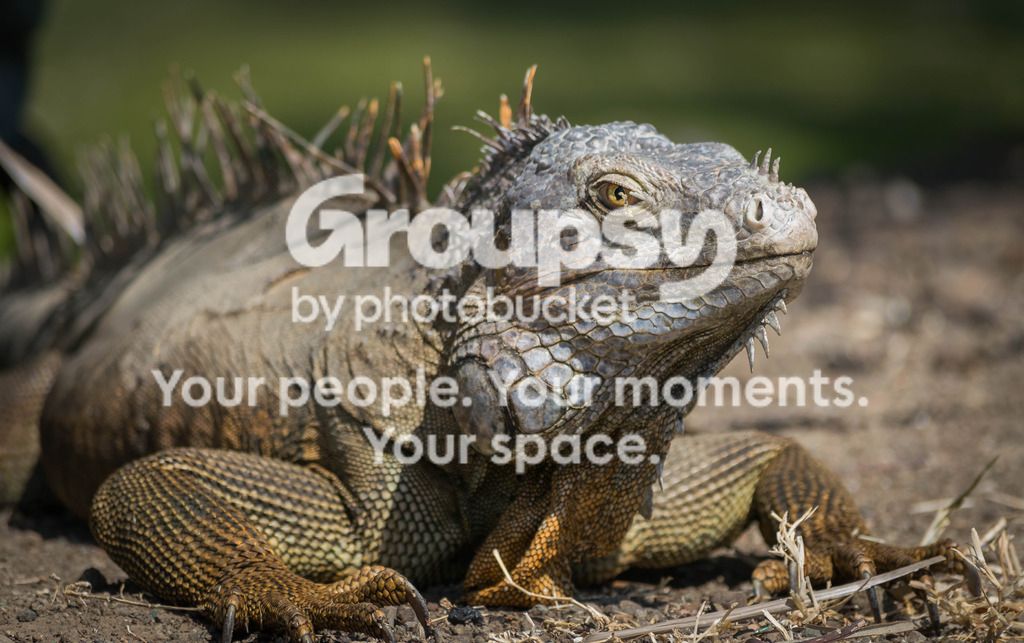
DSC_1883_zpsrakenvax.jpg
 
upload_2016-3-25_20-52-12.webp


Shoot at least 2 f stops higher and change iso to 400.
that will give you the same shutter speed but much greater depth of field
and don't clip his claws
 
Shoot at least 2 f stops higher and change iso to 400.
that will give you the same shutter speed but much greater depth of field
and don't clip his claws

Thanks, I thought about that when I was posting the pic, that I should've had a wider f stop to get more body in focus, but was thinking maybe decreasing the shutter speed instead of moving the ISO. I guess that I already start thinking in the right direction and be critical with my own shots.

I did notice also the claw clipping, unfortunately did not have cropping room to fix it. Definetely need to work on my composition and make sure I am not loosing those details when taking the pic, need to be more patient.

Will work on the editing part since I am newbie to Lightroom as well, so a long way to go (just over a month to take on this hobby) but very motivated and open to feedback.
 
No problem.
Since you were wide open at 200 mm, you should always think about closing the aperture a bit - not just for the depth of field but because only very expensive lenses are routinely good at their widest aperture.
read reviews 55-200mm AF-S DX and DX VR Lens Review by Thom Hogan

On the original version, sharpness is quite good throughout the range, with f/8 or f/11 being the point of maximum sharpness on my sample pretty much across the entire focal length range.

and this article might help 11 Tips for Beginning Photographers - How to Start Taking Pictures
 
Framing animals is very difficult because they know how to move. It is better to allow too much space and then crop. Not that you could do much a bout that if you w ere already at your lens' Max focal length.

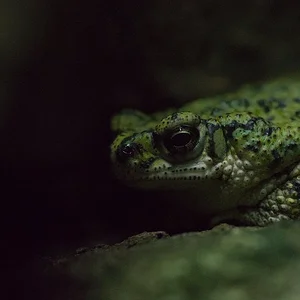
I rather like the lizard's body being out of focus, concentrating my attention on the head. There is no right way of doing photography - it is all down to what you are saying with your picture.

www.johns-old-cameras.blogspot.co.uk
 
Like John I like the depth of field in the lizard; by having a thin depth of field and the angle you've shot at being nice and low you've made it appear far bigger and more dominant in the scene; it feels like a bigger creature and the lighting kinda gives me a vibe of those old films where you've have a lizard playing as a dinosaur.

Clipping the claws is a pain and yes its so easily done with claws, ears, whiskers, legs, tails etc... its something to work on and sometimes you have to compose with free space around the subject and then crop to neaten and tighten up the edges - that can be a more practical and easier approach at times (esp with mobile living subjects) than composing tight where its so easy to clip something.
 
Sorry I wasn't as clear as I should have been.
I too like the OOF body but I think in cases like this where the OP is shooting wide open, the best IQ would be found a stop or so closed and also the OOF area would start a bit further back rather than right at the 'elbow' as indicated.

I don't know what the animal looks like in reality but burning in along the body would take away some of that whitish area.
 

Create an account or login to comment

You must be a member in order to leave a comment

Create account

Create an account on our community. It's easy!

Log in

Already have an account? Log in here.

Back
Top Bottom