What's new

Photos going soft after saving.

manicmike

No longer a newbie, moving up!
Joined
Sep 29, 2009
Messages
1,223
Reaction score
307
Location
Oregon
Can others edit my Photos
Photos OK to edit
Forgive me if this is a very stupid question. When I sharpen and then view my images in photoshop, they are substantially sharper and colors are fairly vibrant. When I upload it to facebook or photobucket, suddenly the images are soft and lack pop. You can kind of tell from this screen shot. Am I missing a setting somewhere when saving? I've tried saving normally, for web. I just have no idea why they would look so much worse outside of photoshop.

Side by side.
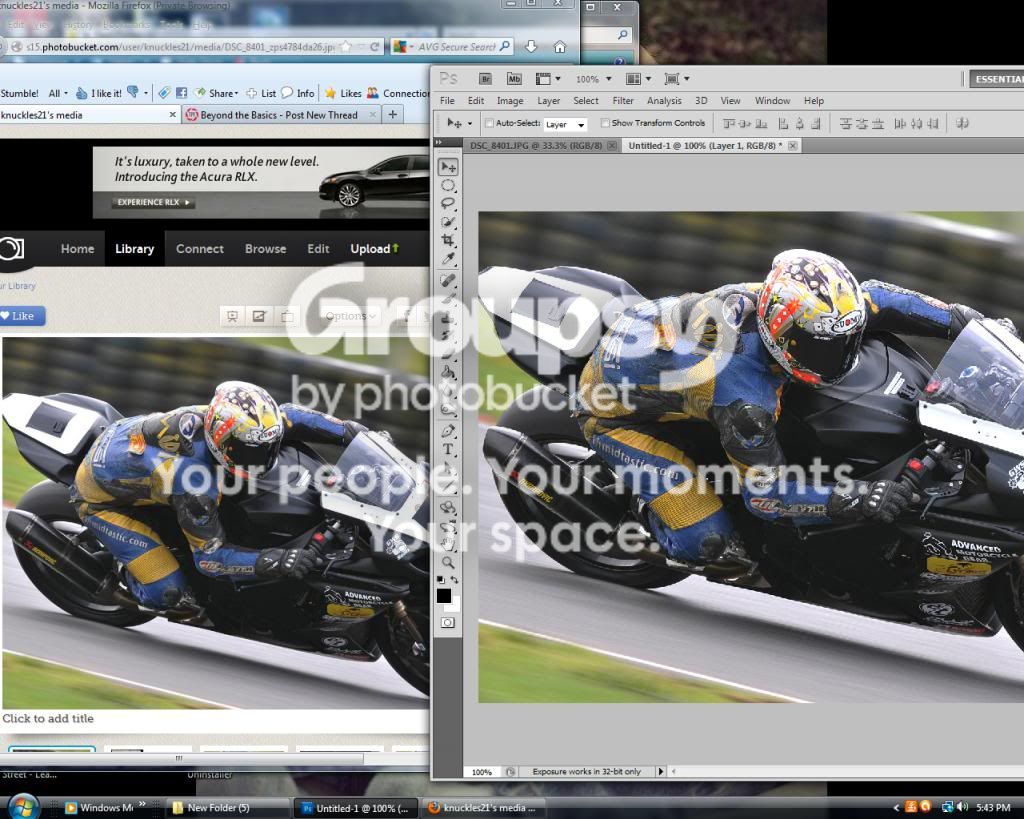

In photoshop.
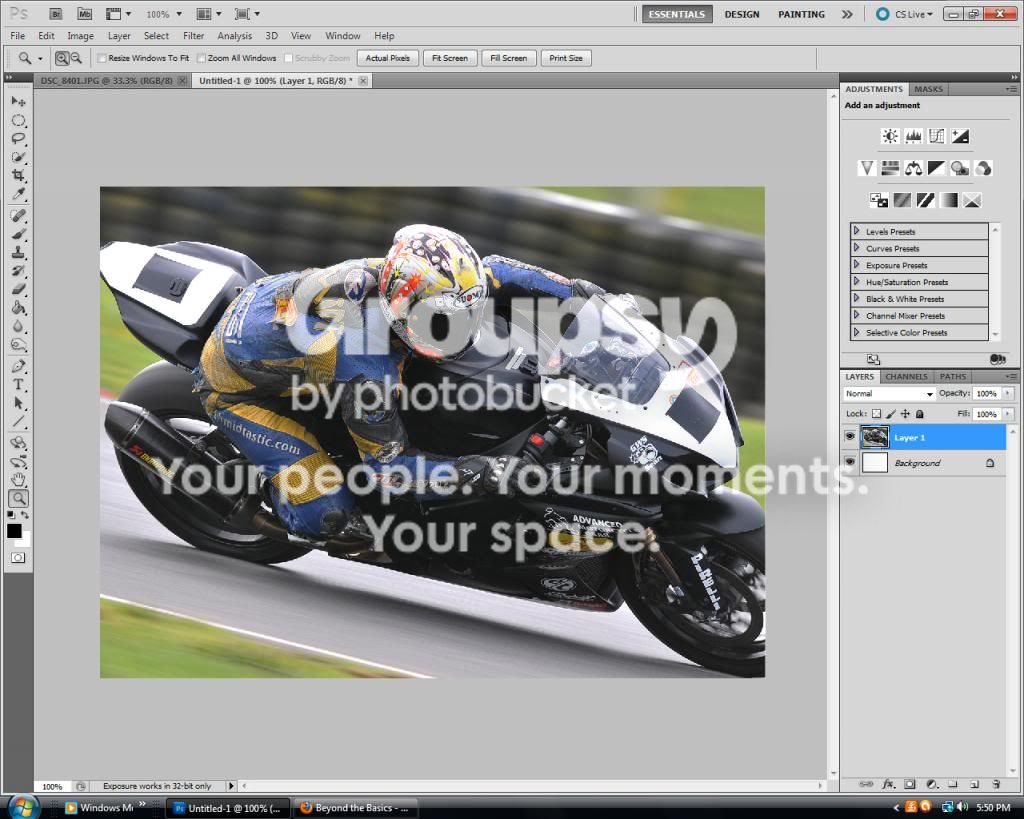

And here's what the photobucket version looks like.

 
Online hosting sites have size limitations. If your photo exceeds their size limit when you upload it, they will re-size it down in the most expedient manner. Sounds like you are also suffering from a color management mismatch. When those hosting sites re-size your photo they also typically don't respect the original photo's embedded ICC profile and often strip it off.

What you need to do: Make sure your photo meets the site's size restriction before uploading it, and save your photo tagged to the sRGB color space.

Photobucket is just fine as long as you do the above.

Joe
 
I have no problems with Photobucket.

I hate the 'bloggy' look of Flickr, and I think the links Flickr adds to posted images is SPAM.
 
Last edited:
Facebook is not really set up to display digital images well.

And PhotoBucket recently limited images to 800-pixels max. on the long side.

So flickr would be a better option correct?

Flickr has it's aggravations as well -- it will also re-size your photo if your upload exceeds their limits, but it does at least keep the EXIF data in the process including the color space tag. It's really about understanding what the sites are doing and manipulating the process from your end.

Here's an example with a photo.

This version was re-sized by me and tagged sRGB before I uploaded it. First Flickr:

8672426916_770ba1322f_b.jpg


And now Photobucket:

peas_sRGB_zpsba9a0207.jpg


Both photos are unmolested by the host site software. (TPF is re-sizing them for display here but you can view them full size with a mouse click).

Now here's the problem. This is the exact same photo but I did not re-size it before uploading it to Photobucket and it was tagged with the Adobe 1998 color space. Photobucket has mangled the photo by re-sizing it and stripping off the EXIF data:

peas_adobe_zps376b0a78.jpg
 
when you open the JPEG on your computer is it soft? or does it only happen once it is online?
 
when you open the JPEG on your computer is it soft? or does it only happen once it is online?
If I open it in photoshop it's sharp. If I open it in windows photo viewer it's soft along with online.
 
Man, the last thing you want is when you have a lady over and your photo is all soft and shiz. You gotta keep your images rock hard bro. Women love that.
 
when you open the JPEG on your computer is it soft? or does it only happen once it is online?
If I open it in photoshop it's sharp. If I open it in windows photo viewer it's soft along with online.

since you are seeing it soft on your computer it leads me to believe it's not the internet's fault. What do you have the quality set as when you save it as JPEG? and when you open it in photoshop is it as a RAW file, PSD file, JPEG, or other?
 
when you open the JPEG on your computer is it soft? or does it only happen once it is online?
If I open it in photoshop it's sharp. If I open it in windows photo viewer it's soft along with online.

This is not physically possible. The same file open in Photoshop and Windows photo viewer will appear equally sharp in both if viewed at 100% (actual pixels).

Joe
 
Does anyone else think the photobucket and photoshop images look exactly the same? I'm not seeing a problem other than the crappy resizing in the photoshop picture which may give the appearance of a sharp image but is otherwise severely hampered by aliasing effects. ...

I'm not sure there is a problem I can see...
 

Create an account or login to comment

You must be a member in order to leave a comment

Create account

Create an account on our community. It's easy!

Log in

Already have an account? Log in here.

New Topics

Back
Top Bottom