What's new

Please help... somethings just not right

tmjjk

No longer a newbie, moving up!
Joined
Mar 28, 2012
Messages
550
Reaction score
61
Location
Cleveland
Can others edit my Photos
Photos OK to edit
1 $tpf (2).webp


2$tpf.webp


3$tpf2.webp


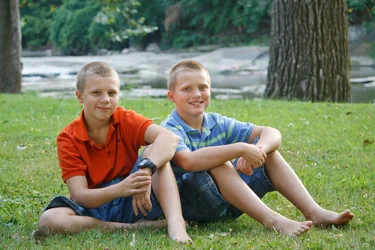
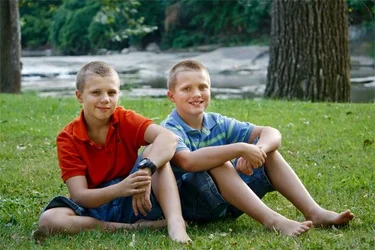
What is wrong with these images??? Color? Exposure? Edit? No need to mention the obvious amputations in image 2, they are my goofy sons and I kept it out of love lol.
 
The background is a bit busy. Try a narrower dof.
 
White balance look a wee bit off.
 
I think what you're seeing that's not quite right has mostly to do with tone response. You don't want the boys faces to get too dark, but then you don't have normal contrast in the rest of the photo. Considering the third photo for example -- there's no black in the photo, just dark grey. Without the black point set the photo looks weak. Here's a subtle adjustment that sets the black point. When I did that the boy's faces did get darker, so I went back and lightened them a smidge.

Joe

$boys.webp
 
Thank you Joe!!! I use lightroom and photoshop.. How do I set the black point? Is that a real process that I can google or YouTube?
 
Thank you Joe!!! I use lightroom and photoshop.. How do I set the black point? Is that a real process that I can google or YouTube?

There is a process in Photoshop using the eyedroppers in Levels or Curves that is often referred to as setting a black point. In Levels and Curves you can use the black eyedropper to click on what should be black in your photo -- set the black point. I don't recommend using it because it alters both tone and color at the same time -- tools that do two things at the same time often produce unintended consequences and using those eyedroppers will also change white balance. So I used that terminology but in fact did something a little different.

Let's back up. First determine that the photo has no black. Use Photoshop's Threshold tool. Image/Adjustments/Threshold. Pull the slider all the way to the left and if the image turns completely white with no black areas remaining then there's no black in the photo. With your 3rd photo this is the case. As you pull the slider back from the left corner you eventually see the darkest areas in the photo begin to show up. You really want those spots to show black when the slider is at the far corner. So cancel Threshold and get Curves. The Curves dialog displays a histogram but it's an RGB composite histogram -- first look at it seems to indicate the photo has black since the histogram reaches the left corner. Threshold told us it didn't. RGB composite histograms can be a tad misleading as they're built from a combination of the three color channels. From the Window menu select Histogram. Use the menu in the upper right corner of the dialog and select Expanded View. From the drop box select Luminosity. This is the same histogram Threshold showed you and there's the graph falling short of the left corner. Back in Curves pull the little black slider at the bottom corner of the graph to the right until the input value is 18. Click OK and go back and check it in Threshold again. Now your photo reaches real black -- with rare exception all photos should.

Joe
 
Thank you so much!! I am going to practice this now. I sincerely appreciate you taking the time to explain this. I'm pretty excited, I think this will help with a lot of my image editing.
 
Ysarex KNOWS what he is talking about when it comes to imaging and photography. Seriously. When he says something, I listen.

He's kind of old and crusty though, so be careful...(now THAT part's just me kidding around...don't want people to think I'm some kinda brown-noser...)
 
Ysarex KNOWS what he is talking about when it comes to imaging and photography. Seriously. When he says something, I listen.

He's kind of old and crusty though, so be careful...(now THAT part's just me kidding around...don't want people to think I'm some kinda brown-noser...)

Yep, my wife says old and grumpy. Thanks for noticing.

Joe
 

Create an account or login to comment

You must be a member in order to leave a comment

Create account

Create an account on our community. It's easy!

Log in

Already have an account? Log in here.

New Topics

Back
Top Bottom