What's new

Portrait for C&C Please:)

fotomumma09

TPF Noob!
Joined
Dec 29, 2011
Messages
274
Reaction score
33
Can others edit my Photos
Photos OK to edit
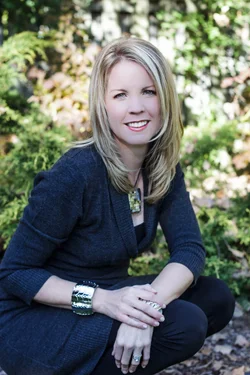
How is this? Improving?
 

Attachments

  • $IMG_40292.webp
    $IMG_40292.webp
    1.1 MB · Views: 222
The pose is great. Exposure looks good at the top of her head, but a little under as you go lower. Focus looks gorgeous. DOF is very nice as the background would be incredibly busy if it were in focus. It's pretty well executed in general.
She's rather cool. Something just does not feel right on the lower half of her face. Shadowing? It's a dual white balance kind of photo. The top of her face and head look good. There seems to be a line under her eyes/across her cheek where it quickly changes. It kind of feels like you were using a flash pointed slightly up with nothing pushing down and no reflector to get the lower half?
Her face looks noticeably skin smoothed at the smaller size. Especially when compared to her hands.
 
It's possible she's just wearing a huge amount of makeup? Her facial skin is eerily smooth, which looks like oversmoothing in photoshop. Compare with her arms, say. She's a grown up girl, her skin isn't sleek and perfect like a baby.

I dunno whether you did it to her skin, or she did, but it's part of what's not right here.

The light, as MleeK points out, is a little weird. It looks like she's in shade with the top of her head poking into sunlight?

 
White balance is too cool...she looks kinda' blue. She's a very attractive woman, so the smoothing on her face is over the top. it looks to me as if this photo has been hit pretty hard with post-exposure software corrections, causing the file to look quite "worked-over", and not in a good way.
 
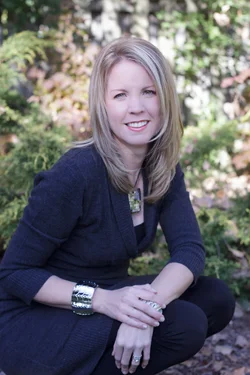
So we did have a ray of sun that seemed to ono hit the top half of her face which is unfortunate. I toned down the skin smoothing in LR. Is this any better??
 

Attachments

  • $IMG_40293.webp
    $IMG_40293.webp
    876.2 KB · Views: 208
She is really purpley magenta and cool now. YOu need to adjust the blue/yellow temperature in the first image. Not the greens and magentas.
 
She is really purpley magenta and cool now. YOu need to adjust the blue/yellow temperature in the first image. Not the greens and magentas.

weird...I just increased the WB slider to 4500.
 
are you exporting in sRGB? It will not look remotely the same on the internet if you aren't.
 
I'm working on a jpeg here, not raw so my settings probably will mean nothing to you, but...
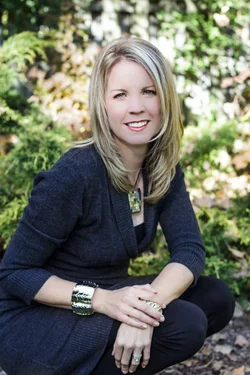
ON the lower half of her face and our right/her left a LITTLE around the eye I bumped the temp up 18. On the hands I had to bump it up more like 35. I only used the adjustment brush.
 

Attachments

  • $Portrait to fix wb1.webp
    $Portrait to fix wb1.webp
    1.1 MB · Views: 163
MLeeK said:
are you exporting in sRGB? It will not look remotely the same on the internet if you aren't.

I'm not even sure what I'm exporting in. My photos never look the same once exported as they do in LR. What/how should I fix that? I really like your edit MLeek! I'm really not very good at editing...yet!
 
You'll get there! This very little bit of skill I have is many years in the making.
I don't use LightRoom... so I am only a LITTLE bit of help here...
I believe LR offers some presets for exporting photos. One of which is to Burn Full Sized JPEG's. This will automatically convert to sRGB. Try that and see if it makes a difference.

I think Keith has some better information when it comes to LR. I THINK it's Keith... You might try him!
 
How is this? Improving?

Trying outdoor informal portraits without a flash or reflector is difficult. In this shot, she seems to be squinting a little, and the background is getting all the best light. If your model was better illuminated, we could overlook the brightness of the background. The little bit of brightness from the sun hitting only the top of her head gives uneven lighting on her face.

I think the pose is unnatural and awkward. She is in an uncomfortable position for no apparent reason, and her hands are in the shot but do not add to the composition. Yesterday's post was much better.
 
use the Adobe RGB color range and not srgb. When doing portraits you should set a custom white balance using a gray card or a white piece of paper if you dont have a gray card.
 
use the Adobe RGB color range and not srgb. When doing portraits you should set a custom white balance using a gray card or a white piece of paper if you dont have a gray card.

If you export in Adobe you will have problems with the lab, internet, etc not looking like your image in LR
 
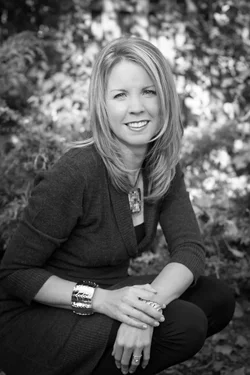
I TOOK a shot at it, and in color, the file is exceedingly hair-trigger...I converted it to B&W...looks tons better, IMHO...$IMG_40293_BW_1400x.webp
 

Create an account or login to comment

You must be a member in order to leave a comment

Create account

Create an account on our community. It's easy!

Log in

Already have an account? Log in here.

New Topics

Back
Top Bottom